

This guide covers how Strata works, what hardware it needs and how to run it in Atomic Chat. We also compare it with llama.cpp, MLX and Ollama on an NVIDIA GPU and a MacBook Pro and check whether it changes the answers.
Short answer:
- The MoE model is larger than your VRAM: use Strata. On the same Inkling 2 Mini file, it generated 53.6 tokens/s compared with 14.1 tokens/s in llama.cpp, but it needs plenty of system RAM.
- You have a Mac: the gain is smaller. Strata was 1.5 times faster on Inkling 2 Mini. On Qwen3.8-Flash-Next, it was faster only with speculative decoding on.
- You run dense models: use llama.cpp or MLX.
- You want it without the terminal: Strata is built into Atomic Chat. The setup takes four steps, described in the Atomic Chat section below.
What to run on common hardware, based on our tests and the Strata documentation:
| Your hardware | What to run on Strata | Generation speed |
|---|---|---|
| 12 GB NVIDIA GPU, 32 GB RAM | Inkling 2 Mini SQ-10 or UD-IQ3_XXS, or the Qwen3.8-Flash-Next Coder variant | 31.9 to 53.6 tokens/s (Inkling, our test) |
| 12 to 16 GB NVIDIA GPU, 64 GB RAM or more | Qwen3.8-Flash-Next Q2_0 to IQ3_S | 32.4 tokens/s (IQ3_S, our test on a machine with 125 GB of RAM) |
| Mac with 16 GB | Inkling 2 Mini SQ-10 | Not measured |
| Mac with 32 GB | Qwen3.8-Flash-Next Q2_0 | 14.1 tokens/s (M4 Mac mini, test by the Strata developer) |
| Mac with 64 GB | Qwen3.8-Flash-Next Q2_0 or IQ3_S, Inkling 2 Mini | 73.7 tokens/s (Qwen Q2_0), 77.1 tokens/s (Inkling SQ-10), our test |
What is the Strata inference engine?
Strata is an open-source inference engine for running large Mixture-of-Experts (MoE) models on consumer hardware. It allows users to run models such as the 125-billion-parameter Qwen3.8-Flash-Next on a home PC. Since its first release on September 24, 2026, the Strata AI project has received around 47,700 stars on GitHub (as of November 27, 2026).
Unlike general-purpose inference engines such as llama.cpp, Strata is developed for a small selection of models. It currently supports four model families:
- Qwen3.8-Flash-Next
- Qwen3.6-35B-A3B
- Tencent Hy4-Flash
- Inkling 2 Mini
Each has a dedicated inference engine optimized for its architecture. Since version 0.2.16, Strata LLM runs on engine code written by the Strata developers, without the llama.cpp and ggml matrix kernels it used before.
The Strata inference engine also sets itself up. strata launch detects your GPU and RAM, downloads the right model files and writes a configuration for your hardware. With llama.cpp, you pick the file and set GPU offloading and context length by hand.
How Strata runs large models on consumer GPUs
A Mixture-of-Experts model is split into many small networks called experts. Each token uses only a few of them. Qwen3.8-Flash-Next has 24,576 experts.
Strata keeps the parts needed for every token and the most used experts in VRAM. When a token needs an expert that is not in VRAM, the CPU runs it from system RAM while the GPU keeps working.
| Hardware component | What it stores | Role in inference |
|---|---|---|
| GPU memory (VRAM) | Attention layers, routers, shared experts, KV cache and frequently used experts | Processes the components required for every token and the experts cached in VRAM |
| System memory (RAM) | All model experts | Provides the CPU with access to experts that are not cached in VRAM |
| SSD | A 28.8 GB n-gram lookup table | Provides access to the lookup table during token generation |
Each extra gigabyte of VRAM holds about 700 more experts, so the CPU has less work to do. More VRAM does not lower the RAM requirement by default because Strata keeps a copy of all experts in RAM. Low-RAM mode stores only the experts that are not already in GPU memory.
Strata also uses speculative decoding to speed up generation. A smaller draft model predicts several upcoming tokens and the main model checks them in a single pass. During a conversation, Strata keeps the computations for previous messages, so a follow-up message only needs the new tokens processed.
Strata hardware requirements
Strata supports graphics cards from NVIDIA, AMD and Intel, as well as Macs with Apple Silicon processors.
| Hardware | Support |
|---|---|
| NVIDIA GeForce RTX 20, 30, 40 and 50 series | Supported |
| AMD Radeon RX 7700, 7800, 7900, RX 9060, 9070 and AI PRO R9700 | Supported |
| AMD Radeon RX 6800 and 6900 | Experimental |
| Intel Arc | Linux only |
| Apple Silicon (M1 or newer) | Supported |
The complete list of supported devices is available in the Strata GitHub repository.
Since Strata splits the work between the GPU and CPU, speed depends on the whole system, not just VRAM. Community members have tested these setups:
| GPU | CPU | RAM | Reported results |
|---|---|---|---|
| RTX 3060 12 GB | Core i7-12700 | 64 GB | Ran all four ISTA-DASLab quantizations of Qwen3.8-Flash-Next with prompts ranging from 128 to 128K tokens |
| RTX 4070 12 GB | Core i5-12600KF | 32 GB | Achieved 48.23 tokens per second with IQ2_XS using a locally modified version of the Strata engine |
For more information on which models you can run with these amounts of GPU memory, see our guides to the best local LLMs for 12 GB of VRAM and 16 GB of VRAM.
Will Strata run with 32 GB of RAM or a 12 GB GPU?
To run Qwen3.8-Flash-Next without loading experts from the SSD, you need RAM for the model's experts plus about 10 GB for the operating system.
| Qwen3.8-Flash-Next quantization | Expert memory (RAM) | Total model memory (RAM + VRAM) |
|---|---|---|
| Q2_0 | 34 GB | 37.6 GB |
| IQ2_XS | 35.5 GB | 39.2 GB |
| IQ3_XXS | 43 GB | 47.0 GB |
| IQ3_S | 50 GB | 54.8 GB |
| Coder (IQ1_M) | 23 GB | n/a |
Which quantization fits depends on how much RAM you have:
- 64 GB: any of the quantizations above.
- 48 GB: Q2_0 or IQ2_XS.
- 32 GB with a 12 to 16 GB GPU: the Coder variant.
With less memory, Strata loads experts from the SSD, which makes it much slower. Users who ran larger quantizations with 32 GB of RAM reported both out-of-memory errors and substantially lower inference speeds.
For general-purpose use on a system with 32 GB of RAM, Inkling 2 Mini is a more suitable option. The Strata README says a 4 GiB card is enough to start with it.
Strata on a Mac
Strata LLM supports Apple Silicon Macs with an M1 or newer processor running macOS 15 or later. Intel-based Macs are not supported. The Strata Mac guide recommends 96 GB of unified memory to run Qwen3.8-Flash-Next without loading experts from the SSD.
The model can also run on Macs with less memory. In a test by the Strata developer, an M4 Mac mini with 32 GB of unified memory generated 14.1 tokens per second using Q2_0, compared with 6.3 tokens per second using llama.cpp in CPU-only mode. For Macs with 16 GB of unified memory, the recommended model is Inkling 2 Mini SQ-10.
AMD and older NVIDIA GPUs
Strata runs on AMD GPUs through HIP, AMD's platform for GPU computing. The developers test it on the Radeon RX 7900 XT and XTX, RX 9070 and 9070 XT and AI PRO R9700. The RX 6000 series has an experimental build. Older NVIDIA GPUs such as the Tesla P40, P100 and V100 or the GeForce GTX 10 series work through experimental community builds.
Which model to run on Strata
Strata supports four model families. The choice depends on your memory, your GPU and your tasks:
| Model | Parameters | Hardware requirements |
|---|---|---|
| Qwen3.8-Flash-Next | 125B (MoE) | 37.6 to 54.8 GB of combined RAM and VRAM, depending on quantization. The Coder variant can run with approximately 32 GB of RAM. |
| Qwen3.6-35B-A3B | 35B (3B active) | 32 to 52 GB of RAM. NVIDIA and AMD GPUs only. |
| Tencent Hy4-Flash | MoE | 64 to 128 GB of RAM or unified memory, with an additional 67.6 GB model shard stored on the SSD. |
| Inkling 2 Mini | 26.4B (MoE) | SQ-10 for GPUs with 12 GB of VRAM or Macs with 16 GB of unified memory, SQ-15 for 16 GB GPUs and SQ-20 for 24 GB GPUs. |
Strata was first built around Qwen3.8-Flash-Next. Besides the standard quantizations, the model comes in a Coder variant that keeps half of the experts in each layer, chosen by how often they fire during coding tasks. According to the Strata model list, the Coder variant retains 91% of the full model's score on SWE-bench Verified, but it is weaker on non-coding tasks and in languages other than English.
For model-specific installation instructions, see our guides to running Qwen3.8-Flash-Next and Inkling 2 Mini.
DeepSeek support
Strata still installs DeepSeek V4.1-Flash, but its DeepSeek engines are frozen at version 0.1.59. Since release 0.2.13, they receive no updates while the other engines keep improving.
Uncensored and abliterated models on Strata
Abliteration changes a model's weights to reduce how often it refuses requests. Community developers have released abliterated versions of Qwen3.8-Flash-Next for Strata, such as alesha-pro's GSQ-RCO and jimmy31chen's RVN IQ3_S. Dense uncensored models such as Qwen 3.8 27B do not run on Strata, but you can run them with llama.cpp or MLX in Atomic Chat.
For setup steps, see our guides to running Qwen3.8 Flash Next Uncensored locally and running Qwen 3.8 27B Uncensored locally.
How to run Strata in Atomic Chat
Atomic Chat supports Strata natively, alongside llama.cpp and MLX. You can install the engine, download models and change its settings in the app without using the terminal.
Installing Strata and downloading a model
- Download and install Atomic Chat.
- Open Models Hub → Inference engines → Strata and enable the engine. Atomic Chat will download the appropriate build for your operating system and hardware.
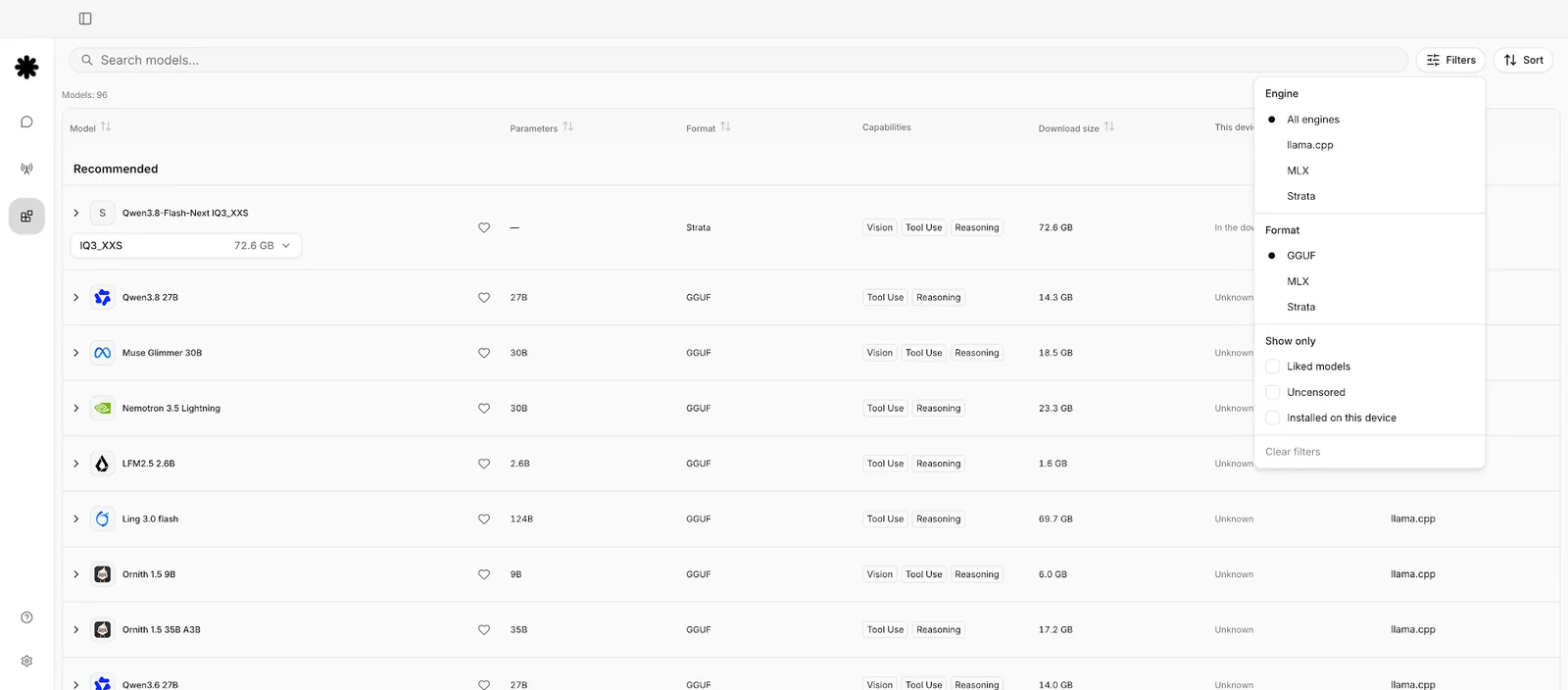
- Go to Local models, open Filters and select Strata as the inference engine.
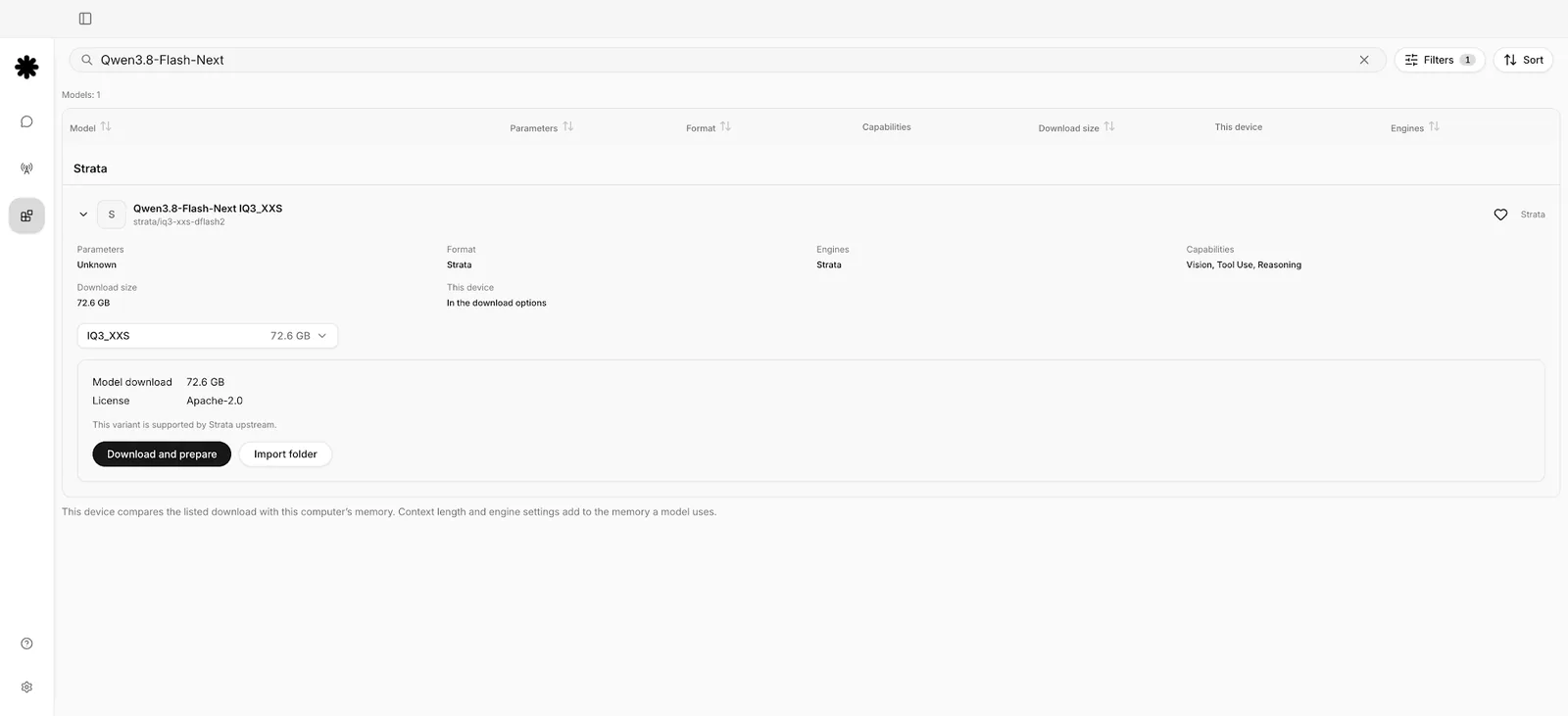
- Open the model you want to run, select a quantization and click Download and prepare. If you have already downloaded the model files, select Import folder instead.
Starting a conversation
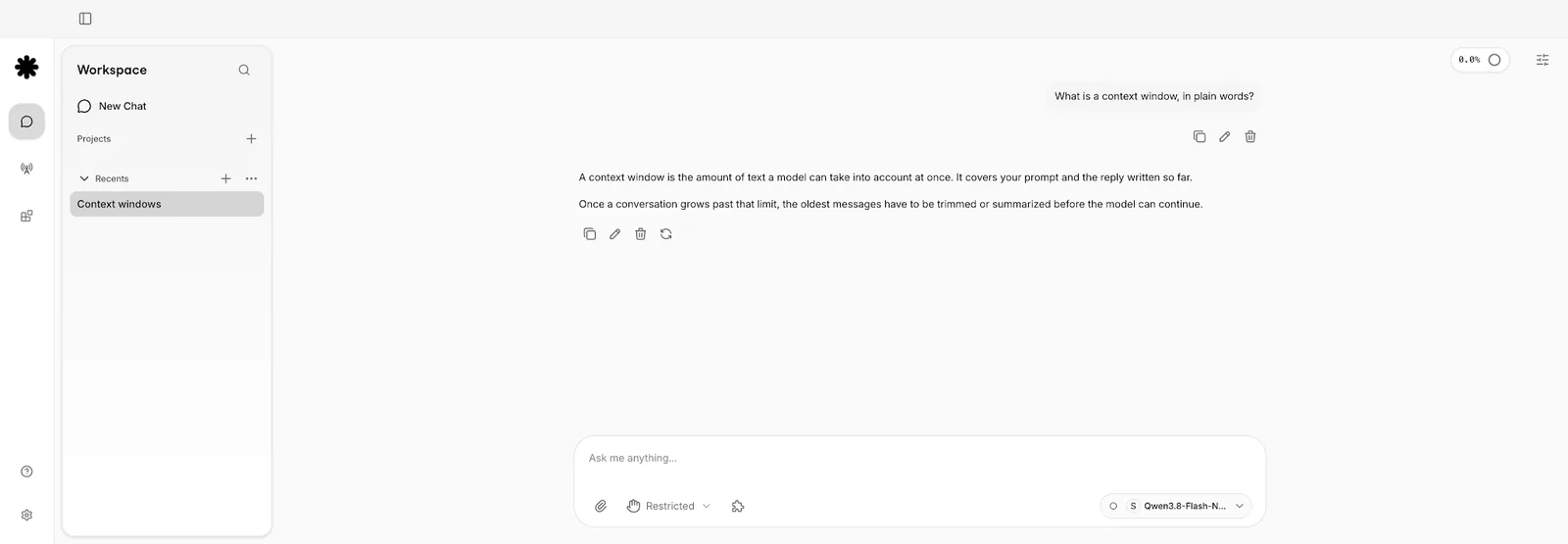
Once the model is ready, start it from the Strata page. Open New Chat and select the model in the chat input. Models running on Strata are identified by an S badge.
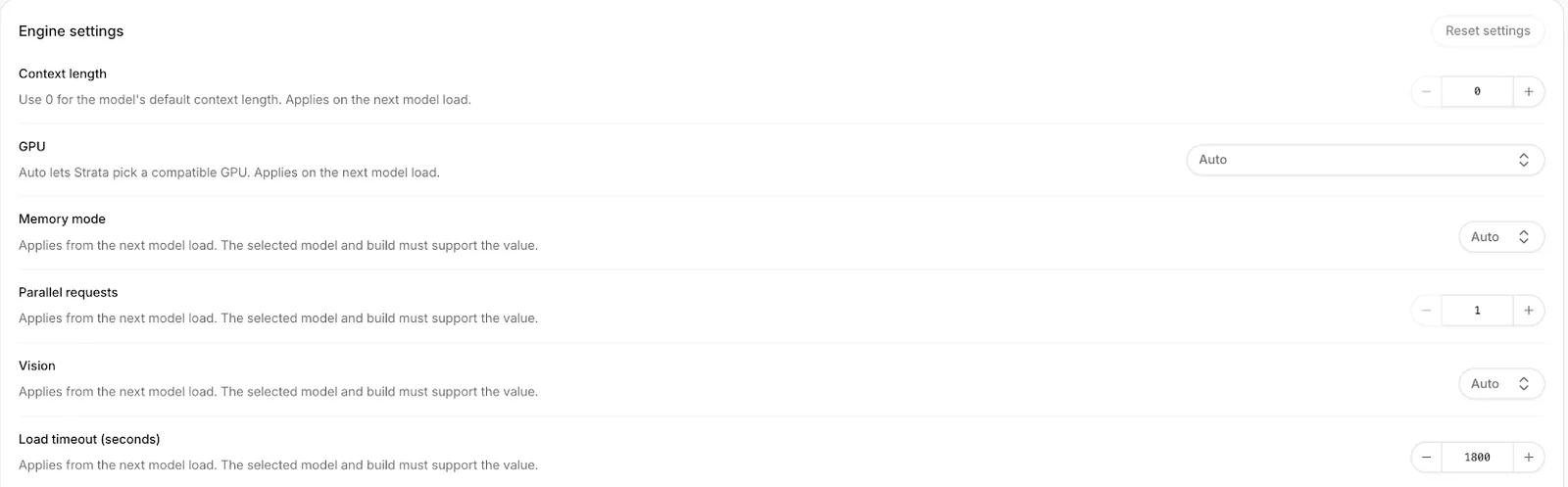
You can configure the engine from the Strata page, which provides settings for context length, GPU selection, memory mode, parallel requests, vision and load timeout. Most of these are configured automatically.
Without Atomic Chat, you can use the standalone Strata app, run strata launch in the terminal or deploy it with Docker.
Which Strata settings to change
Strata sets most options for your hardware automatically. Two settings are worth checking yourself.
Model quantization
The quantization sets how much memory the model needs and affects both speed and output quality. Lower-bit files leave room for more experts in VRAM. Higher-bit files keep more of the original weights. On our Mac with Strata 0.2.21.1, Qwen3.8-Flash-Next generated:
| Quantization | Generation speed |
|---|---|
| Q2_0 | 73.7 tokens/s |
| IQ3_S | 29.5 tokens/s |
According to the Strata model list, IQ3_S picks the same most likely next token as the 8-bit Q8_0 version in 87.7% of cases and Unsloth's UD-Q4_K_XL in 93.1%. We could not check this ourselves because the 188 GB Q8_0 file did not fit on our test machines.
Context length
Qwen3.8-Flash-Next supports 262,144 tokens of context. Strata can extend it to 512K experimentally. Longer contexts need more memory for the KV cache. From 64K tokens, Strata moves part of this cache into system RAM. You set the context length on the Strata page in Atomic Chat.
Using Strata with coding agents
Atomic Chat provides a local OpenAI-compatible API for models on any of its engines, including Strata. To connect OpenCode, Hermes, OpenClaw or another agent, set this API base URL:
http://127.0.0.1:1337/v1
Claude Code needs extra setup, described in our guide to running Claude Code locally. Without Atomic Chat, strata connect prints the setup for supported tools.
Agents need a longer context than chats because they carry code, tool outputs and past actions. For Hermes, set the context length to at least 64,000 tokens. If you run several agents at once, raise the Parallel requests setting on the Strata page. Otherwise, extra requests wait for a free slot.
Performance in multi-turn sessions
Strata keeps the KV cache between requests, so it reuses the computations from previous turns when the new prompt starts with the same text. Version 0.2.21 improved this cache reuse in agent workflows.
We compared the time to first token on a follow-up agent request using Strata 0.2.21.1 and llama.cpp on our Mac test system, with the same model file in both engines:
| Model | Strata | llama.cpp |
|---|---|---|
| Qwen3.8-Flash-Next Q2_0 | 2.41 s | 3.35 s |
| Inkling 2 Mini UD-IQ3_XXS | 1.99 s | 5.92 s |
For more information on configuring local models for agent workflows, see our guide to running AI agents locally.
Strata benchmarks: Strata vs llama.cpp vs MLX vs Ollama
We compared Strata 0.2.21.1 with llama.cpp, MLX and Ollama on two model families, Qwen3.8-Flash-Next and Inkling 2 Mini. The tests ran on an NVIDIA RTX 4090 with only 11.9 GB of VRAM left free and on a MacBook Pro with 64 GB of unified memory. We ran the tests on November 24 and 25, 2026. The setup, versions and launch flags are described after the results.
NVIDIA benchmark results
To reproduce the free memory of a 12 GB card, we limited an RTX 4090 to 11,900 MiB of VRAM. The card keeps the speed and memory bandwidth of an RTX 4090, so a real 12 GB card will be slower. The machines also had plenty of RAM (125 GB for Qwen, 41 GB for Inkling) and Strata used it.
Qwen3.8-Flash-Next IQ3_S
The table shows prompt processing and generation speeds, time to first token and peak memory for each engine:
| Engine | Prompt 4K (tok/s) | Prompt 16K (tok/s) | Generation (tok/s) | TTFT, short prompt (s) | TTFT, 4K prompt (s) | Peak VRAM (MiB) | Peak RAM (MiB) |
|---|---|---|---|---|---|---|---|
| Strata 0.2.21.1 | 2,565 | 2,509 | 32.4 | 1.16 | 1.61 | 11,682 | 84,161¹ |
| llama.cpp b12679 | 643 | 670 | 22.9 | 0.90 | 6.30 | 10,764 | 64,911 |
¹ Measured in the 32K-prompt run with a context length of 40,960 tokens because the memory sampler missed the main run.
Strata processed prompts about four times faster than llama.cpp and generated tokens 1.4 times faster. On the 32K prompt, it processed 2,746 tokens/s compared with 682 in llama.cpp. Strata ran with speculative decoding on by default. llama.cpp ran without it.
Strata used about 82 GiB of system RAM, more than llama.cpp. With RAM to spare, it also kept the 28.8 GB lookup table in memory instead of reading it from the SSD. The 83.6 GB download is 54.8 GB of model weights plus this table.
Inkling 2 Mini
For Inkling 2 Mini, we tested Strata's native SQ-10 file and the UD-IQ3_XXS file that both engines support:
| Engine and quantization | Prompt 4K (tok/s) | Prompt 16K (tok/s) | Generation (tok/s) | TTFT, short prompt (s) | TTFT, 4K prompt (s) | Peak VRAM (MiB) | Peak RAM (MiB) |
|---|---|---|---|---|---|---|---|
| Strata 0.2.21.1, SQ-10 | 1,323 | 1,392 | 31.9 | 0.47 | 3.12 | 11,190 | 4,584 |
| Strata 0.2.21.1, UD-IQ3_XXS | 1,091 | 1,053 | 53.6 | 0.47 | 3.78 | 11,588 | 14,913 |
| llama.cpp b12679, UD-IQ3_XXS | 446 | 403 | 14.1 | 1.06 | 12.21 | 9,776 | 23,803 |
| llama.cpp b12679, UD-Q4_K_XL | 367 | 343 | 12.8 | 1.06 | 14.69 | 11,034 | 29,783 |
On the same UD-IQ3_XXS file, Strata generated tokens 3.8 times faster than llama.cpp (53.6 compared with 14.1 tokens/s) and processed the 16K prompt about 2.6 times faster while using less system RAM. Speculative decoding was off in both engines for this model. Strata's SQ-10 used the least RAM, about 4.5 GiB, but generated more slowly than UD-IQ3_XXS.
Mac benchmark results
On the MacBook Pro, the engines share one pool of unified memory and the smaller quantizations of both models fit in it.
Inkling 2 Mini
The table compares Strata, llama.cpp and MLX with Inkling 2 Mini. Peak memory is the highest memory footprint of the engine's processes:
| Engine and quantization | Prompt 4K (tok/s) | Prompt 16K (tok/s) | Prompt 32K (tok/s) | Generation (tok/s) | TTFT (s) | Peak memory (GiB) |
|---|---|---|---|---|---|---|
| Strata 0.2.21.1, SQ-10 | 2,378 | 2,175 | 1,931 | 77.1 | 0.09 | 4.0 |
| Strata 0.2.21.1, UD-IQ3_XXS | 2,134 | 1,994 | 1,807 | 58.4 | 0.11 | 28.1 |
| llama.cpp b12681, UD-IQ3_XXS | 790 | 622 | 495 | 39.5 | 0.22 | 13.5¹ |
| llama.cpp b12681, UD-Q4_K_XL | 782 | 618 | 493 | 38.9 | 0.21 | 13.9¹ |
| mlx-lm (PR #2086), 4-bit | 2,173² | 1,960² | 1,645² | 41.5² | 0.22 | 32.8 |
¹ llama.cpp maps the model file outside its process footprint, so its real memory use is higher.
² Measured on the client side.
On the same UD-IQ3_XXS file, Strata generated tokens about 1.5 times faster than llama.cpp, with speculative decoding off in both. The gap in prompt processing grew with input length. On the 32K prompt, Strata processed 1,807 tokens/s, compared with 495 in llama.cpp.
MLX processed prompts almost as fast as Strata but generated more slowly and had the highest peak memory, 32.8 GiB. It used a different 4-bit file, so this compares the available builds rather than identical weights.
Qwen3.8-Flash-Next
We used the Q2_0 quantization to compare Strata, llama.cpp and Ollama. We also ran Strata with speculative decoding off and with the larger IQ3_S file:
| Engine and quantization | Prompt 4K (tok/s) | Prompt 16K (tok/s) | Prompt 32K (tok/s) | Generation (tok/s) | TTFT (s) | Peak memory (GiB) |
|---|---|---|---|---|---|---|
| Strata 0.2.21.1, Q2_0 | 1,612 | 1,565 | 1,580 | 73.7 | 0.36 | 38.3 |
| Strata 0.2.21.1, Q2_0 (speculative decoding off) | 1,994 | 1,786 | 1,676 | 28.8 | 0.83 | 40.6 |
| Strata 0.2.21.1, IQ3_S | 840 | 882 | 861 | 29.5 | 1.35 | 35.5 |
| llama.cpp b12681, Q2_0 | 1,099 | 953 | 1,008 | 58.8 | 0.21 | 12.9¹ |
| Ollama 0.40.16, Q2_0 | 1,097 | 991 | 975 | 58.3 | 0.21 | 49.2 |
¹ llama.cpp maps the model file outside its process footprint, so its real memory use is higher.
With speculative decoding on, its default, Strata generated tokens about 25% faster than llama.cpp and Ollama. With it off, Strata dropped to 28.8 tokens/s, half the speed of llama.cpp (58.8 tokens/s), which ran without speculative decoding. Strata processed prompts faster in both modes, but llama.cpp and Ollama started answering short prompts sooner.
Strata also ran the larger IQ3_S file on the 64 GB Mac. It maps the experts from the file instead of copying them into memory, so its peak footprint was 35.5 GiB. Only Strata could run IQ3_S in 64 GB.
Interpreting the benchmark results
Strata's biggest advantage showed up when the model did not fit in VRAM. On a Mac, where the model fits in unified memory, the gain was smaller and depended on speculative decoding.
Benchmark methodology
We used Strata's community benchmark: three short questions and prompts of about 4,000, 16,000 and 32,000 tokens. Each value is the median of three runs, with the server restarted before each test. We used a context length of 32,768 tokens unless noted, temperature 0 and thinking off. Speeds come from each engine's timing logs, except where marked as client-side.
| Engine | NVIDIA | Mac |
|---|---|---|
| Strata | 0.2.21.1 (engines 0.1.67) | 0.2.21.1 (engines 0.1.67) |
| llama.cpp | b12679 | b12681 |
| Ollama | 0.40.18 | 0.40.16 |
| MLX | n/a | mlx-lm, pull request #2086 |
Each engine ran with its default settings. For llama.cpp, this means the default batch sizes. Third-party tests show that a larger micro-batch brings llama.cpp's prompt processing close to Strata's. Ollama appears only in the Mac Qwen table. On NVIDIA, it did not finish importing the 83.6 GB Qwen file and with Inkling 2 Mini it reported no timings, so its speed would include reasoning tokens. On the Mac, it did not recognize the Inkling 2 Mini architecture.
Our Mac results, raw files and the exact launch command for every engine are in the strata-benchmarks repository, with all launch flags in flags.md. For a broader comparison of local inference engines, see our guides to Ollama vs llama.cpp and GGUF vs MLX.
Does Strata affect model quality?
Two engines rarely give word-for-word identical answers, even with the same model file at temperature 0, because their math differs in small ways. To see how big that gap usually is, we also compared two quantizations of the same model inside llama.cpp. We sent the same 20 questions to each pair and counted answers that matched word for word:
| Comparison | Identical answers (out of 20) |
|---|---|
| Inkling UD-IQ3_XXS: Strata vs llama.cpp (NVIDIA) | 5 |
| Inkling UD-IQ3_XXS: Strata vs llama.cpp (Mac) | 4 |
| Inkling: llama.cpp UD-IQ3_XXS vs UD-Q8_K_XL (two quantizations) | 4 |
| Qwen IQ3_S: Strata vs llama.cpp (NVIDIA) | 12 |
| Qwen Q2_0: Strata vs llama.cpp (Mac) | 13 |
For Inkling 2 Mini, Strata differed from llama.cpp about as often as a 3-bit file differs from an 8-bit one in the same engine. The differences were in wording, not in facts. Both engines also found all nine code words hidden at the start, middle and end of 8K, 16K and 32K texts. We did not test reasoning, math or coding, so these results do not cover every aspect of quality.
Strata vs Ollama
Ollama runs GGUF models on llama.cpp and performs about the same as llama.cpp with the same file. On the Mac with Qwen3.8-Flash-Next Q2_0, Ollama generated 58.3 tokens/s and Strata 73.7 tokens/s, with speculative decoding on in Strata. Ollama could not load Inkling 2 Mini on the Mac. It supports far more model architectures than Strata.
Strata vs llama.cpp
llama.cpp runs dense and MoE models of almost any architecture in GGUF format. Strata supports four model families, each with a dedicated engine. When the model did not fit in VRAM, Strata generated tokens 3.8 times faster on Inkling 2 Mini and processed Qwen3.8-Flash-Next prompts about four times faster. On a Mac, Strata was 1.5 times faster on Inkling. On Qwen, it was faster only with speculative decoding on.
Strata vs MLX on a Mac
MLX is built for Apple Silicon. On Inkling 2 Mini, the 4-bit MLX build generated 41.5 tokens/s, while Strata reached 58.4 tokens/s on UD-IQ3_XXS and 77.1 tokens/s on SQ-10. In the agent test, MLX reused 4.9% of the previous prompt, compared with about 71% in Strata, so its follow-up answer took 5.32 seconds compared with 1.99. The smallest MLX build of Qwen3.8-Flash-Next is 73 GB, too large for a 64 GB Mac.
Strata's limitations
Strata changes fast, so the version you use affects both speed and answers.
Inference optimizations and model quality
Strata has two optional optimizations that trade accuracy for speed. Expert skipping drops some of the experts the model's router selects for each token. It was on by default on NVIDIA and AMD Radeon RX 9000 GPUs, where it added about 29% speed on an RTX 5090. After users reported changes in output quality, version 0.2.17 (November 20, 2026) made it optional. The second, a faster expert routing mode for GPUs with up to 13 GiB of VRAM, arrived in version 0.2.7 and left the defaults in version 0.2.8 after reports of repetitive answers in long sessions.
We tested both on Qwen3.8-Flash-Next IQ3_S with speculative decoding off:
| Configuration | Generation speed (tok/s) | Identical answers to llama.cpp (out of 20) |
|---|---|---|
| Both optimizations off | 33.1 | 10 |
| Expert skipping on | 43.3 (+31%) | 6 |
| Faster routing on | 61.3 (+85%) | 4 |
Both made Strata faster and its answers further from llama.cpp's. Expert skipping did not affect the code-word retrieval test.
Stability and updates
The Strata app and its engines have separate version numbers (0.2.x and 0.1.x). An update can change the default settings, so read the release notes before installing a new version.
The most common cause of instability is a lack of system memory. Strata may load tens of gigabytes of weights into RAM before it starts, which can freeze the system for a while. If you see "The engine stopped unexpectedly", close other apps or pick a smaller quantization. If a problem starts after an update, restore the previous engine with this command:
strata components rollback
Privacy and security
According to its privacy page, Strata does not collect telemetry.
The standalone Strata app also includes a coding agent with access to your files. The agent asks for approval before making changes, but its access is not limited to the current folder. The developers note that Strata has not had an independent security audit, so keep this in mind on a machine with sensitive files.
When to use a different inference engine
Strata is built for large MoE models on systems with limited GPU memory. If you are looking for a Strata LLM alternative, these are the cases where another engine fits better:
- Running unsupported models. Strata supports four model families. For dense models and other MoE architectures, use llama.cpp or MLX.
- Serving multiple users. On a shared GPU server, an engine built for high-throughput serving, such as vLLM, is a better choice.
- Running models that already fit in GPU memory. Strata's advantage shrinks when the whole model fits. On our Mac with Qwen3.8-Flash-Next Q2_0, Strata was 25% faster than llama.cpp with speculative decoding and slower without it.
Community forks such as Basalt (tuned for RTX 50 series GPUs), Radiance (based on vLLM), Maya and RustingStrata (written in Rust for standard GGUF files) take a similar approach. We did not benchmark them.
Atomic Chat includes Strata, llama.cpp and MLX as separate engines, so you can pick the right one for each model.
Download Atomic Chat to run Strata, llama.cpp and MLX from a single desktop application.
Frequently asked questions
Short answers to the questions people most often ask about Strata.
Is Strata free and open source?
Yes. Strata is available under the MIT license, does not require an account and can be downloaded from GitHub. Each model comes with a separate license.
Strata is also available as a built-in inference engine in Atomic Chat at no additional cost.
What GPU do I need for Strata?
Strata supports NVIDIA RTX 20 through 50 series GPUs, selected AMD Radeon RX 7000 and 9000 series GPUs, Intel Arc on Linux and Apple Silicon.
According to the Strata README, a 4 GiB card is enough to start with Inkling 2 Mini. For larger models such as Qwen3.8-Flash-Next, the amount of system RAM matters as much as VRAM.
Can Strata run uncensored models?
Yes. Community developers have released abliterated versions of Qwen3.8-Flash-Next for Strata. Dense uncensored models run on llama.cpp or MLX instead. For setup steps, see our guide to running Qwen3.8 Flash Next Uncensored locally.
Why does Strata generate repetitive responses?
Check that your sampling settings match the ones the model's developers recommend. If you use an older version of Strata, update it. Version 0.2.8 removed a routing mode that caused repetitive output in long sessions.
Why does Strata crash or run out of memory?
Large MoE models need enough system RAM for the experts that do not fit on the GPU. If Strata stops unexpectedly, free up RAM or choose a smaller quantization. If the problem started after an update, run strata components rollback.
What is Strata's maximum context length?
It depends on the model. Qwen3.8-Flash-Next supports 262,144 tokens, with experimental support for 512K. On Macs with less than 96 GB of unified memory, Strata setup recommends 32K tokens. In Atomic Chat, change it with the Context length setting on the Strata page.
Is Strata faster than Ollama?
In our Mac test with Qwen3.8-Flash-Next Q2_0, Strata generated 73.7 tokens/s and Ollama 58.3, with speculative decoding on in Strata. With it off, Strata was slower than Ollama at 28.8 tokens/s. Ollama supports a much wider range of model architectures.