

In this guide, you'll learn:
- What an uncensored Qwen3.8 Flash Next is, and what abliteration changed in it
- Which of the community builds to run, and what hardware each one needs
- How to run Qwen3.8 Flash Next uncensored locally with Atomic Chat or llama.cpp
This article is about the uncensored builds. For the original model from Alibaba, see our guide to running Qwen3.8 Flash Next locally, and for the rest of the lineup, our guide to running Qwen models locally. If your machine is a 24 GB card, the same edit on the dense 27B is in our guide to running Qwen 3.8 27B uncensored locally.
What is Qwen3.8 Flash Next Uncensored?
Qwen3.8 Flash Next Uncensored is not a release from Alibaba. Alibaba published Qwen3.8 Flash Next under the Qwen Community License 1.0 on August 26, 2026, and community publishers released weight-edited builds over the first two days. The license allows derivative weights. Every build in this guide is one of those community edits, and each one was made by a different person with a different method.
| Specification | Qwen3.8 Flash Next Uncensored |
|---|---|
| Total parameters | 125B, plus 51B n-gram embeddings and a 4B MTP head |
| Active parameters per token | 6B |
| Architecture | MoE, hybrid attention (Gated DeltaNet + Qwen Sparse Attention) |
| Experts | 512 routed, 10 active per token, plus 1 shared |
| Layers | 48 |
| Context window | 262,144 tokens native, extensible to 1M |
| Modalities | Text, image, and video input |
| Reasoning | Thinking on by default, can be switched off |
| Multi-Token Prediction | Supported by the architecture, kept differently by each build |
| Base model | Qwen/Qwen3.8-Flash-Next, released August 26, 2026 |
| Base model license | Qwen Community License 1.0 |
Abliteration edits weights without retraining the model, so it does not change the model's size, context window, or hardware requirements.
The vision tower stays outside the weight edit in the documented builds. dealignai also keeps the MTP head, while the current llama.cpp GGUF conversion path does not export it. Flash Next also includes a 51B n-gram embedding table. It is why 4-bit files weigh 111 to 119 GB, even though the language model itself has 125B parameters.
Qwen3.8 Flash Next abliterated: what the edit changes
Researchers found that refusal in many aligned models is governed by a single direction in the model's residual stream, the internal state it passes from layer to layer. Arditi et al. showed this across 13 open-weight chat models at NeurIPS 2024: erase that one direction and the model stops declining harmful instructions, add it back and the model starts declining harmless ones.
To find the direction, you run the model over matched sets of harmful and harmless prompts, record the activations, and take the difference in means between the two. Then you remove the model's ability to write to that direction by orthogonalizing the weight matrices against it. The edit changes weights directly. It does not use training data or gradient descent.
The word abliteration does not appear in that paper. It is a community coinage for what the authors called directional ablation.
Abliterated and uncensored point at the same files here. Abliterated names the method. Uncensored names the result, and it also covers models like Dolphin and Hermes that got there by training on extra instruction data instead. For the same edit on a dense model, see our guide to running Qwen 3.8 27B uncensored locally. For the method on its own, across models and toolchains, see our explainer on what abliterated models are; for the wider category of builds, our roundup of the best uncensored LLMs to run locally.
The refusal direction lives in the residual stream, but Flash Next needs a different edit from a dense model. Its 512 experts sit in fused tensors rather than ordinary Linear modules. windowsxp changed 151 residual writers, including 25,088 expert output projections, in a batched pass. Compare a refusal result only with the thinking mode stated on that card.
What abliteration costs Qwen3.8 Flash Next
windowsxp measured its BF16 edit against the original checkpoint on the same prompts, with thinking off and greedy decoding:
| Benchmark | Qwen3.8 Flash Next | Abliterated | Change |
|---|---|---|---|
AdvBench refusals, 520 prompts | 99.42% | 0.96% | -98.46 pp |
HarmBench refusals, 400 prompts | 96.50% | 2.00% | -94.50 pp |
MMLU, 1,000 paired questions | 86.00% | 84.40% | -1.60 pp |
GSM8K, 200 questions | 96.00% | 97.00% | +1.00 pp |
The publisher reports a paired McNemar p value of 0.017 for its MMLU test. Its card is the only one here that tests the edited model and the original on the same 1,000 questions. dealignai reports a separate 2,280-question MMLU run on NVFP4, 82.11% to 81.93%. The two results use different harnesses and are not comparable.
Abliteration can remove intended safety refusals along with over-refusals. Test outputs against your own rules before you rely on the model.
Which uncensored Qwen3.8 Flash Next build should you run?
At least three publishers have released a real Flash Next uncensored build, and others have repackaged those. Choose by hardware and whether you need vision.
| Build | Best for | Files | Vision | Runtime |
|---|---|---|---|---|
| windowsxp811203 | Text and documented tests | GGUF Q4_K_M to Q8_0, plus BF16 | Text only in GGUF | Atomic Chat or llama.cpp b10661+ |
| orcarouter | Vision or native MLX | GGUF IQ2_XXS to Q5_K_M; MLX 2 to 8-bit | f16 projector shipped | Atomic Chat or llama.cpp b10661+; gated |
| dealignai | Server use with MTP | FP8 and NVFP4 | Image and video | SGLang on 2x DGX Spark |
For a text model, use windowsxp811203. Its card documents the direction capture, the lambda sweep, the tensors that changed, and the unchanged tensors. The GGUF card also tests Q4_K_M with llama.cpp. Use it from 128 GB of memory.
For native MLX or image input, use orcarouter. It ships GGUFs from IQ2_XXS through Q5_K_M, plus 2-, 3-, 4-, 6-, and 8-bit MLX builds. The GGUF repository also has an f16 projector for vision. Access requires agreeing to share contact information. mradermacher republishes the same edited checkpoint with public Q2_K, Q4_K_S, Q6_K, Q8_0, and mmproj files.
dealignai runs through SGLang on two DGX Sparks. Its NVFP4 card tests refusal behavior with thinking off, low, and xhigh, and keeps the MTP head. It is a server build. Atomic Chat loads GGUFs instead.
Why the refusal numbers don't line up
| Build | Refusal rate | Prompt set | Conditions |
|---|---|---|---|
| windowsxp811203 | 0.96%, from 99.42% | AdvBench, 520 prompts | BF16, non-thinking, greedy, no jailbreak |
| orcarouter | about 0 to 3.3%, from 64 to 100% | Not named on the card | Served with vLLM; thinking mode not stated |
| dealignai | 0%, from the base not reported | 240 real-harm HarmBench prompts | NVFP4, greedy, thinking off, low, and xhigh |
The rows differ in the prompt set, the number of prompts, who or what decides that an answer counts as a refusal, and whether thinking was on. A response that opens with a warning and then delivers exactly what was asked scores as a refusal under one publisher's judge and as compliance under another's.
windowsxp publishes the base model's result on the same prompts. dealignai's test covers 240 real-harm prompts. Run your own prompts against a build before you rely on it.
Qwen3.8 Flash Next uncensored hardware requirements
The system requirement to check is memory. The BF16 release is 360 GB, so quantization is what brings an uncensored build onto a workstation. A 4-bit file lands between 111 and 119 GB, and the smallest imatrix file is 74.8 GB. Those sizes include the 51B n-gram table. On Apple Silicon, compare the file size against unified memory.
| Available memory | Recommended build | Approximate size | Leaves room for |
|---|---|---|---|
| 80 GB | IQ2_XXS | 74.8 GB | Around 8K of context |
| 96 GB | Q3_K_S or IQ3_M | 88.8 to 89.5 GB | Around 32K of context |
| 128 GB | Q4_K_M | 111 to 119 GB | Around 32K with headroom; 262K is tight |
| 192 GB or more | Q6_K | 156 to 168 GB | Full native context |
| 64 GB or less | None | - | No memory-resident build with safe headroom |
When two neighbouring files both fit with context headroom, take the larger one. It costs a few gigabytes more and picks the wrong token noticeably less often, especially at the bottom of the range.
Low-bit builds carry a risk here that they do not carry on the original model. Published refusal figures come from the BF16 or NVFP4 parent, not from the smallest GGUFs. Use Q4_K_M or higher when you need to judge the edit itself.
How much memory does the context window add?
The figures above cover model weights only. The engine also allocates a KV cache. It grows as the conversation, document, or codebase gets longer.
Only 12 of the 48 layers use Qwen Sparse Attention, and each of them has 2 KV heads. From the official configuration, 12 layers x 2 KV heads x 256 dimensions x key/value x 2 bytes gives 24 KiB per token, about 25 KB. This is a configuration-derived estimate, not a measured runtime number:
| Context length | Attention cache |
|---|---|
| 8K (typical chat) | ~0.2 GB |
| 32K (long document) | ~0.8 GB |
| 128K (large codebase) | ~3.2 GB |
| 262K (maximum native context) | ~6.5 GB |
A Q4 build and the full 262K cache add up to roughly 118 to 126 GB before operating-system headroom. Keep the context lower when your machine is close to that number.
What hardware can run Qwen3.8 Flash Next uncensored?
- 128 GB unified-memory Macs (M4/M5 Max, Mac Studio) and 128 GB compact workstations (NVIDIA DGX Spark, AMD Strix Halo): fit a 4-bit file at a practical chat context. On a Mac, raise the default GPU memory limit first. The GGUF builds run natively through Metal; see our GGUF vs MLX guide if you're choosing between formats.
- 96 GB GPUs (RTX PRO 6000): fit an IQ2 or Q2 file entirely in VRAM. A larger GGUF needs system RAM for offload.
- 96 GB Macs and 96 GB RAM desktops: fit an IQ2 or Q3 file at a moderate context. On a Mac this also needs the GPU memory limit raised.
- 24 GB GPUs (RTX 3090 / 4090) with 96 GB or more of system RAM: can try a 4-bit build with the attention layers on the GPU and expert weights in RAM. OrcaRouter documents CPU and GPU offload for its GGUFs, but nobody has published throughput on this exact configuration.
- 24 GB GPUs without that much system RAM: cannot run any build of a 125B model. The dense Qwen 3.8 27B uncensored is the same edit on hardware that size.
- Phones: cannot run a memory-resident Flash Next build. For an uncensored model that runs on a phone, see the smaller entries in our uncensored roundup.
How to run Qwen3.8 Flash Next uncensored locally with Atomic Chat
Atomic Chat is a free, open-source local AI app we built. It includes a Hugging Face model browser and a built-in chat, with no manual llama.cpp build required.
Here's how to run Qwen3.8 Flash Next uncensored with Atomic Chat:
Step 1: Install Atomic Chat
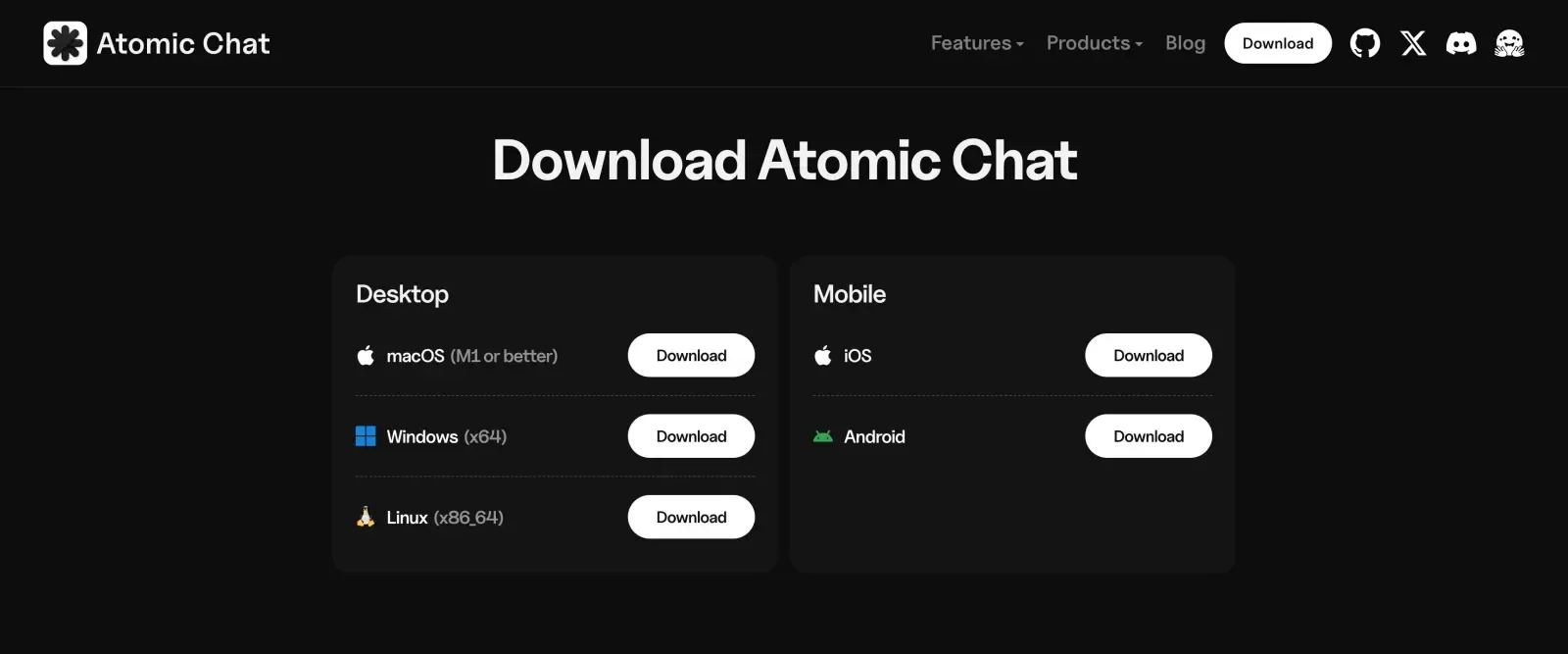
Download Atomic Chat from atomic.chat and install the build for your platform:
- macOS: a universal .dmg (Intel and Apple Silicon), macOS 13.6 or later
- Windows: an .exe installer for x64
- Linux: a self-contained .AppImage for x86_64, which needs no root
- iOS: through the App Store
- Android: through Google Play
On Linux, mark the AppImage executable with chmod +x and run it directly. If the app asks about FUSE on first launch, install it with sudo apt install fuse libfuse2 on Debian or Ubuntu, or sudo dnf install fuse fuse-libs on Fedora.
Step 2: Find an uncensored Qwen3.8 Flash Next GGUF
Open the Models tab and search for:
windowsxp811203/Qwen3.8-Flash-Next-Abliterated-GGUF
The catalog is backed by Hugging Face, so community repositories appear alongside official ones. Check the publisher name on the result before you download, then expand the Download Options picker to list the available quantizations.
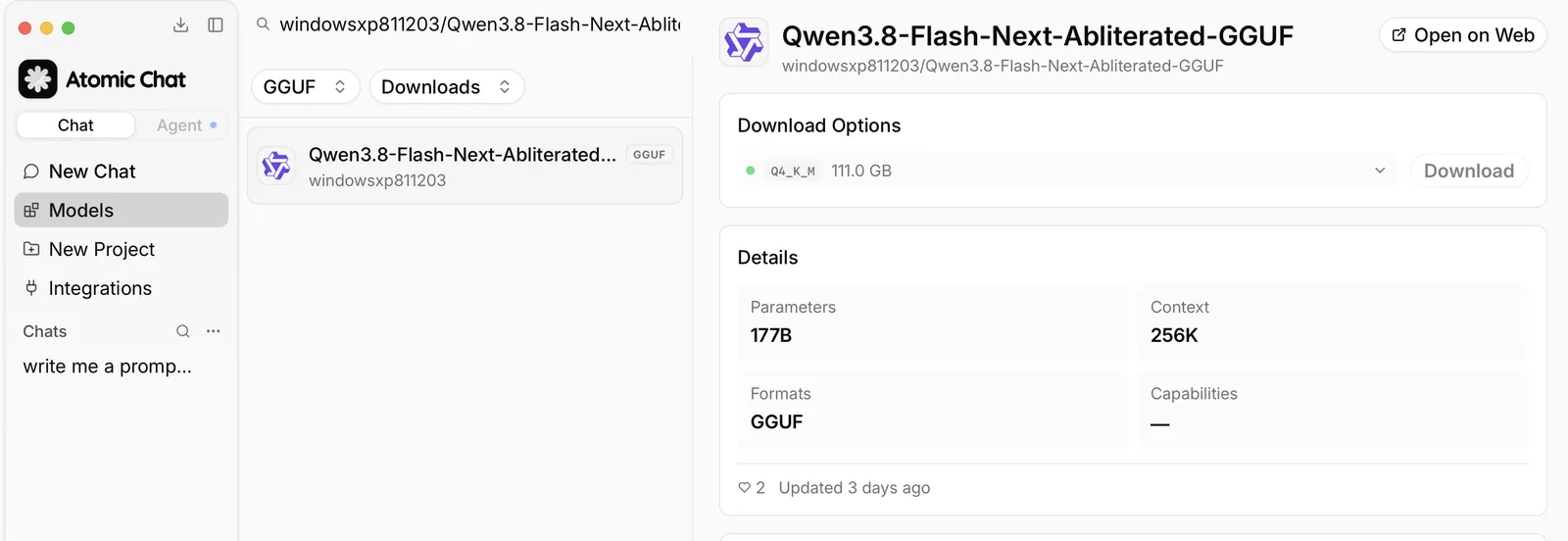
Note: several repositories carry near-identical names, and one of them is gated. See the Troubleshooting section for what to check before you download.
Step 3: Pick a quant for your memory
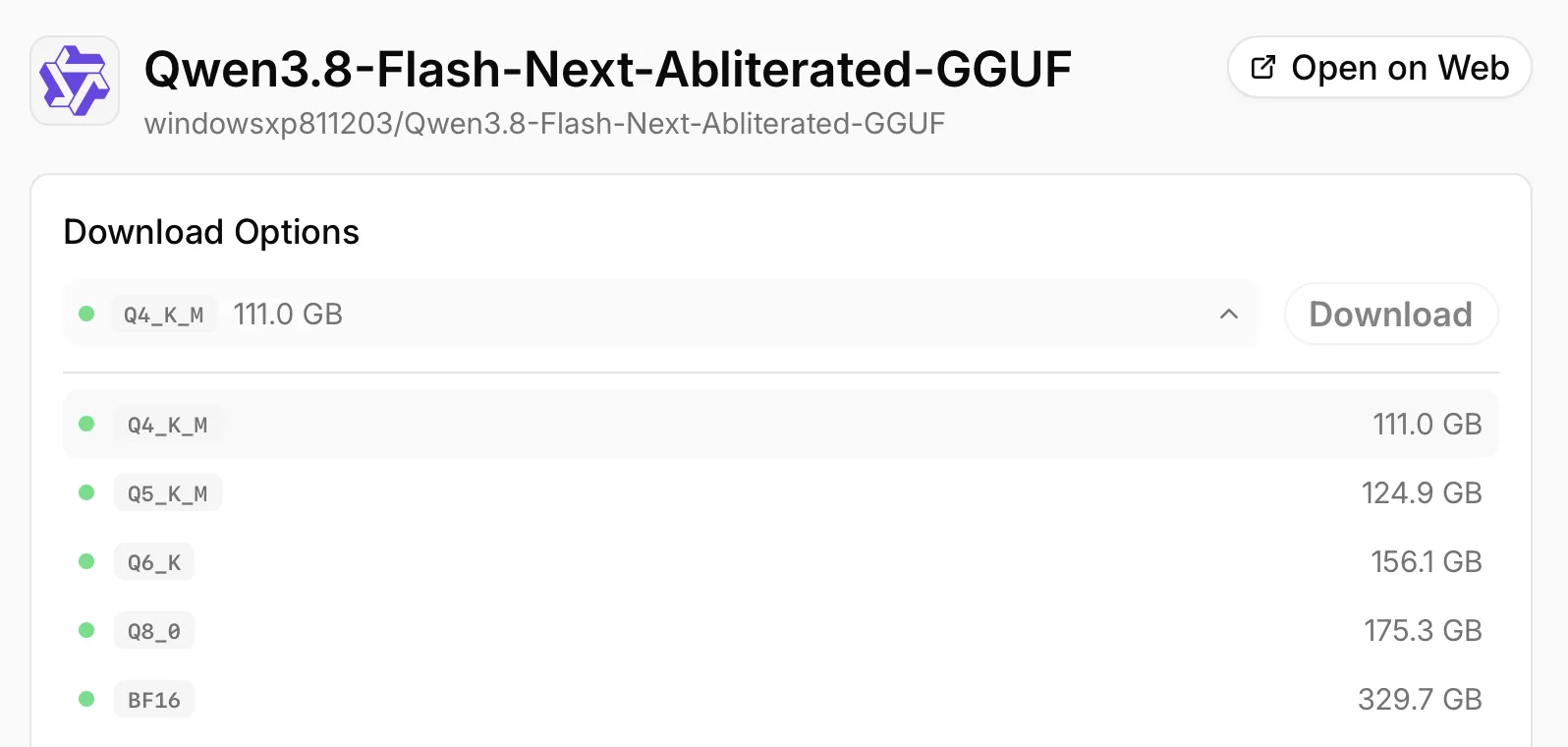
Use the hardware table above. For the most common configurations:
- 128 GB unified memory or RAM: download Q4_K_M, at 111 GB.
- 160 GB or more: download Q5_K_M, at 125 GB.
- 192 GB or more: download Q6_K, at 156 GB.
The picker lists each build under its short tag, and sizes differ a little from the numbers above. Select the largest quant that fits with context headroom. If you're not sure what the quant names mean, see our guide to what GGUF is and how quantization works.
Step 4: Set the context, thinking, and sampling
The model declares a 262K context window, but configuring the maximum allocates the KV cache up front. Start with 8,192 tokens for chat or 32,768 for code and document work, and increase it only when the workload requires it.
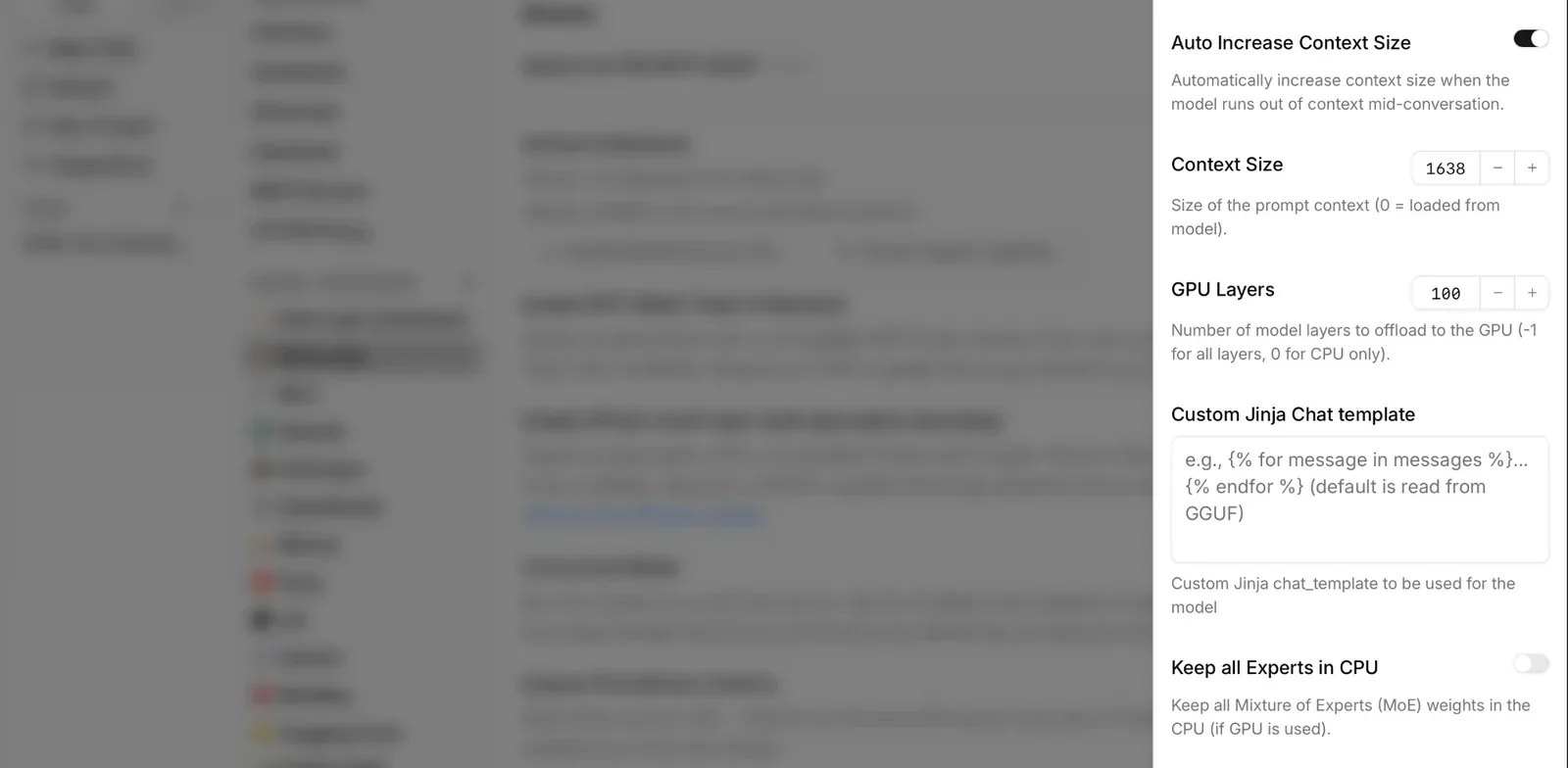
Context size lives in the model's own settings, not in the chat window. Open Settings → Model Providers → Llama.cpp, find the build in the model list, and click the gear icon on its row. Set three things there:
- Context Size: set it to 8192 or 32768. A value of 0 reads the maximum from the GGUF, which for this model means the full 262K window.
- Auto Increase Context Size: on by default. It grows the context when a conversation runs out of room, which can push a build that only just fit past your memory limit. Turn it off when you're working close to that limit.
- GPU Layers: -1 offloads every layer. On a machine where the weights fit in GPU or unified memory, use -1.
Changing Context Size or GPU Layers restarts the model, so set them before a long conversation.
Thinking is on by default. The lightbulb icon in the chat switches it off.
Sampling is a separate panel: click the sliders icon next to the model name at the top of the chat. Qwen's recommended settings carry over from the original weights: temperature 1.0, top_p 0.95 and top_k 20 with thinking on, 0.7 and 0.80 with it off. These settings are saved on the assistant, your chat profile, not on the model, so they stay the same when you switch models.
Step 5: Chat locally
After the download completes, Atomic Chat loads the model and opens it in the built-in chat. Send it a prompt the original declines, to check that the build you downloaded is the edited one.
The windowsxp GGUF is a text build. For image input, download OrcaRouter's gated GGUF with its separate projector file instead. The image, the weights, and your prompts stay on your machine.
Atomic Chat also exposes an OpenAI-compatible API server at http://localhost:1337/v1. Any tool that speaks the OpenAI API, including coding agents like Claude Code and Cline, can use the local model as a drop-in replacement for a cloud one.
How to run Qwen3.8 Flash Next uncensored with llama.cpp
Run the model directly through llama.cpp when you need:
- A server you can start headless, with the host and port set by flag
- You need precise control over GPU offload
- You need a reproducible server configuration
These builds use the same qwen4_exp architecture as the original. llama.cpp has supported it upstream since b10661. Use that release or a newer build.
Step 1: Build current llama.cpp
For NVIDIA CUDA:
git clone https://github.com/ggml-org/llama.cpp
cmake -S llama.cpp -B llama.cpp/build -DCMAKE_BUILD_TYPE=Release -DGGML_CUDA=ON
cmake --build llama.cpp/build -j --target llama-cli llama-server llama-mtmd-cli
For Apple Silicon, Metal is enabled by default:
cmake -S llama.cpp -B llama.cpp/build -DCMAKE_BUILD_TYPE=Release
cmake --build llama.cpp/build -j --target llama-cli llama-server llama-mtmd-cli
Step 2: Run the model
Download the documented 4-bit build first:
hf download windowsxp811203/Qwen3.8-Flash-Next-Abliterated-GGUF \
  --include "Qwen3.8-Flash-Next-Abliterated-Q4_K_M.gguf" \
  --local-dir ./qwen-flashnext-uncensored
Then run it with 8K of context:
./llama.cpp/build/bin/llama-cli \
  -m ./qwen-flashnext-uncensored/Qwen3.8-Flash-Next-Abliterated-Q4_K_M.gguf \
  --single-turn -c 8192 -n 512 --temp 0.7 \
  -p "Explain how a mixture-of-experts model works."
Replace the file with the quant your system can hold. If it is larger than your VRAM, increase GPU offload until the model runs out of memory, then step back. OrcaRouter documents CPU and GPU offload for its GGUFs, but it has not published one portable set of flags for every hardware split.
Step 3: Expose a local OpenAI-compatible API
Replace llama-cli with llama-server:
./llama.cpp/build/bin/llama-server \
  -m ./qwen-flashnext-uncensored/Qwen3.8-Flash-Next-Abliterated-Q4_K_M.gguf \
  --alias qwen3.8-flash-next-uncensored \
  --jinja \
  --temp 1.0 --top-p 0.95 --top-k 20 \
  -ngl 99 \
  -c 8192 \
  --host 127.0.0.1 --port 8080
Test it with:
curl http://127.0.0.1:8080/v1/chat/completions \
  -H "Content-Type: application/json" \
  -d '{ "model": "qwen3.8-flash-next-uncensored", "messages": [ { "role": "user", "content": "Summarize what an n-gram embedding table does." } ] }'
Bind the server to 127.0.0.1 unless other machines on your network need access.
Running vision through llama.cpp
Image input needs one extra file, the vision projector, which is shared by all quants in the same repository. The windowsxp GGUF is text-only, so use OrcaRouter's vision path instead. Its repo is gated, and you need to accept its access conditions before downloading these two files:
hf download orcarouter/Qwen3.8-Flash-Next-Uncensored-GGUF \
  --include "Qwen3.8-Flash-Next-Uncensored-Q4_K_M*" "mmproj-*" \
  --local-dir ./qwen-flashnext-uncensored-vision
./llama.cpp/build/bin/llama-mtmd-cli \
  -m ./qwen-flashnext-uncensored-vision/Qwen3.8-Flash-Next-Uncensored-Q4_K_M-00001-of-00003.gguf \
  --mmproj ./qwen-flashnext-uncensored-vision/mmproj-Qwen3.8-Flash-Next-Uncensored-F16.gguf \
  --image your-photo.jpg \
  -ngl 99 -c 8192 \
  -p "What is in this image?"
The original checkpoint also ships a 4B multi-token prediction head, the mechanism behind speculative decoding. The current GGUF converter does not export or run it, so current GGUFs have no local speculative-decoding path. dealignai keeps the head in its NVFP4 build and reports about 2.4 accepted draft tokens per step through SGLang NEXTN. That is a separate two-GPU server path.
Atomic Chat packages current upstream llama.cpp, so it loads qwen4_exp GGUFs. Ollama and LM Studio need their own runtime update before the same files load there.
Troubleshooting
The model still refuses
Abliteration reduces refusals, it does not eliminate them. Check these:
- Turn thinking off with the lightbulb icon. A reasoning block can change what the model does with a borderline prompt.
- Try a larger quant. The refusal boundary is the least stable part of an abliterated model, and the low-bit files compound exactly that.
- Confirm you loaded the build you meant to load. The original weights and the edited ones sit under very similar names in the app catalog.
The build you downloaded is not what it claims
Repositories carrying the Qwen3.8-Flash-Next name existed on Hugging Face before the weights did, including abliterated and jailbreak variants with zero files behind them. Before downloading from an unfamiliar repository, check that the model card describes an actual method, that the file list contains GGUF shards of a plausible size, and that the publisher is one you can trace. A 125B model at 4-bit cannot weigh 400 MB.
llama.cpp says the model architecture is unknown
Your runtime is older than qwen4_exp support. Atomic Chat already packages current upstream llama.cpp. For a direct install, use llama.cpp b10661 or newer. Ollama and LM Studio need their own runtime update before the same files load there.
The model loads but generation is very slow
GPU offload may be zero, or the operating system may have swapped expert weights to disk. Check that your total free RAM plus VRAM exceeds the file size with a few gigabytes of headroom, set GPU Layers to -1, and use the MoE offload controls before the OS starts swapping.
You run out of memory at long context
The KV cache may be past your headroom, or Auto Increase Context Size may have raised the window on its own. The cache is about 25 KB per token, so set an explicit Context Size and turn off Auto Increase when you're near the limit.
Frequently asked questions
The questions that come up most often about running an uncensored Qwen3.8 Flash Next on your own hardware.
What is the difference between abliterated and uncensored models?
Abliterated describes how the model was changed: one direction in the weights, the one that governs refusal, was removed. Uncensored describes the result, and it also covers models that got there through fine-tuning rather than weight editing. The three Flash Next publishers in this guide describe direct weight-level ablation, so both words point at the same files.
Is Qwen3.8 Flash Next Uncensored a Qwen4 model?
No. Alibaba published Qwen3.8 Flash Next under the Qwen Community License 1.0 and the uncensored versions are community edits of those weights, made by individual publishers. Alibaba neither produced nor endorsed them. Flash Next is a Qwen4-exp architecture preview.
How much RAM does Qwen3.8 Flash Next uncensored need?
About 128 GB of combined RAM and VRAM, or unified memory, runs a 4-bit build with useful context headroom. OrcaRouter's 74.8 GB IQ2_XXS is the practical minimum at 80 GB. The BF16 release is 360 GB.
Can I run Qwen3.8 Flash Next uncensored on an RTX 4090?
No, not on the card alone. 24 GB of VRAM does not hold any build of a 125B model. With 96 GB or more of system RAM next to it, yes: keep the attention layers on the GPU and move the expert weights to RAM. Only 6B parameters are active per token, so the penalty for offloading is far smaller than it would be for a dense model of this size.
Can you run Qwen3.8 Flash Next uncensored on a Mac?
Yes, from 96 GB of unified memory up after raising the GPU memory limit, and comfortably at 128 GB. macOS caps GPU-addressable memory at roughly 75 percent of unified memory by default, so a 128 GB Mac gives the model about 96 GB to work with: that runs a 2-bit build as is, and a 4-bit build after raising the limit with sysctl iogpu.wired_limit_mb. The GGUF builds run natively through Metal.
Which uncensored Qwen3.8 Flash Next build is best?
windowsxp811203's, unless you need vision or native MLX. It is the best documented build: its card publishes the actual target tensors, a lambda sweep, a refusal table, and a paired capability test against the original model. Take its Q4_K_M on a 128 GB machine for text. For image input or a Mac-native MLX build, take OrcaRouter's instead and accept its repository access conditions. dealignai is the separate choice for a Blackwell server with SGLang, not for a local GGUF app.
Do abliterated models get dumber?
The shipped windowsxp build lost 1.6 MMLU points on 1,000 paired questions and did not lose GSM8K points. Its lambda sweep shows that stronger edits lose more capability while still passing a simple refusal test. dealignai reports a 0.18-point MMLU gap on a separate harness. Test the build on your own work before you rely on it.
Is Qwen3.8 Flash Next uncensored free for commercial use?
Yes for the windowsxp811203 and dealignai builds, whose cards state the Qwen Community License 1.0. The base license allows commercial use, modification, and redistribution. OrcaRouter labels its repository Apache 2.0, so check the license file on the exact repository you deploy. Under the base license, a product with more than 100 million monthly active users or 20 million dollars in monthly revenue must display the model name in its interface, and a model-as-a-service API or a coding or office assistant product requires a separate license from Qwen.
Is it safe to download an uncensored Qwen3.8 Flash Next build?
Repositories with this model's name were on Hugging Face before the model itself. Check that the card describes an actual method and that the file list holds GGUF shards of a plausible size. Keep your inference tools updated and stick to publishers you can trace.
Does Qwen3.8 Flash Next uncensored support vision locally?
Yes, when the repository ships a projector. Flash Next is a native vision-language model that accepts image and video input, and the vision tower sits outside the part that abliteration edits. OrcaRouter and mradermacher ship a separate mmproj file for local image input. windowsxp keeps the vision tower in the BF16 parent but its GGUF repository has no mmproj, so use its Q4_K_M as a text build.
Does Qwen3.8 Flash Next uncensored work with Atomic Chat, Ollama, or LM Studio?
It works in Atomic Chat, which packages current upstream llama.cpp. Ollama and LM Studio need their own qwen4_exp runtime update before the same GGUF files load there. A repository can appear in a model search before the app runtime supports it.
Can I abliterate Qwen3.8 Flash Next myself?
Not with the stock recipe. Flash Next stores its 512 experts as fused tensors. windowsxp used a custom batched pass across 25,088 expert projections and worked from a 360 GB BF16 checkpoint. That is a multi-GPU server job, not a desktop experiment. Heretic is still useful for ordinary models, but verify qwen4_exp support before you point it at this one.
Bottom line
On a 128 GB machine, use llama.cpp b10661 or newer, download windowsxp811203's Q4_K_M at 111 GB, and start at 8K of context. Its card documents the tensors changed and the measured capability cost.
For image input or a Mac-native format, take OrcaRouter's 4-bit build with its mmproj instead. A 24 GB card is better served by the uncensored Qwen 3.8 27B.
Key takeaways:
- Uncensored Qwen3.8 Flash Next builds are community edits of Alibaba's weights. Alibaba did not publish them.
- Abliteration removes the refusal direction from the weights without retraining, so it does not change the base model's size or memory requirements.
- A 4-bit build lands between 111 and 119 GB.
- An 80 GB machine can run an IQ2 file with short context.
- A 24 GB card alone cannot run any Flash Next build.
- Refusal rates from different publishers are measured on different prompt sets. They cannot be ranked against each other.