

For a 24 GB GPU or a 32 GB Mac, start with Qwen3.8 27B. On a 64 GB Mac, you can run Flash Next with our split GGUF build. The larger GLM, Kimi, and Qwen Max models need server hardware.
In this guide, you'll learn:
- What GPT-6 Astra is
- How its benchmarks compare with Claude Fable 5.1 and Opus 5
- How to use GPT-6 Astra in Atomic Chat with your ChatGPT subscription
- Which open-weight models need server hardware
- Which local models run on a desktop or MacBook
What is GPT-6 Astra?
GPT-6 Astra is a language model developed by OpenAI, the successor to GPT-5.6 Sol. OpenAI released Astra on September 3, 2026, with a million-token context window and support for text and image input.
GPT-6 Astra main specs:
| Specification | GPT-6 Astra |
|---|---|
| Release date | September 3, 2026 |
| API model ID | gpt-6-astra |
| Context window | 1,050,000 tokens |
| Maximum output | 128,000 tokens |
| Modalities | Text and image input; text output |
| Reasoning effort | Low, medium, high, xhigh, max |
| API price | $10 / 1M input tokens; $50 / 1M output tokens |
| Open weights | No |
Astra can work through longer coding tasks in Codex, keeping notes across context windows and searching earlier messages or tool outputs. OpenAI serves the model through ChatGPT and its API. Atomic Chat connects to it through your ChatGPT account.
For offline use, you need one of the downloadable models covered below. Downloading the weights does not include Astra's computer-use tools or its Codex workflow.
How much does GPT-6 Astra cost?
The standard API rate is $10 per million input tokens and $50 per million output tokens. Cached input costs $1 per million tokens.
Once a request exceeds 272,000 input tokens, the higher rate applies to the whole request: $20 per million input tokens and $75 per million output tokens. A request with 300,000 uncached input tokens and 10,000 output tokens costs $6.75.
Connecting a ChatGPT subscription in Atomic Chat uses your account's Codex allowance. The API prices above apply to separately billed API usage.
GPT-6 Astra benchmarks
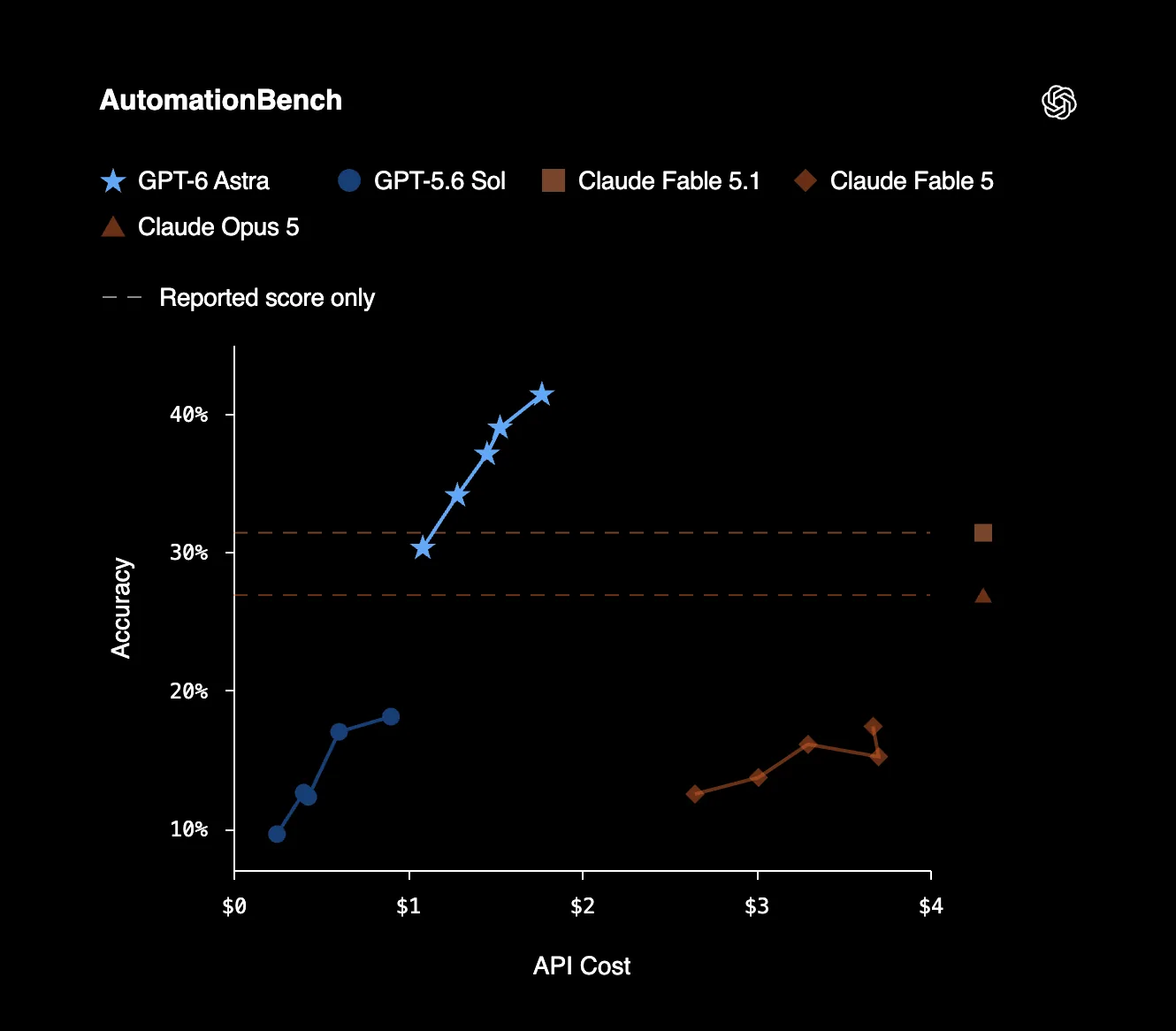
OpenAI's launch numbers compare Astra with Claude Fable 5.1, Claude Opus 5, and Gemini 3.8 Flash:
| Benchmark | GPT-6 Astra | Claude Fable 5.1 | Claude Opus 5 | Gemini 3.8 Flash |
|---|---|---|---|---|
AutomationBench Office automation | 41.4 | 31.4 | 26.9 | - |
Artificial Analysis Intelligence Index v4.1.1 General intelligence | 61.2 | 65.7 | 63.1 | 58.7 |
Terminal-Bench 4.0 Terminal agents | 57.9 | 55.8 | 52.6 | 19.1 |
DeepSWE v1.1 Agentic coding | 74.1 | 67.4 | 73.7 | 73.8 |
GPQA Diamond Expert science | 96.0 | 93.7 | 93.7 | 95.3 |
Humanity's Last Exam (w/ tools) Expert questions | 57.2 | 65.0 | 63.6 | - |
Astra comes out ahead of Fable 5.1 and Opus 5 on four of the six benchmarks. Its largest lead over both is on AutomationBench; Fable 5.1 keeps the higher Intelligence Index and Humanity's Last Exam score.
These are OpenAI's reported results, using the highest score at any reasoning effort. ChatGPT and other production apps can use different tools and settings.
How to use GPT-6 Astra in Atomic Chat
You can connect your ChatGPT subscription to Atomic Chat and use the models available to your account. The connection uses OpenAI's Codex service, with the same account allowance you use in Codex.
Here's how to connect it:
Step 1: Install Atomic Chat
Download the desktop app from atomic.chat and install it on your Mac, Windows PC, or Linux machine.
Step 2: Connect your ChatGPT account
Open Cloud, find ChatGPT subscription (Codex), and click Connect in browser. Sign in with the ChatGPT account you use for Codex, then return to Atomic Chat. You do not need a separate OpenAI API key.
Step 3: Select GPT-6 Astra
Atomic Chat loads the models available to your account. Select GPT-6 Astra when it appears in that list, then open a chat.
Astra availability depends on your account's access. Connecting your subscription does not unlock models outside your plan or increase your Codex usage limit.
You can keep Astra and downloaded local models in the same app. Use Astra through your connected account, then switch to a local model when you want the conversation to run on your own computer.
Open-weight alternatives to GPT-6 Astra
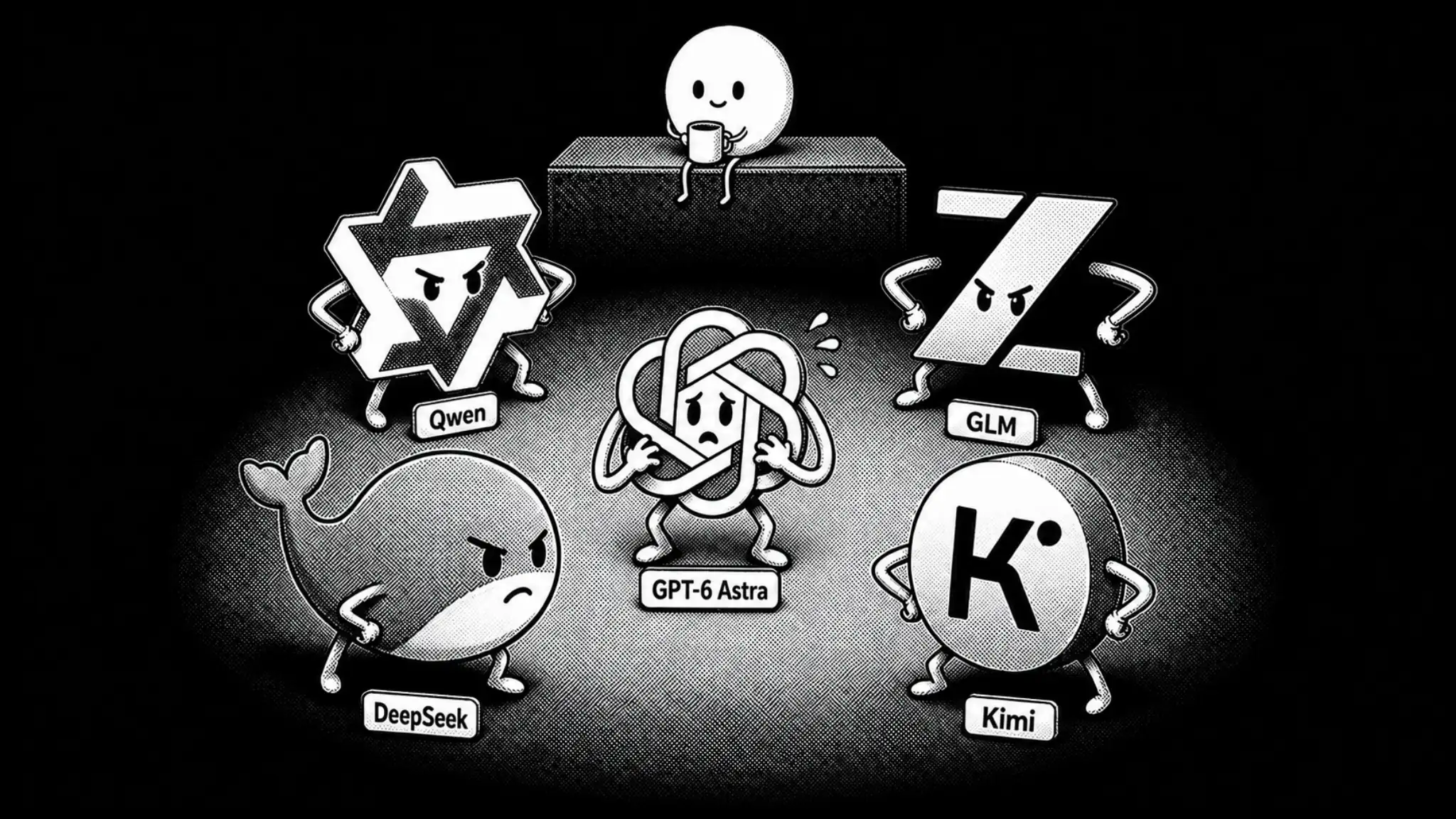
GLM-5.3, GLM-5.3 Flash, Qwen Max, Kimi K3, and DeepSeek V4 Flash are the large open-weight models to compare with Astra. Their weights are available to download, but running them takes server hardware.
The smaller Qwen and Laguna models come later in this guide. Those are the ones to look at for a desktop or MacBook.
GPT-6 Astra vs open-weight models
| Model | Total parameters | Active parameters | Hardware |
|---|---|---|---|
| GLM-5.3 | 753B checkpoint | - | Multi-GPU server |
| GLM-5.3 Flash | 320B | 18B | Multi-GPU server |
| Qwen3.8-2.4T-A95B | 2.4T | 95B | Datacenter cluster |
| Kimi K3 | 2.8T | 104B | Datacenter cluster |
| DeepSeek V4 Flash 0731 | 284B core | 13B | Multi-GPU server |
MoE models use only some of their parameters for each token. The download still contains the full model.
Here's how the vendors score their models. Each lab uses its own evaluation setup:
| Benchmark | GPT-6 Astra | GLM-5.3 | GLM-5.3 Flash | Qwen3.8 Max | Kimi K3 | DeepSeek V4 Flash |
|---|---|---|---|---|---|---|
DeepSWE Agentic coding | 74.1 | 66.9 | 63.4 | 56.6 | 67.5 | 54.4 |
HLE with tools | 57.2 | 62.5 | 55.3 | 56.2 | 56.0 | - |
Terminal-Bench 2.1 Terminal agents | - | 88.2 | 84.3 | 86.6 | 88.3 | 82.7 |
Sources: OpenAI, GLM-5.3, GLM-5.3 Flash, Qwen, Kimi, and DeepSeek. These scores describe the vendors' models, not the quantized GGUF files.
The DeepSWE results use v1.1 except for DeepSeek, whose card does not specify a version. A hyphen means the cited source does not report a score.
Qwen3.8-2.4T-A95B is the downloadable version of Qwen Max. It is text-only and reasons on every request. The scores above belong to hosted Qwen3.8 Max, which also supports vision input, non-thinking responses, and built-in tools.
If you want a smaller GLM, GLM-5.3 Flash has 320B total parameters and 18B active. Our Kimi K3 guide covers running the larger model on rented GPUs, and the DeepSeek V4 Flash guide covers its GGUF builds and setup.
Local alternatives for a Mac or workstation
You can run Qwen3.8 Flash Next on a 64 GB Mac with our split GGUF build. Laguna S 2.1 needs more memory: its current official Q4_K_M file alone is 96 GB.
Qwen3.8 Flash Next
Flash Next is a 125B Mixture-of-Experts model with 6B active parameters, plus an n-gram table and a prediction head. Our GGUF keeps the n-gram table on SSD, so the entire download does not have to fit in memory.
We measured the AD-3.84bpw-IQ4_XS-M64 build at 36 tokens per second on a 64 GB MacBook Pro M5 Max. The download is 84.9 GB, with 45.8 GB of GPU-resident weights. The app and context cache use additional memory.
For the files and setup, see our guide to running Flash Next locally. The Atomic GGUF repository contains the measurement details.
Laguna S 2.1
Laguna S 2.1 is Poolside's 118B coding model with about 8B active parameters. Poolside reports 70.2 on Terminal-Bench 2.1 and 40.4 on DeepSWE.
The official Q4_K_M download is 96 GB. That puts it beyond a 64 GB Mac with this build. You need a machine with enough memory for the weights and the context cache; Poolside's repository includes its llama.cpp and Ollama instructions.
Local alternatives for everyday hardware
Qwen3.8 27B and Laguna XS 2.1 are the smaller models you can run on an everyday machine. For the configurations below, that means a desktop with a 24 GB GPU or a MacBook with 32 to 36 GB of unified memory.
| Model | Parameters | GGUF file | Hardware |
|---|---|---|---|
| Qwen3.8 27B | 27B dense | Atomic AD-Q4_K_M, 17.1 GB | 24 GB GPU or 32 GB Mac |
| Laguna XS 2.1 | 33B total, 3B active | Official Q4_K_M, 20.3 GB | 36 GB Mac with Metal |
Qwen3.8 27B
For a 24 GB GPU, Qwen3.8 27B is the model to start with. Our AD-Q4_K_M file is 17.1 GB, leaving room for an 8K context and the runtime. The same build fits a 32 GB Apple Silicon Mac.
Qwen's published results give the 27B a 61.7 on SWE-bench Pro and 89.2 on GPQA Diamond. The model accepts images as well as text, so you can use it for screenshots and documents alongside code.
The native context window is 262,144 tokens, but you do not need to allocate all of it. Start at 8,192. Longer conversations use more memory through the KV cache, and the full context needs far more than a 24 GB card.
Our Qwen3.8 27B guide covers the other quantizations and hardware configurations.
Laguna XS 2.1
Laguna XS 2.1 is the smaller sibling of Laguna S, with 33B total parameters and 3B active per token. Its official Q4_K_M file is 20.3 GB, and Poolside lists a 36 GB Mac configuration.
Poolside reports 47.6 on the SWE-bench Pro public dataset. Qwen's published score is higher, though the vendors use different coding agents and evaluation settings.
On a Mac, follow the GGUF repository's runtime instructions. Poolside provides a Metal recipe there, while the main model card flags an Apple Silicon issue with ollama run.
How to run a local model with Atomic Chat
Atomic Chat includes a Hugging Face model browser and a built-in chat. You can download a local model without building llama.cpp yourself.
Here's how to run Qwen3.8 27B:
Step 1: Find our Qwen3.8 27B GGUF
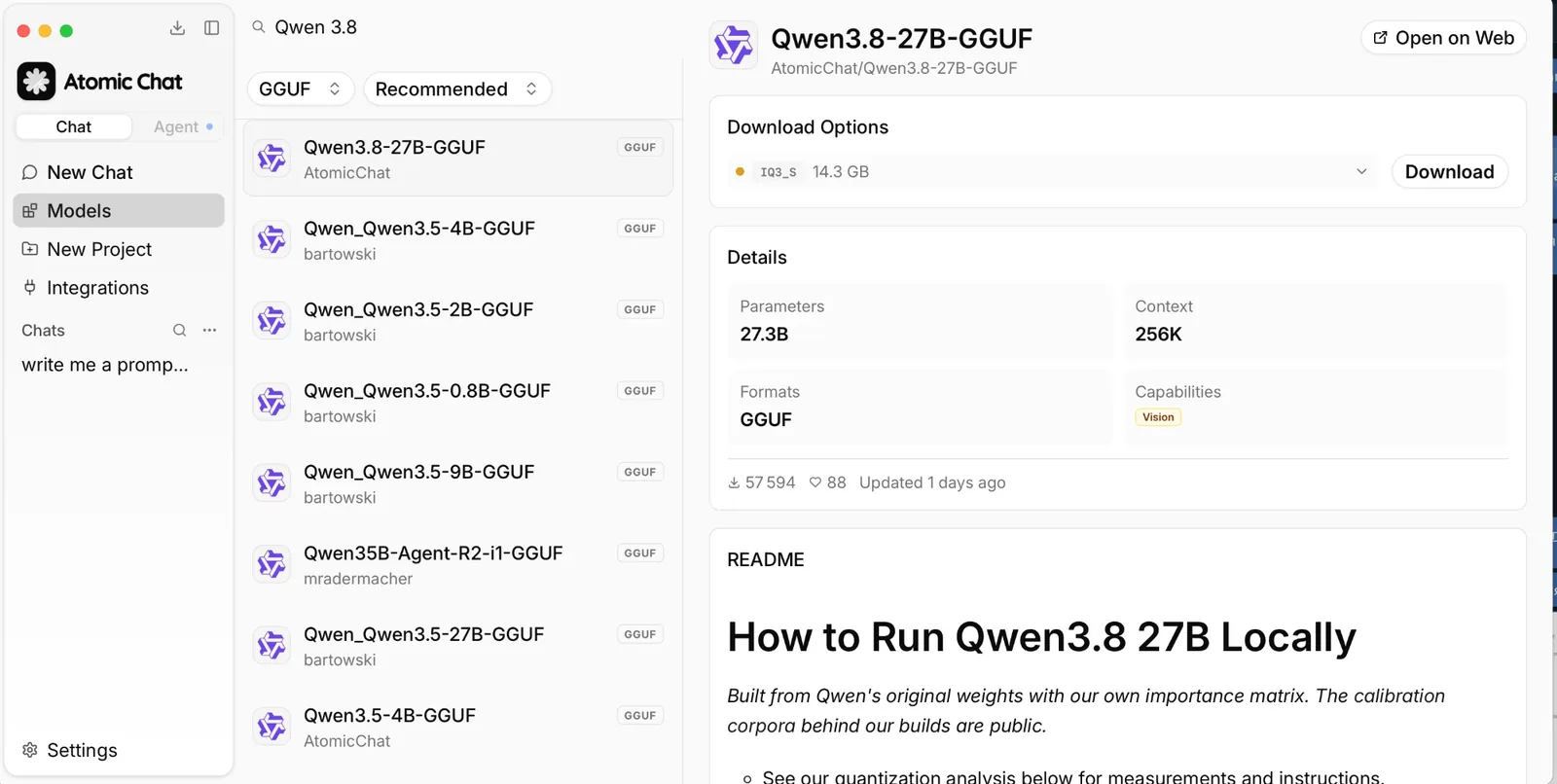
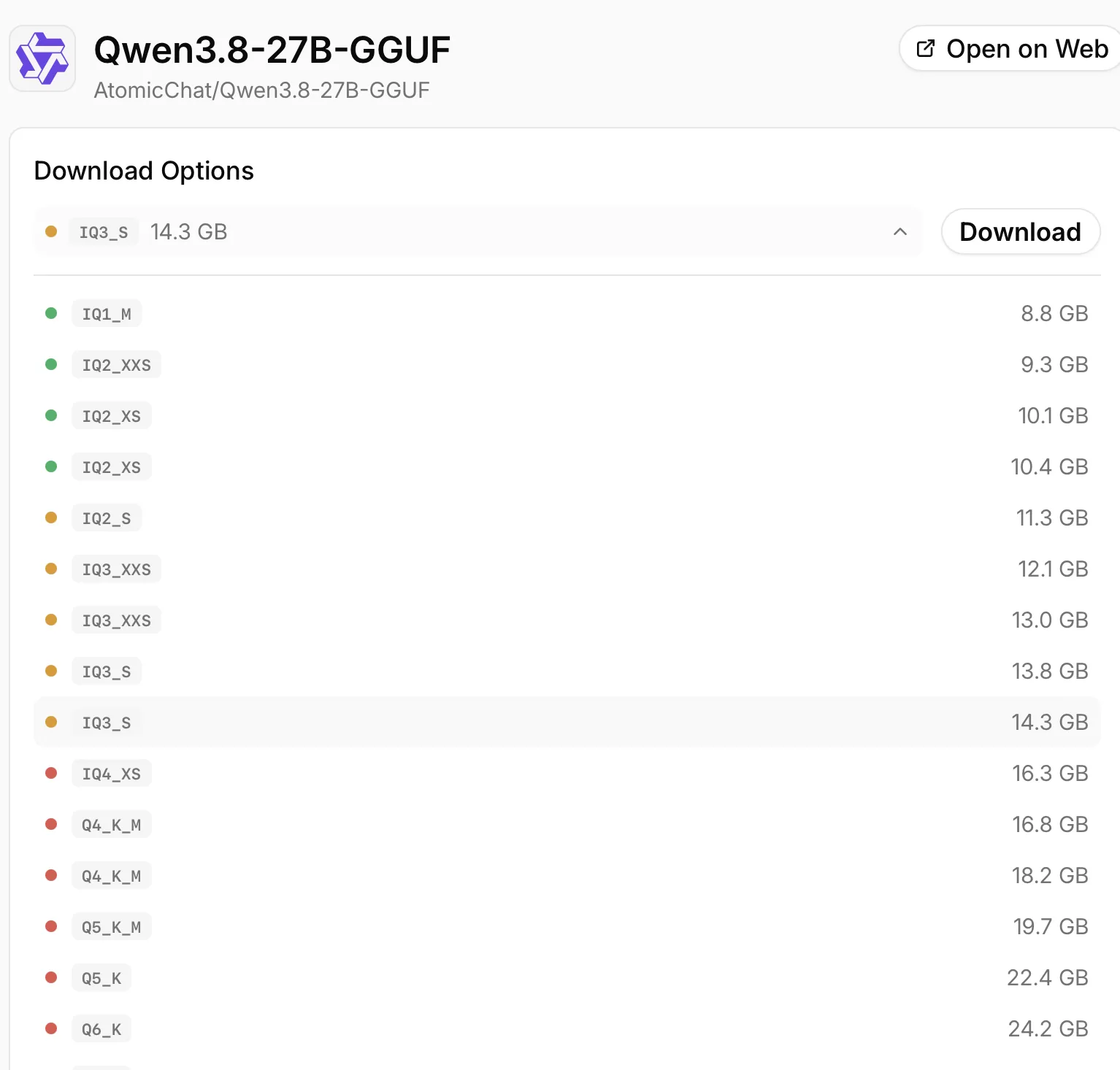
Open the Models tab and search for AtomicChat/Qwen3.8-27B-GGUF. Choose the AtomicChat repository, then expand Download Options.
Step 2: Pick a quant for your memory
For the 24 GB GPU or 32 GB Mac setup, download AD-Q4_K_M. The picker shows the shorter Q4_K_M name, so use the file size to identify the 17.1 GB build.
Step 3: Set the context size
Open Settings > Model Providers > Llama.cpp, find the downloaded model, and click the gear icon on its row.
Set Context Size to 8192 and GPU Layers to -1 for full GPU offload. If you are close to the memory limit, turn off Auto Increase Context Size so a longer chat does not allocate more memory than your machine has.
Step 4: Chat locally
After the download completes, Atomic Chat loads the model and opens it in the built-in chat. Your computer generates the answers.
You can also connect a coding tool through Atomic Chat's OpenAI-compatible server at http://localhost:1337/v1. The local LLM setup guide covers that setup.
Frequently asked questions
Can I use GPT-6 Astra with my ChatGPT subscription in Atomic Chat?
Yes. Connect the ChatGPT subscription provider and select Astra from the models available to your account. The connection uses your Codex allowance.
Can GPT-6 Astra run locally?
No. OpenAI has not released downloadable Astra weights. In Atomic Chat, Astra runs through your connected OpenAI account; downloaded Qwen and Laguna models run on your hardware.
Is GPT-6 Astra better than Claude Fable 5.1 or Opus 5?
Astra leads four of the six benchmarks in OpenAI's comparison above. Fable 5.1 and Opus 5 both score higher on the Intelligence Index and Humanity's Last Exam with tools.
What is the best local alternative for a 24 GB GPU?
Qwen3.8 27B with the 17.1 GB Atomic AD-Q4_K_M build. Start at 8K context. For a 64 GB Mac, you can also run the larger Flash Next model.
Do local models use my ChatGPT allowance?
No. A downloaded model runs on your computer and does not use your ChatGPT subscription. The allowance applies when you select a model through the connected ChatGPT provider.
Bottom line
You can use Astra in Atomic Chat with your ChatGPT subscription and keep a local model in the same app. For a 24 GB GPU or 32 GB Mac, download Qwen3.8 27B AD-Q4_K_M and start at 8K context. On a 64 GB Mac, Flash Next is the larger option we've tested.
Key takeaways:
- Astra leads the selected automation and coding benchmarks in OpenAI's launch comparison.
- Connecting ChatGPT in Atomic Chat uses your account's Codex allowance.
- Qwen3.8 27B fits a 24 GB GPU at 4-bit quantization.
- Flash Next runs on a 64 GB Mac with its n-gram table on SSD.
- GLM-5.3, Qwen Max, Kimi K3, and DeepSeek V4 Flash need server hardware.