
DeepSeek V4 Flash is the smaller model in DeepSeek's V4 series, but it still contains 284 billion total parameters, which is why we created some of the smallest and most efficient quantization builds available — and in this guide, we'll show you how to run DeepSeek V4 Flash locally with Atomic Chat, or directly through llama.cpp, as well as explain the benefits of running it via Atomic Dynamic GGUF.
If you want DeepSeek R1 distills that run on consumer laptops, use our separate guide to running DeepSeek locally. This article is only about DeepSeek V4 Flash.
What is DeepSeek V4 Flash?
DeepSeek V4 Flash is an open-weight Mixture-of-Experts language model released as part of the DeepSeek V4 preview. It contains 284B total parameters, of which 13B are activated per token. The model is built for coding, reasoning, agentic workflows, and very long inputs:
| Specification | DeepSeek V4 Flash |
|---|---|
| Total parameters | 284B |
| Active parameters per token | 13B |
| Architecture | Mixture of Experts |
| Layers | 43 |
| Routed experts | 256, with 6 active per token |
| Shared experts | 1 |
| Context window | 1,048,576 tokens |
| Vocabulary | 129,280 tokens |
| Official weight format | MXFP4 experts with FP8/BF16 tensors |
| Reasoning modes | Non-think, Think High, Think Max |
| License | MIT |
DeepSeek trained the V4 family on more than 32 trillion tokens. Read their technical report to learn more.
DeepSeek V4 Flash benchmarks
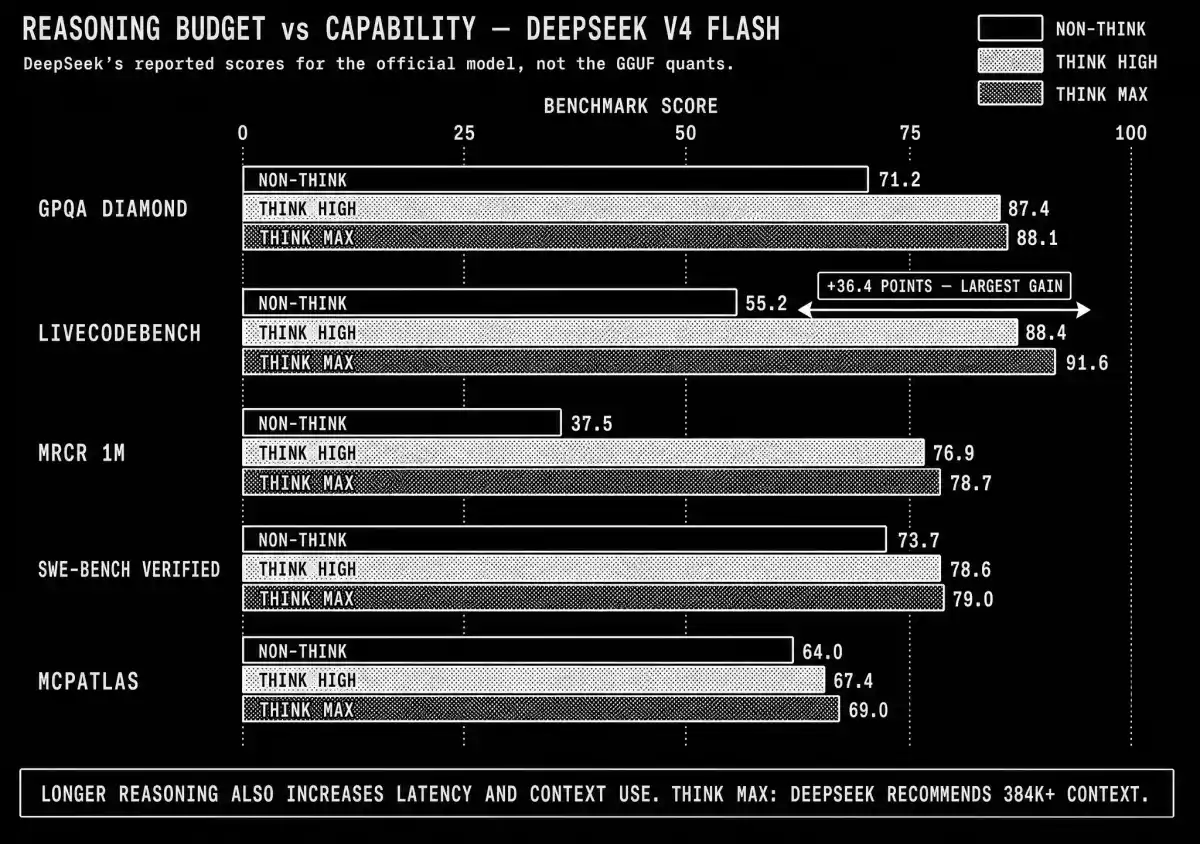
DeepSeek publishes three inference modes for the instruct model. Non-think prioritizes latency; Think High and Think Max allocate progressively larger reasoning budgets.
| Benchmark | Non-think | Think High | Think Max |
|---|---|---|---|
| MMLU-Pro | 83.0 | 86.4 | 86.2 |
| GPQA Diamond | 71.2 | 87.4 | 88.1 |
| LiveCodeBench | 55.2 | 88.4 | 91.6 |
| MRCR 1M | 37.5 | 76.9 | 78.7 |
| SWE-bench Verified | 73.7 | 78.6 | 79.0 |
| BrowseComp | — | 53.5 | 73.2 |
| MCPAtlas | 64.0 | 67.4 | 69.0 |
Note: These are DeepSeek's reported scores for the official model, not for the GGUF builds.
The reasoning budget has the largest effect on LiveCodeBench, which increases from 55.2 in Non-think mode to 91.6 in Max. SWE-bench Verified increases from 73.7 to 79.0.
For local inference specifically, DeepSeek V4 Flash features three mechanisms:
- Hybrid attention: Compressed Sparse Attention and Heavily Compressed Attention reduce the cost of long-context inference.
- Manifold-Constrained Hyper-Connections: mHC replaces conventional residual paths with a more controlled way to propagate information through the network.
- Muon optimization: DeepSeek used the Muon optimizer to improve training stability and convergence.
As a MoE model, DeepSeek V4 Flash activates only 13B parameters for each token's forward pass. The router can select different experts for subsequent tokens, so the complete set of 284B parameters remains part of the model. Because of this:
- Compute per generated token is closer to a much smaller dense model.
- Storage and memory still have to accommodate a 70–162 GB GGUF.
This allows us to run DeepSeek V4 Flash locally and efficiently on hardware that otherwise wouldn't have supported it (more about hardware requirements later). This is especially true when using efficient quantized builds.
We quantized DeepSeek V4 Flash ourselves
The original DeepSeek checkpoint is already quantization-aware-trained. Its routed experts make up about 96% of the model and are stored in MXFP4 at roughly 4.25 bits per weight; the remaining tensors use FP8 or BF16.
This weight layout requires a model-specific quantization strategy. Converting the MXFP4 experts to a wider type increases the file size without recovering information that is not present in the checkpoint. Reducing the experts much below three bits, however, introduces error faster than it typically does in a BF16-trained model.
We built the AtomicChat DeepSeek V4 Flash GGUF repository from the official weights, then calibrated and measured every quant on the same harness.
Our conversion process used the following steps:
- We converted the original safetensors to GGUF without lazy evaluation. Lazy conversion produced NaNs in
token_embd.weighton this architecture. - We preserved FP8-sourced tensors as BF16 where required instead of mapping them to a linear Q8 grid.
- We built an importance matrix from 1,868,626 calibration tokens covering code, long-context documents, tool-call traces, reasoning, structured output, and broad vocabulary coverage.
- We assigned precision by tensor and layer based on measured activation energy instead of applying one quantization type to the complete model.
- We compared every result with the lossless GGUF reference using perplexity, KL divergence, top-1 token agreement, and probability drift.
The AD prefix in the file names stands for Atomic Dynamic. AD-BF16 is not an all-BF16 expansion of the model. It preserves the mixed native checkpoint in a GGUF container and matches the source weights byte for byte.
Atomic Dynamic GGUF quality versus size
| Quant | File size | Expert bits | Perplexity | Mean KLD | Top-1 match |
|---|---|---|---|---|---|
AD-BF16 | 162.1 GB | 4.25 | 4.5289 | 0 | 100.000% |
AD-MXFP4 | 154.5 GB | 4.25 | 4.5446 | 0.1564 | 87.369% |
AD-IQ3_M_XL | 143.6 GB | 3.94 | 4.5490 | 0.1675 | 86.864% |
AD-IQ3_M | 135.8 GB | 3.71 | 4.5695 | 0.1798 | 86.317% |
AD-IQ3_S | 130.8 GB | 3.56 | 4.6016 | 0.1891 | 85.945% |
AD-IQ3_XS | 118.2 GB | 3.20 | 4.6657 | 0.2065 | 85.384% |
AD-IQ3_XXS | 108.1 GB | 2.91 | 4.8491 | 0.2495 | 83.761% |
AD-IQ2_M | 104.0 GB | 2.79 | 4.8822 | 0.2567 | 83.560% |
AD-IQ2_S_XL | 96.8 GB | 2.58 | 5.1406 | 0.3187 | 81.461% |
AD-IQ2_S | 93.4 GB | 2.48 | 5.2152 | 0.3343 | 81.031% |
AD-IQ2_XS | 85.1 GB | 2.25 | 5.4917 | 0.3947 | 79.240% |
AD-IQ2_XXS | 78.5 GB | 2.06 | 5.7878 | 0.4544 | 77.459% |
AD-IQ1_M_XL | 72.8 GB | 1.89 | 6.1786 | 0.5351 | 75.162% |
AD-IQ1_M | 70.2 GB | 1.81 | 6.3813 | 0.5641 | 74.547% |
How to read the table: mean KLD measures the distance between the quant's output distribution and the lossless reference. Lower values are better. Top-1 match is the percentage of positions where the quant selects the same next token as the reference. For a single summary measure, use top-1 match.
The main inflection point in the quality-size curve lies between 104 and 118 GB. Below 104 GB, each additional size reduction causes a larger loss in fidelity.
The 70–79 GB builds are intended for systems that cannot load V4 Flash at a higher precision — they are not the preferred configuration for experts trained at four bits.
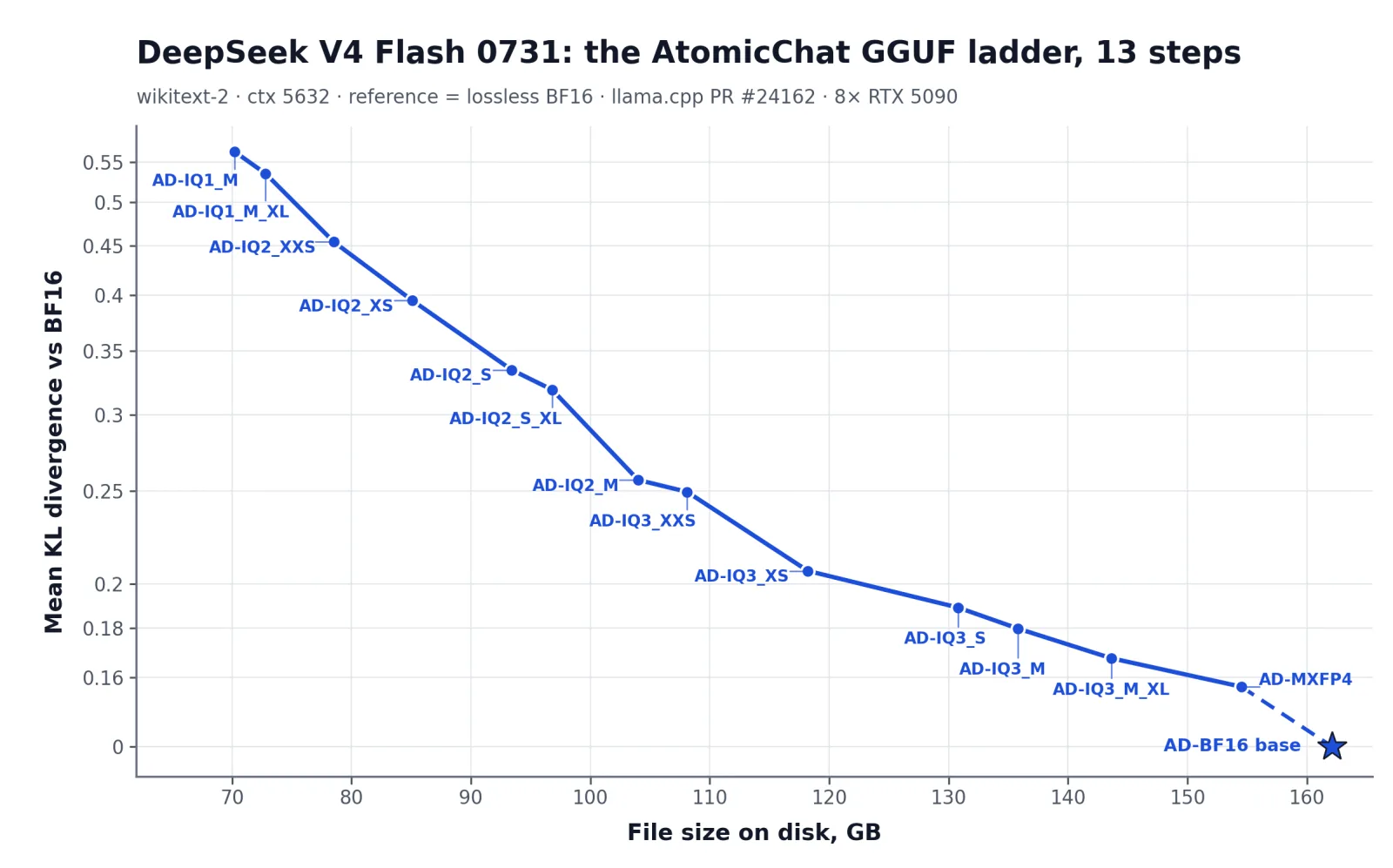
Mean KLD was measured against the lossless AD-BF16 reference on wikitext-2 with a 5,632-token context. The evaluation ran on 8× RTX 5090 using llama.cpp from PR #24162.
How our GGUFs compare at matched sizes
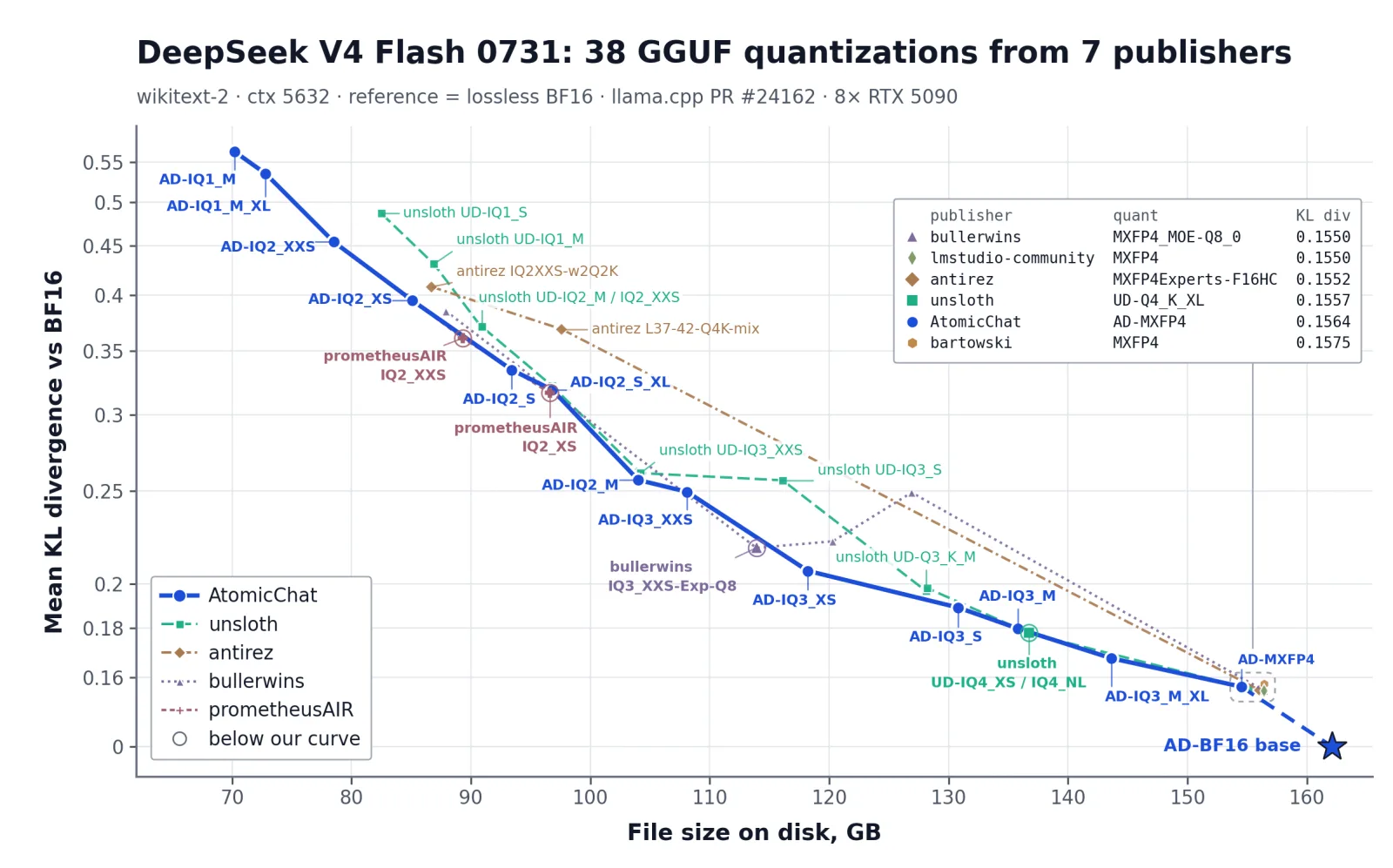
Quant names do not provide a reliable size comparison. Publishers can use different labels for files with nearly the same number of bits per expert. We therefore measured every build on one harness:
| Test parameter | Value |
|---|---|
| Corpus | wikitext-2 |
| Context length | 5,632 tokens |
| Reference | AD-BF16, our lossless conversion of the original weights |
| Inference build | llama.cpp, PR #24162 |
| Hardware | 8× RTX 5090 |
The same configuration produced the Atomic Dynamic figures in the previous section.
| Approximate size | AtomicChat quant | Atomic KLD | Unsloth quant | Unsloth KLD |
|---|---|---|---|---|
| 155 GB | AD-MXFP4 | 0.1564 | UD-Q4_K_XL | 0.1557 |
| 136 GB | AD-IQ3_M | 0.1798 | UD-IQ4_XS | 0.1779 |
| 128–131 GB | AD-IQ3_S | 0.1891 | UD-Q3_K_XL | 0.1981 |
| 116–118 GB | AD-IQ3_XS | 0.2065 | UD-IQ3_S | 0.2565 |
| 104 GB | AD-IQ2_M | 0.2567 | UD-IQ3_XXS | 0.2610 |
| 96.8 GB | AD-IQ2_S_XL | 0.3187 | UD-Q2_K_XL | 0.3216 |
Above roughly 135 GB, the difference falls within measurement error. At 118 GB, AD-IQ3_XS is about 19% closer to the reference distribution than UD-IQ3_S while using two additional gigabytes. At the two exactly matched sizes, 104 GB and 96.8 GB, the AtomicChat builds have the lower KLD.
These results come from the same test harness. Absolute perplexity and KLD values should not be compared across publishers when they were measured on different hardware or test configurations. DeepSeek V4's native MXFP4 path produces measurably different results across GPU generations.
DeepSeek V4 Flash hardware requirements
The memory column below means total usable RAM plus VRAM, or unified memory on Apple Silicon:
| Available memory | Recommended GGUF | File size | What to expect |
|---|---|---|---|
| 192 GB or more | AD-BF16 | 162.1 GB | Bit-exact original with room for context |
| 160 GB | AD-MXFP4 | 154.5 GB | Experts untouched; context headroom is tight |
| 144 GB | AD-IQ3_M_XL | 143.6 GB | Near-reference quality, but insufficient runtime headroom on a 144 GB system |
| 128 GB | AD-IQ2_M | 104.0 GB | Best practical balance for a large workstation |
| 112 GB | AD-IQ2_S_XL | 96.8 GB | Still above 81% top-1 match |
| 96 GB | AD-IQ2_XS | 85.1 GB | Usable, with noticeable drift |
| 80 GB | AD-IQ1_M_XL | 72.8 GB | Lowest recommended memory-resident option |
| 64 GB or less | None | — | No memory-resident build with safe headroom |
Note: On a system with exactly 144 GB of memory, use AD-IQ3_M or AD-IQ3_S and reserve the remaining capacity for context. Apply the same rule whenever the model file would consume nearly all available memory.
Measured throughput by quant size
We benchmarked five Atomic Dynamic builds on one AMD MI300X with 192 GB HBM3, full GPU offload, no tensor parallelism, and no CPU offload. The test used ROCm 7.2.4 and llama.cpp with the fused V4 kernels.
| Quant | File size | Prompt processing, 512 tokens | Generation, 128 tokens |
|---|---|---|---|
AD-IQ2_M | 96.85 GiB | 615.60 t/s | 37.16 t/s |
AD-IQ3_XXS | 100.70 GiB | 612.88 t/s | 36.92 t/s |
AD-IQ3_S | 121.77 GiB | 652.11 t/s | 37.31 t/s |
AD-IQ3_M | 126.46 GiB | 647.62 t/s | 37.19 t/s |
AD-IQ3_M_XL | 133.77 GiB | 665.47 t/s | 37.75 t/s |
Across a 1.4× range in file size, generation remained between 36.92 and 37.75 tokens per second, a difference within run-to-run variance. On this hardware, kernel-launch overhead across 43 layers limits DeepSeek V4 Flash more than memory bandwidth does.
What hardware can run DeepSeek V4 Flash?
- A 192 GB accelerator or multi-GPU server: can run
AD-BF16orAD-MXFP4entirely in fast memory. - A 128 GB unified-memory Mac or workstation: can run
AD-IQ2_Mwith a moderate context length. - A 96 GB GPU: can run
AD-IQ2_XS, or combine VRAM and system RAM for a larger quant at lower speed. - An 80 GB accelerator: can run
AD-IQ1_M_XLas the lowest recommended memory-resident build. It is a compatibility option, not the quality target. - A consumer laptop with 16–64 GB: can't run DeepSeek V4 Flash at all. Use a smaller model instead.
How to run DeepSeek V4 Flash locally with Atomic Chat
Atomic Chat is a free, open-source local AI app we developed. It includes a Hugging Face model browser, manages split GGUF downloads, and provides a chat interface without requiring a manual llama.cpp build. Atomic Chat is available on macOS, Windows, and Linux.
Here's how to run DeepSeek V4 Flash with Atomic Chat:
Step 1 — Install the latest Atomic Chat build
Download the current build from atomic.chat and install it for your platform.
Use a recent build for DeepSeek V4. Upstream llama.cpp added fused hyper-connection kernels and a CUDA lightning indexer after the initial V4 implementations. In our MI300X test, the fused implementation increased generation speed from 16.34 to 37.27 tokens per second with the same model file.
Step 2 — Find our DeepSeek V4 Flash GGUF
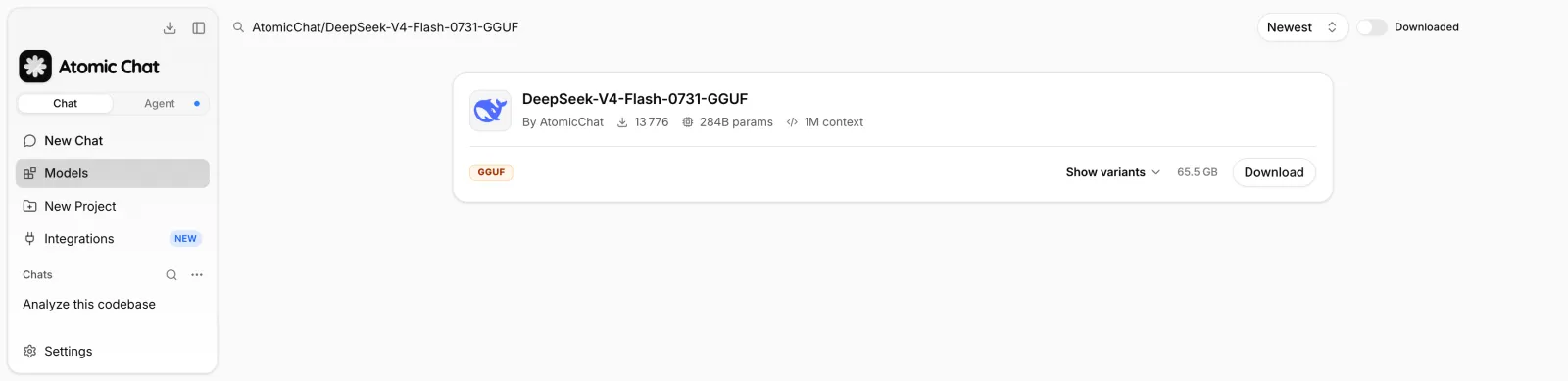
Open the Models tab and search for:
AtomicChat/DeepSeek-V4-Flash-0731-GGUF
Choose the result published by AtomicChat, then open Download Options. The repository contains multiple split GGUFs, from the 70.2 GB AD-IQ1_M build to the 162.1 GB lossless conversion.
Step 3 — Pick a quant for your memory
Use the hardware table above. For the most common viable configurations:
- 128 GB: download
AD-IQ2_M. - 112 GB: download
AD-IQ2_S_XL. - 96 GB: download
AD-IQ2_XS. - 192 GB or more: download
AD-BF16.
Select the largest quant that fits with sufficient context headroom. On this model, quality degrades more rapidly below 104 GB.
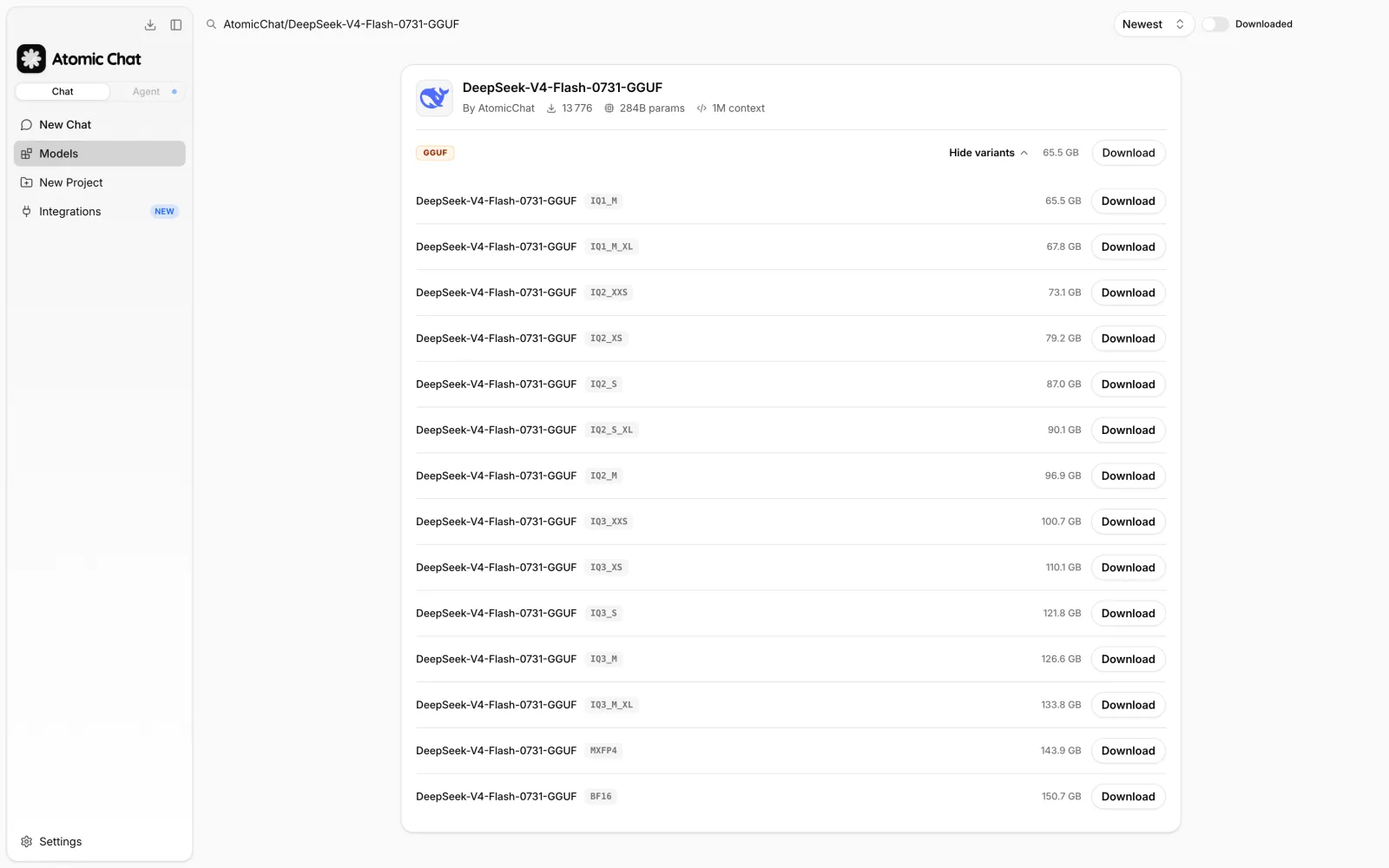
The variant picker drops the AD- prefix and reports sizes in binary gigabytes, so AD-IQ2_M appears as IQ2_M at 96.9 GB. That is the same file the tables above list as 104.0 GB in decimal gigabytes.
Step 4 — Start with an 8K or 32K context
The model declares a 1M context window, but configuring the maximum creates a correspondingly large KV-cache allocation. Start with 8,192 tokens for chat or 32,768 for code and document work. Increase the limit only when the workload requires it and memory measurements confirm sufficient headroom.
Context size lives in the model's own settings, not in the chat window. Open Settings → Model Providers → Llama.cpp Turboquant, find DeepSeek-V4-Flash-0731-GGUF:AD-IQ2_M in the model list, and click the gear icon on its row.
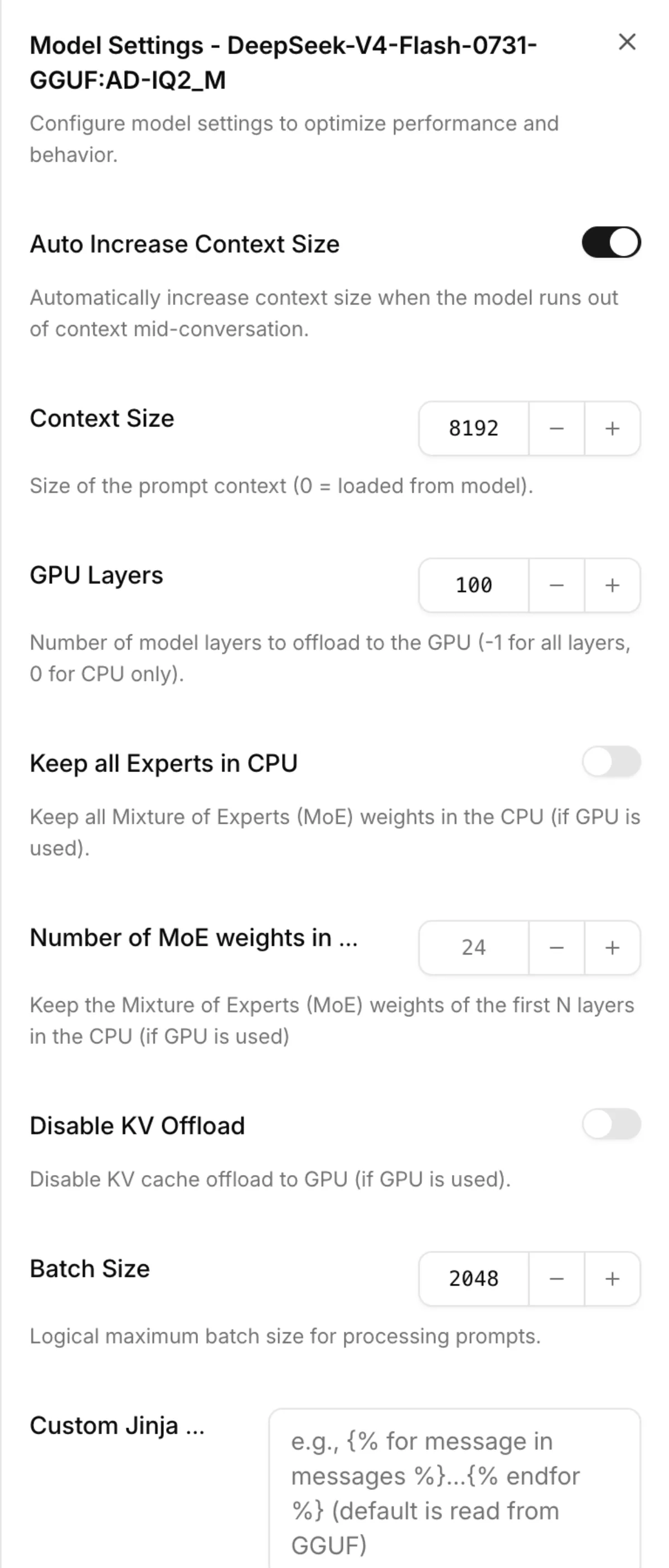
Four fields in this panel matter for V4 Flash:
- Context Size — set it to
8192or32768. A value of0reads the maximum from the GGUF, which for this model means the full 1M window. - Auto Increase Context Size — on by default. It grows the context when a conversation runs out of room, which can push a build that only just fit past your memory limit. Turn it off when you are working close to that limit.
- Keep all Experts in CPU and Number of MoE weights in the CPU — the MoE offload controls. They move expert weights off the GPU so a quant larger than your VRAM still loads. Expect slower generation, because those weights cross the bus on every token.
- GPU Layers —
-1offloads every layer,0keeps the model on CPU.
Changing any of these restarts the model, so apply them before you start a long conversation.
Sampling parameters are separate. DeepSeek recommends temperature = 1.0 and top_p = 1.0 for local deployment; both live behind the sliders icon next to the model name at the top of the chat, under Sampling. They belong to the active assistant rather than to the model, so they carry across every model you load.
Use Think High for complex coding and planning tasks. Think Max uses a larger reasoning budget, and DeepSeek recommends a context of at least 384K for this mode. This substantially increases the memory requirement.
Step 5 — Chat locally
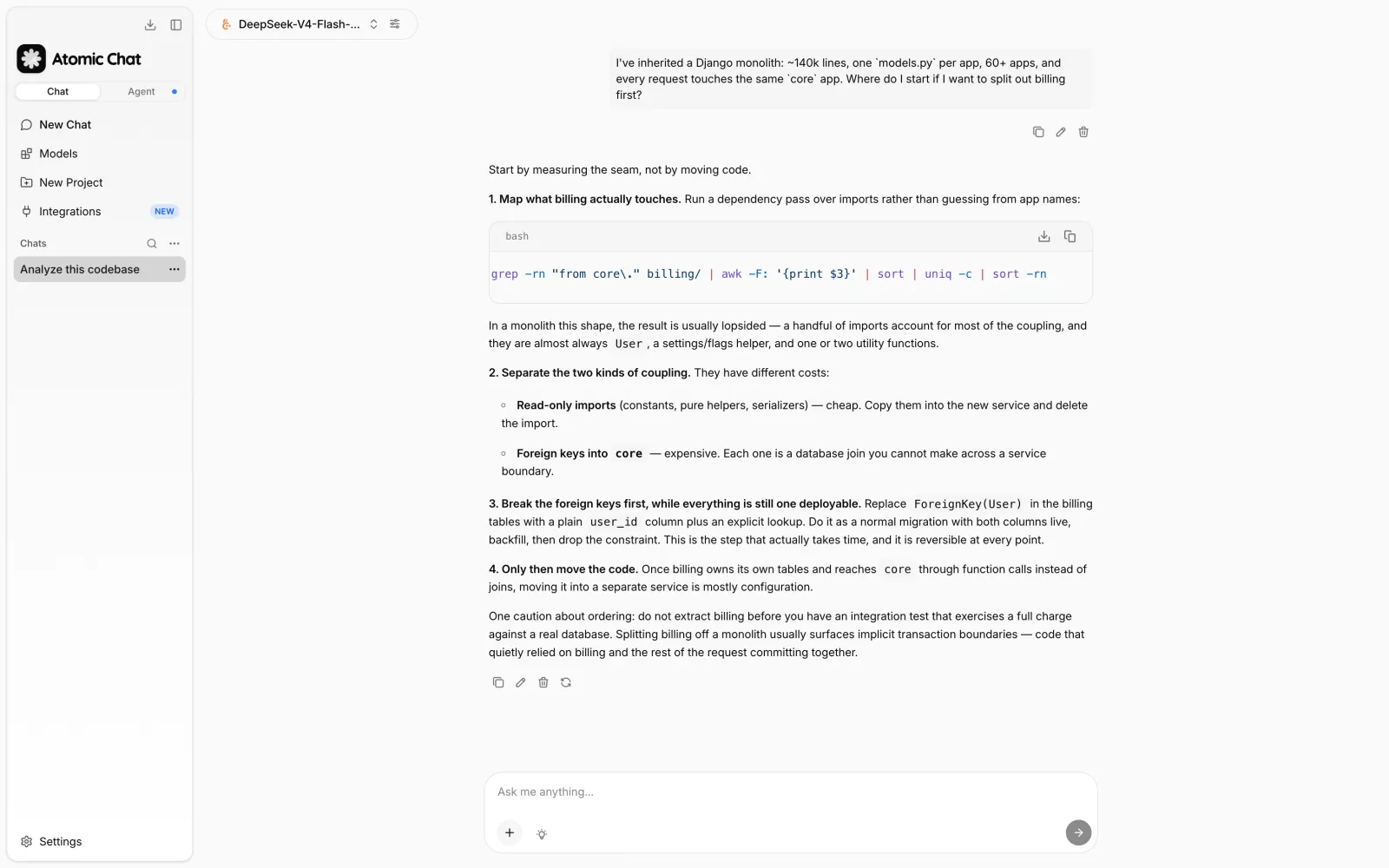
After the download completes, load the model and send a prompt. The weights and prompts remain on your machine, so local inference has no per-token API charge and works offline.
How to run the AtomicChat GGUF with llama.cpp
You might prefer to run the model directly through llama.cpp if you need:
- An OpenAI-compatible local endpoint.
- Explicit control over GPU offload.
- A reproducible server configuration.
DeepSeek V4 support is available in upstream llama.cpp. Build the current master branch; prebuilt packages based on older revisions may not include the fused V4 kernels.
Step 1 — Build current llama.cpp
For NVIDIA CUDA:
git clone https://github.com/ggml-org/llama.cpp
cd llama.cpp
cmake -B build -DCMAKE_BUILD_TYPE=Release -DGGML_CUDA=ON
cmake --build build -j --target llama-cli llama-server
For AMD, replace the configure line with:
cmake -B build -DCMAKE_BUILD_TYPE=Release \
  -DGGML_HIP=ON \
  -DGPU_TARGETS=<your-gfx-target>
For Apple Silicon, Metal is enabled by default, but you can make it explicit:
cmake -B build -DCMAKE_BUILD_TYPE=Release -DGGML_METAL=ON
cmake --build build -j --target llama-cli llama-server
Step 2 — Download the corrected chat template
The current GGUF files contain an older embedded chat template. The template can drop earlier reasoning after tool results and prevent reasoning_effort from reaching the model in agent loops without producing an explicit error. Download the corrected template from the repository:
curl -sLO \
  https://huggingface.co/AtomicChat/DeepSeek-V4-Flash-0731-GGUF/resolve/main/chat_template.jinja
You do not need to download the GGUF again. The Jinja template is a separate file.
Step 3 — Run the model
The following command downloads and runs AD-IQ2_M from Hugging Face, offloads all supported layers to the GPU, applies the corrected template, and limits the context to 8K:
./build/bin/llama-cli \
  -hf AtomicChat/DeepSeek-V4-Flash-0731-GGUF:AD-IQ2_M \
  --jinja \
  --chat-template-file ./chat_template.jinja \
  --chat-template-kwargs '{"reasoning_effort":"high"}' \
  --reasoning-format deepseek \
  --temp 1.0 \
  --top-p 1.0 \
  -ngl 99 \
  -c 8192 \
  -fa off
Replace AD-IQ2_M with another quant name if your system has a different memory capacity.
Apply the following runtime restrictions:
- Keep
-fa off: a reported CUDA flash-attention bug can make DeepSeek V4 emit repeating<characters when a prompt spans more than one forward pass. Track llama.cpp issue #26509 before removing the flag. - Do not quantize the K cache yet: quantized K-cache types can corrupt V4 output. Leave the cache at its default type until issue #25382 is resolved.
Step 4 — Expose a local OpenAI-compatible API
Replace llama-cli with llama-server:
./build/bin/llama-server \
  -hf AtomicChat/DeepSeek-V4-Flash-0731-GGUF:AD-IQ2_M \
  --host 127.0.0.1 \
  --port 8080 \
  --alias deepseek-v4-flash \
  --jinja \
  --chat-template-file ./chat_template.jinja \
  --chat-template-kwargs '{"reasoning_effort":"high"}' \
  --reasoning-format deepseek \
  --temp 1.0 \
  --top-p 1.0 \
  -ngl 99 \
  -c 8192 \
  -fa off
Test it with:
curl http://127.0.0.1:8080/v1/chat/completions \
  -H "Content-Type: application/json" \
  -d '{
    "model": "deepseek-v4-flash",
    "messages": [
      {
        "role": "user",
        "content": "Write a migration plan for splitting a monolith into three services."
      }
    ]
  }'
Bind the server to 127.0.0.1 unless remote access from other machines is required.
Frequently asked questions
The questions we get most often about running DeepSeek V4 Flash on local hardware.
Can I run DeepSeek V4 Flash on a laptop?
No. A consumer laptop with 16–64 GB of memory cannot hold the model with adequate runtime and context headroom. The smallest Atomic Dynamic GGUF is 70.2 GB before overhead; a high-memory workstation or server is the appropriate target.
If you want a laptop model, run one of the DeepSeek R1 distills covered in our general DeepSeek local guide.
How much RAM does DeepSeek V4 Flash need?
The minimum practical configuration is about 80 GB of combined RAM and VRAM for AD-IQ1_M_XL. We recommend 128 GB for AD-IQ2_M: the 104 GB file leaves useful context headroom and preserves 83.56% top-1 agreement with the lossless reference. With 192 GB or more, use the 162.1 GB lossless GGUF.
Which DeepSeek V4 Flash quant should I download?
For 128 GB, download AD-IQ2_M. For 112 GB, use AD-IQ2_S_XL; for 96 GB, use AD-IQ2_XS. On a 192 GB system, use AD-BF16. In every case, leave memory beyond the file size for the operating system, runtime buffers, and KV cache.
Can DeepSeek V4 Flash use a one-million-token context locally?
The architecture supports 1,048,576 tokens, but the KV cache and runtime allocations must also fit in memory. Do not use 1M as the initial setting. Configure a smaller explicit context and increase it only for workloads that require it. DeepSeek recommends at least 384K for Think Max, so a practical Max deployment needs substantially more memory than an 8K chat configuration.
What is the difference between DeepSeek V4 Flash and DeepSeek R1?
V4 Flash is a 284B-total, 13B-active MoE model for coding, agentic, reasoning, and long-context workloads. The R1 distills commonly used on consumer hardware are separate 1.5B–70B dense models trained to imitate R1's reasoning. They have much lower hardware requirements and are not variants of V4 Flash.
Is DeepSeek V4 Flash free to run locally?
Yes. DeepSeek released the model weights under the MIT license, and the AtomicChat GGUFs are free to download. Local inference has no per-token fee, though you still pay for the hardware, electricity, and storage.
Can I use Ollama or LM Studio?
Use Ollama or LM Studio only if the installed build includes recent upstream DeepSeek V4 support and allows you to apply the corrected Jinja template and required runtime flags. Atomic Chat or a current llama.cpp build provides a more predictable configuration while V4 support is still changing.
Bottom line
DeepSeek V4 Flash is an open-weight model designed for coding, agentic, reasoning, and long-context workloads. Its 13B active parameters reduce per-token compute, but all 284B total parameters remain part of the model, so it still requires a fairly beefy machine to run locally — 70–162 GB before runtime and context overhead.
If you have the hardware, one of the easiest ways to run DeepSeek V4 Flash locally is through Atomic Chat, using a build from our DeepSeek V4 Flash GGUF repository.