
Sonnet 5.5 comes close to Opus 5.5 on some of Anthropic's published benchmarks, at half the standard API token price. Opus still leads on FrontierCode, while Fable 5.1 and GPT-6 Astra offer other cloud options to compare. The results depend on the task and the evaluation settings, so the tables below explain where those comparisons hold.
If you want to run a model on your own computer, the choice changes. Anthropic does not publish Sonnet's weights. Open-weight alternatives range from large models such as GLM-5.3 and Kimi K3, which need server hardware, to Qwen3.8 27B and Ornith 1.5 9B for a desktop. We'll compare their published results before choosing a model and download for your hardware.
In this guide, you'll learn:
- What Sonnet 5.5 offers and how much its API costs
- How it compares with Opus, Fable and GPT-6 Astra in benchmarks
- How open-weight models compare with Sonnet
- Which local model and download fit your computer
- How to connect Sonnet's API in Atomic Chat
- How to download and run a local alternative in Atomic Chat
What is Claude Sonnet 5.5?
Anthropic released Claude Sonnet 5.5 on September 28, 2026, as the successor to Sonnet 5. It sits below Opus 5.5 in the lineup, with lower token prices.
Claude Sonnet 5.5 main specs, from Anthropic's model documentation:
Swipe to compare →
| Specification | Claude Sonnet 5.5 |
|---|---|
| API model ID | claude-sonnet-5-5 |
| Context window | 1 million tokens |
| Maximum output | 128K tokens |
| Modalities | Text and image input; text output |
| API input price | $2 per million tokens |
| API output price | $10 per million tokens |
| Local weights | No public checkpoint |
You can use Sonnet through Claude or a supported cloud provider. There is no Sonnet GGUF to download. If you want the model to work offline, you need one of the open-weight alternatives later in this guide.
How much does Sonnet 5.5 cost compared with Opus and Fable?
These are the standard API token rates:
Swipe to compare →
| Model | Input, per 1M tokens | Output, per 1M tokens |
|---|---|---|
| Claude Sonnet 5.5 | $2 | $10 |
| Claude Opus 5.5 | $4 | $20 |
| Claude Fable 5.1 | $10 | $50 |
A request with 100,000 uncached input tokens and 10,000 output tokens costs $0.30 on Sonnet at those rates, before any additional tool charges; running the same token counts through Opus costs $0.60.
The amount you pay for a task also depends on how long the model reasons and how many attempts it makes. In Artificial Analysis's own evaluation, Sonnet 5.5 at max effort cost $7.60 per Intelligence Index task, about 50% more than Sonnet 5, in an evaluation using a prerelease deployment with a subsequently fixed structured-output bug.
Start with the effort setting you expect to use and compare the total bill for completed tasks. Opus is the next model to test when Sonnet needs too many retries; Anthropic's model-selection guidance reserves Fable for demanding work where higher-effort Opus still falls short.
Claude Sonnet 5.5 benchmarks
Anthropic's launch table compares Sonnet 5.5 with Sonnet 5, Opus 5.5 and GPT-6 Sol:
Swipe to compare →
| Benchmark | Sonnet 5.5 | Sonnet 5 | Opus 5.5 | GPT-6 Sol |
|---|---|---|---|---|
Terminal-Bench 4.0 Terminal agents | 70.6 | 10.3 | 66.4 | - |
FrontierCode v1.1 Main Code changes | 46.2 | 42.4 | 54.4 | 49.3 |
CursorBench 4.0 Coding agents | 55.5 | 34.1 | 57.8 | - |
GDPval-AA v2.1 Professional work | 1844 | 1449 | 1846 | 1487 |
HLE with tools Tool-assisted reasoning | 64.5 | 54.9 | 67.7 | - |
Sonnet nearly matches Opus on GDPval-AA and leads Terminal-Bench, while Opus keeps the higher FrontierCode score.
FrontierCode reports Sonnet at max effort; xhigh scores 52.1. Opus's Terminal-Bench result uses xhigh. GDPval-AA is an Elo score; the other rows are percentages. The launch footnotes disclose a fixed prerelease bug affecting structured outputs and a recent GPT-6 Sol vision fix. A hyphen means no result in that source.
Sonnet 5.5 vs Fable 5.1 and GPT-6 Astra
Fable and Astra appear in Anthropic's Opus 5.5 announcement. The following table places those published results beside Sonnet's launch scores:
Swipe to compare →
| Benchmark | Sonnet 5.5 | Fable 5.1 | GPT-6 Astra |
|---|---|---|---|
Terminal-Bench 4.0 Terminal agents | 70.6 | 55.8 | 57.9 |
FrontierCode v1.1 Main Code changes | 46.2 | 50.3 | 53.3 |
HLE with tools Tool-assisted reasoning | 64.5 | 65.6 | 57.2 |
These results come from two Anthropic release tables with different evaluation settings. Astra's Terminal-Bench score uses high effort; Sonnet's FrontierCode result above uses max. Anthropic attributes Astra's results to OpenAI.
Terminal-Bench tests completing terminal tasks; FrontierCode tests producing changes a reviewer would merge. Our GPT-6 Astra alternatives guide covers Astra and its local options in more detail.
Open-weight alternatives to Claude Sonnet 5.5
Downloading an open-weight model lets you run inference on your own hardware. For codebase edits, you also need a coding tool that can use the model; downloading weights alone does not reproduce Claude Code's workflow.
GLM-5.3 is a large open-weight coding model with published vLLM and SGLang deployment instructions. Kimi K3 has 2.8 trillion total parameters and 104 billion active per token. Both need server hardware. Qwen3.8 27B and Ornith 1.5 9B are the smaller models to look at for a desktop.
MoE models use only some of their parameters for each token. The download still contains the full model. Our Kimi K3 guide covers the hardware and setup for that class of model.
Sonnet 5.5 vs open-weight models
Here's how the vendors score their models. Each lab uses its own evaluation setup:
Swipe to compare →
| Benchmark | Sonnet 5.5 | GLM-5.3 | Kimi K3 | Qwen3.8 Flash Next | Qwen3.8 27B | Ornith 1.5 9B |
|---|---|---|---|---|---|---|
HLE with tools Tool-assisted reasoning | 64.5 | 62.5 | - | - | - | 30.5 |
DeepSWE v1.1 Software engineering | - | 66.9 | 67.5 | 58.7 | 42.2 | - |
GPQA Diamond Expert science | - | - | 93.5 | 91.7 | 89.2 | 86.4 |
Sources: Anthropic, Z.ai, Moonshot, Qwen Flash Next, Qwen 27B and Ornith.
Tools, judges and reasoning budgets differ across vendors, so a small gap between columns does not establish a winner. Kimi separately reports 56.0 on HLE-Full with tools; we leave its HLE cell empty because the source labels do not establish the same test edition. For DeepSWE, Kimi uses Kimi Code, GLM uses mini-swe-agent, and Qwen takes the higher score from Claude Code and mini-SWE-agent. These scores describe the original models rather than the quantized GGUF files recommended below.
Sonnet's launch table does not report DeepSWE or GPQA Diamond. Qwen's HLE results are not labeled as tool-assisted, so they do not belong in the first row.
Qwen reports 58.7 on DeepSWE for Flash Next and 42.2 for the 27B under its published evaluation procedure. Flash Next runs on a 64 GB Mac with our split build; the 27B fits a 24 GB GPU.
Local Claude Sonnet 5.5 alternatives for your hardware
The system requirement to check is memory. These are specific downloads, with room still needed for the runtime and conversation cache:
Swipe to compare →
| Your hardware | Model and build | Download size |
|---|---|---|
| 8 GB GPU, start with text and short context | Ornith 1.5 9B, AD-Q5_K-Q4_K | 5.93 GB |
| 24 GB GPU or 32 GB Apple Silicon Mac | Qwen3.8 27B, AD-Q4_K_M | 17.1 GB |
| 64 GB Apple Silicon Mac with SSD space | Flash Next, AD-3.84bpw-IQ4_XS-M64 | 84.9 GB total; 45.8 GB GPU-resident weights |
The Ornith and Qwen 27B vision projectors add about 0.92 GB and 0.93 GB respectively if you use images. Flash Next stores its large n-gram table on SSD with the split Atomic build, which is why its download can exceed the Mac's memory.
Qwen3.8 27B for a 24 GB GPU or 32 GB Mac
For this hardware, Qwen3.8 27B is the model to start with. It accepts text and images, and the 17.1 GB Atomic AD-Q4_K_M file leaves room on a 24 GB GPU for the runtime and a conversation starting at 8,192 tokens of context. Longer conversations use more memory through the KV cache, so a model fitting at 8K does not mean its full context window will fit on the same card.
Our Qwen3.8 27B guide covers the other builds and the llama.cpp commands. Use that guide if you want a larger quant or need to split the model between GPU and system memory.
Qwen3.8 Flash Next for a 64 GB Mac
Flash Next has a 125B core with 6B active parameters, plus separate n-gram embeddings and a prediction head; the Atomic build keeps the n-gram table on SSD while the main weights remain in memory.
Our GGUF repository reports generation at 36 tokens per second for the AD-3.84bpw-IQ4_XS-M64 build on a 64 GB MacBook Pro M5 Max.
Follow the Flash Next setup guide for the split files and memory settings. The 45.8 GB figure covers the GPU-resident weights. The runtime and context cache still need memory.
Ornith 1.5 9B for an 8 GB GPU
Ornith 1.5 9B is a dense model with a much smaller download: our 5.93 GB AD-Q5_K-Q4_K build is the repository's recommended option for 8 GB of VRAM. Start with text and a short context before adding the vision projector.
Its vendor reports 70.6 on SWE-bench Verified and 47.5 on SWE-bench Pro, which test different tasks from Sonnet's Terminal-Bench result. For the files and settings, see our Ornith 1.5 guide.
Bonsai 2 27B if you can use Prism's runtime
Bonsai 2 27B compresses Qwen3.8 27B into ternary weights. Its PTQ1_0 language-model file is 5.95 GB; the PQ2_0 packing is 7.21 GB.
These files require Prism ML's llama.cpp build because stock llama.cpp cannot read their ternary packing formats; follow the Bonsai 2 guide for the fork and its setup. The local Atomic Chat steps below are for Qwen's standard GGUF build.
Its vendor benchmarks measure compression against the original Qwen model; they do not establish that Bonsai matches Sonnet 5.5.
How to use Claude Sonnet 5.5 via API in Atomic Chat
You can connect Anthropic's API to Atomic Chat and use Sonnet alongside your local models. Sonnet runs through Anthropic's hosted service. API usage is billed separately from a Claude subscription.
Step 1: Get an Anthropic API key
Open the Claude Console and create an API key. Set up API billing if you have not used the service before.
Step 2: Connect Anthropic
Open Cloud in Atomic Chat and select Anthropic. Paste your key into API key, then click Connect. Keep the default Base URL.
Step 3: Add Sonnet 5.5
Click Reload models and look for claude-sonnet-5-5. If it is missing, click the + button beside Reload models. Enter claude-sonnet-5-5 in Model ID, then click Add Model.
Step 4: Start a chat
Open a chat and select Sonnet 5.5 from the model picker. Your Anthropic account must have API access to the model.
You can switch to a downloaded local model in the same app when you want your computer to generate the answers.
How to run a local alternative with Atomic Chat
Atomic Chat includes a Hugging Face model browser and a built-in chat. You can download a local model without building llama.cpp yourself.
Here's how to run Qwen3.8 27B:
Step 1: Install Atomic Chat
Download the desktop app from atomic.chat and install the build for your platform.
Step 2: Find the Qwen GGUF
Open Models and search for AtomicChat/Qwen3.8-27B-GGUF. Choose the AtomicChat repository, then expand Download Options.
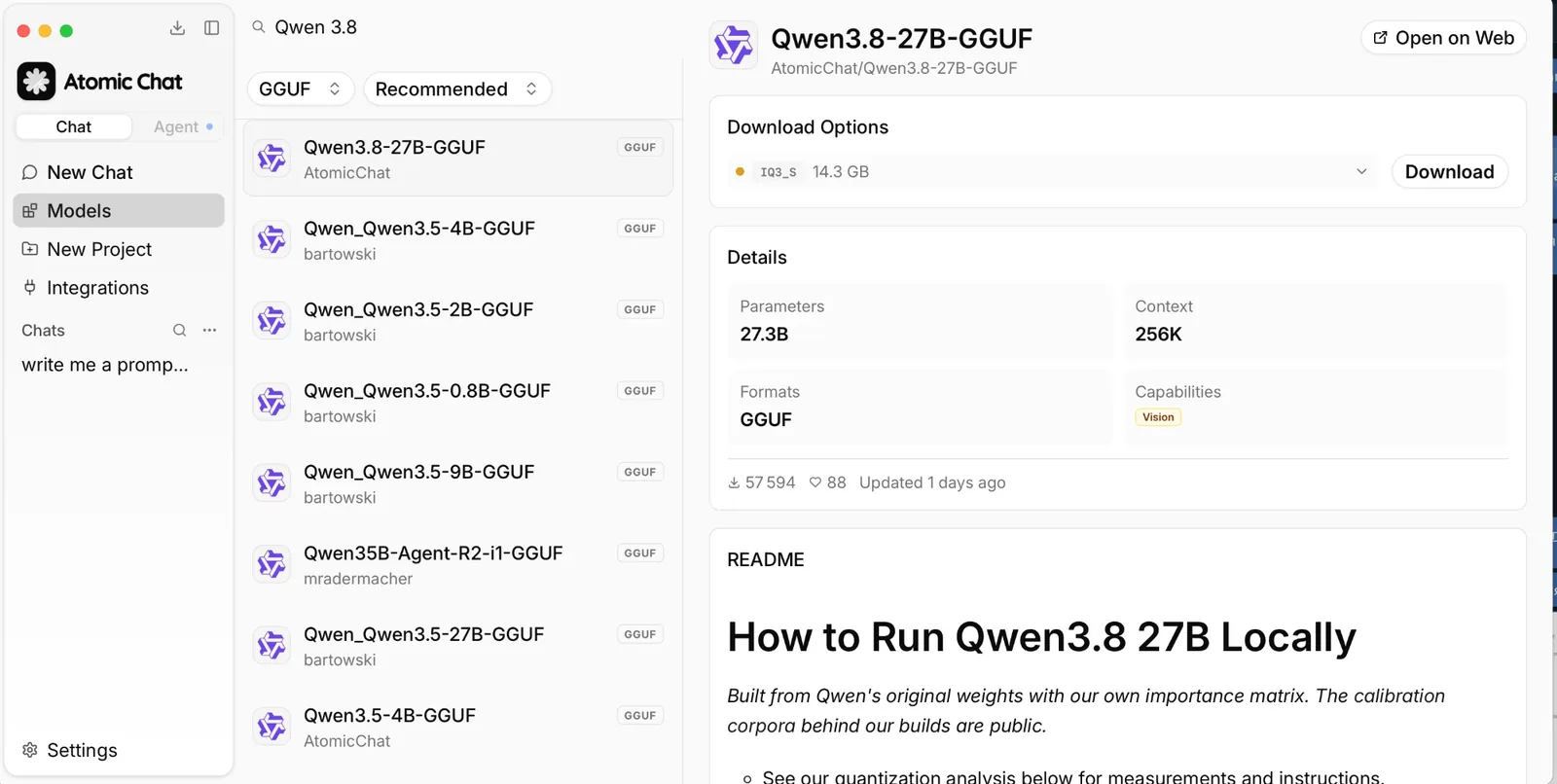
Step 3: Download the build for your memory
For a 24 GB GPU or 32 GB Mac, choose AD-Q4_K_M, whose full filename is Qwen3.8-27B-AD-Q4_K_M.gguf; the picker can show the shorter Q4_K_M tag, and displayed download sizes can differ from the weight-file sizes in the table.
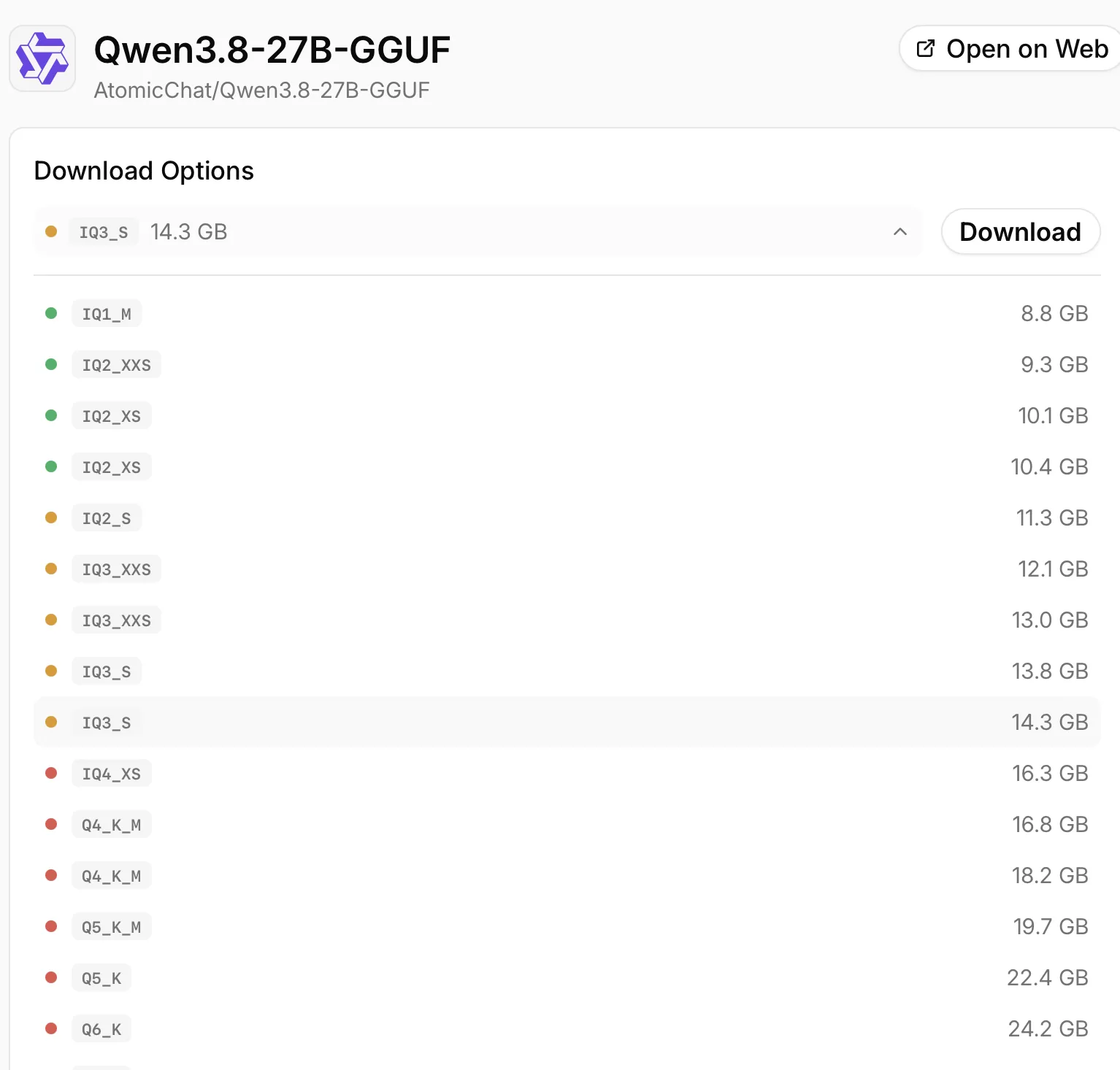
Step 4: Set the context and start a chat
Open Settings > Model Providers > Llama.cpp, find the downloaded model, and click the gear icon on its row. Set Context Size to 8192. If memory is tight, turn off Auto Increase Context Size so a longer chat does not allocate more memory than your machine has.
Load the downloaded model and open a chat. Your computer generates the answers. To connect a compatible coding tool, Atomic Chat also exposes a local OpenAI-compatible server at http://localhost:1337/v1; the local LLM setup guide covers that route.
Frequently asked questions
Can Claude Sonnet 5.5 run locally?
No. There is no public Sonnet 5.5 checkpoint to download. Calling Claude from a desktop app still uses a hosted model; Qwen, Ornith and Bonsai provide downloadable alternatives.
Is Sonnet 5.5 better than Opus 5.5?
Sonnet leads Terminal-Bench 4.0 in Anthropic's launch table, while Opus leads the other four rows shown above. Compare completed tasks at the effort setting you plan to use.
What is the best local Sonnet 5.5 alternative for a 24 GB GPU?
Start with Qwen3.8 27B and the 17.1 GB Atomic AD-Q4_K_M build at 8K context. It is a practical local option for that hardware, with text and image support.
Can I run a local alternative on an 8 GB GPU?
Yes. Ornith 1.5 9B has a 5.93 GB Atomic build recommended for that memory tier. Begin with text and a short context; images require an additional projector and more working memory.
Can I load Bonsai 2 like a normal GGUF?
Its ternary GGUF files require a runtime that implements their packing formats. Prism documents its own llama.cpp build for this purpose. Follow that setup instead of assuming every GGUF loader supports the files.
Do local models use my Claude subscription?
No. Inference with a downloaded model runs on your computer and does not consume your Claude allowance. Your hardware still uses electricity, and any external tools you connect can have their own costs.
Which model should you use?
Keep Sonnet or Opus for work where their results justify cloud access. For local use on a 24 GB GPU or 32 GB Mac, download Qwen3.8 27B and start at 8K context. Choose Ornith 1.5 9B when memory is tighter. Flash Next is the larger option for a 64 GB Mac, with its split build and SSD-backed table.