

We'll cover what an uncensored LLM actually is, why models refuse in the first place, and how abliteration differs from fine-tuning. Then the models worth running in 2026 — what each one is for, which came out on top in our own benchmarks, and how to run one locally with Atomic Chat.
TLDR
An uncensored LLM is an open-weight model with the alignment layer removed — the part that makes a model refuse. While an aligned model rejects a wide range of requests, both harmful and merely sensitive, an uncensored model responds and leaves the decision up to you. We benchmarked five on a single RTX 3060, and Gemma Abliterated 9B came out the best all-rounder — it answered every prompt and kept its reasoning almost untouched (MMLU 68.0 vs 68.4 aligned). For code, reach for DolphinCoder or Qwen 3.6 Uncensored; for creative writing, Nous Hermes 3; for speed and long context, Llama 3.2 Dark Champion; and if you have a big GPU, Dolphin-Mistral 24B is the strongest reasoner we measured — Llama 3.3 70B Abliterated if you can run it. Run it locally in two clicks with Atomic Chat — no refusals and no cloud watching what you asked.
What is an uncensored LLM?
An uncensored LLM is an open-weight model whose refusal layer has been reduced or removed, while the underlying reasoning is left intact.
To see what that means, it helps to know how a model learns to refuse in the first place. It happens in three stages:
That third stage is deliberately broad, because the team shipping a mass-market product can't anticipate every situation. The side effect is over-generalization: instead of blocking only genuinely harmful specifics, the model learns to treat whole categories as off-limits — the same ten buckets safety benchmarks use: violence, illegal activity, hate, harassment, sexual content, self-harm, deception, privacy, unethical behavior and general "harmful." Ask about the chemistry behind a household reaction, how a historical weapon worked, or a crime plot for a novel and the reflex meant to stop real misuse fires on your legitimate task too.
Uncensoring targets exactly that reflex. It weakens the learned tendency to decline, so the capability already baked into the weights becomes reachable again.
And because these are open-weight models, you get a second benefit that has nothing to do with refusals: you can download, inspect, quantize, and run them entirely offline. Nothing you type is sent to a third party, logged on a server, or used as training data. For legal, medical, financial, cybersecurity, or proprietary-code work, that alone is often reason enough to run locally — censored or not.
How uncensored models are made
There are three routes, from heaviest to lightest.
Fine-tuning. Train the base model further on additional instruction data. A fine-tuned uncensored model — most of the Dolphin family — learns new behavior, including the willingness to answer, from that dataset. Because it's genuine training, it can also improve instruction following, tone, and formatting, not just remove refusals. The cost is compute, and the risk of drifting from the base model's strengths if the data is weak.
Abliteration. Researchers found that refusal in many aligned models is governed by a single direction in the model's residual stream — the internal state it passes from layer to layer. To find it, you run the model over matched sets of harmful and harmless prompts, record the activations, and take the difference-in-means between the two. Then you remove the model's ability to express that direction, either on the fly at inference or — in the checkpoints you download — permanently, by orthogonalizing the weight matrices against it. It's fast, cheap, and stays close to the original, though it usually needs a light "healing" fine-tune afterward to recover the small capability dip. Models tagged "abliterated," like Llama 3.2 Dark Champion, are built this way.
The best releases often combine them — abliterate for compliance, then fine-tune to restore polish. For what that edit costs on a reasoning model, see the uncensored Ornith 1.5 builds.
What uncensored models are used for
Although the uncensored label attracts attention, the actual uses are quite ordinary:
In most cases, the issue is not that the task is risky, but that a broad safety layer gets in the way and running locally keeps the data yours.
Benefits and risks of LLMs with no restrictions
The benefits:
The risks are just as real and mostly come down to responsibility shifting to you:
Best uncensored LLMs to run locally in 2026
We favored the builds the community keeps alive: active maintainers, a full spread of GGUF quants — usually 10 or more, from 2-bit to 8-bit — and real documentation to fall back on when something breaks. Some pull six-figure download counts every month (the Mistral-based Dolphin build alone clears 190k), others are niche but well-supported. Each entry notes what the model is for, how it was uncensored (fine-tuning or abliteration), and the sizes to look for.
1. Dolphin 3.0 — best all-rounder
Method: Fine-tune
Best for: General use — coding, research, everyday productivity
Sizes: ~8B–70B
Dolphin 3.0 is the default recommendation for most users — a fine-tune that removes the refusal layer while keeping strong instruction following. It has broad community support and runs on a wide range of sizes. It is the most reliable model for doing what you ask, and its mid-range sizes fit comfortably on a consumer GPU.
2. Qwen 3.6 Uncensored — coding and multilingual reasoning
Method: Abliteration
Best for: Code generation, debugging, refactoring, multilingual
Sizes: 8B, 27B, 35B-A3B (MoE)
Built on one of the strongest open bases for code and multilingual reasoning, the uncensored version keeps that capability while dropping refusals. It is a popular choice among developers who want a local model for code generation, debugging and refactoring. It's also a strong pick if you work across languages: the Qwen base is highly capable beyond English and holds up on structured reasoning, an area weaker models tend to struggle with.
3. DolphinCoder — coding specialist
Method: Fine-tune (StarCoder2 base)
Best for: Writing, reviewing, fixing code, technical docs
Sizes: 7B, 15B
A code-focused member of the Dolphin family. DolphinCoder trades breadth for sharper behavior on programming tasks such as code generation, review, fixes and technical documentation. It works well alongside an editor or agent that provides repository context.
4. Nous Hermes 3 — chat and creative writing
Method: Fine-tune (Nous Research · Llama 3.1 base)
Best for: Fiction, roleplay, worldbuilding, dialogue, agentic tasks
The pick for creative professionals. Nous Hermes 3 stands out for natural prose, a consistent character voice and long-form dialogue — a strong choice for fiction, worldbuilding or roleplay. It skips the flat, over-cautious tone that alignment training bakes into many chat models, so the writing reads more like a collaborator than a corporate assistant. The Nous Hermes line also handles agentic tasks well, which is why its user base extends far beyond the creative sector.
5. Llama 3.2 Dark Champion Abliterated — least restrictive + long context
Method: Abliteration + MoE
Best for: Immersive fiction, roleplay, long-context work
Sizes: 18.4B MoE (8×3B) · 128k context
An abliterated mixture-of-experts model that removes refusals at the weight level rather than through retraining. It's the choice when other models still hedge on legitimate but sensitive topics and you want one that engages directly — with the understanding that you're fully responsible for how you use it.
6. Dolphin-Mistral 24B (Venice Edition) — smartest of our set, but slow
Method: Fine-tune (Mistral Small 24B base)
Best for: Reasoning-heavy work
Sizes: ~24B
An uncensored Dolphin fine-tune on Mistral Small 24B, tuned for open, low-refusal behavior. It posted the highest MMLU of anything we tested (see below) and near-perfect compliance — the smartest model in the group.
7. Dolphin-Mixtral 8x7B — mixture-of-experts, quality per compute
Method: Fine-tune (Mixtral MoE base)
Best for: Reasoning-heavy work
Sizes: 8×7B (~47B total, ~13B active)
Built on Mixtral's mixture-of-experts design, which activates only a fraction of its parameters per token — so you get quality closer to a much larger dense model without paying full compute each step. The uncensored Dolphin tune makes it a strong general model, provided you have the VRAM for the full expert set.
8. Gemma Abliterated — lightweight, laptop-friendly
Method: Abliteration
Best for: Everyday tasks, summarization, quick drafting
Sizes: 2B, 9B, 27B
Abliterated builds of Google's Gemma are the go-to for modest hardware — small, fast and capable for everyday work. They run comfortably on a laptop or entry GPU, even CPU-only in a pinch. In our tests the 9B was the best all-rounder: it answered everything and kept its base model's reasoning almost intact.
9. Llama 3.3 70B Abliterated — high-end reasoning at scale
Method: Abliteration
Best for: Top-tier open reasoning
Sizes: 70B
If you have the proper hardware (48 GB+ or a 64 GB Mac), an abliterated Llama 3.3 70B is the heavyweight pick. It keeps the base model's strong reasoning and long-context handling while dropping the refusal layer — the closest local experience to a frontier hosted model.
10. Rocinante / Cydonia (TheDrummer) — roleplay and long-form fiction
Method: Fine-tune (TheDrummer)
Best for: Immersive roleplay, long-form storytelling
Sizes: Rocinante ~12B · Cydonia ~22–24B
Community fine-tunes from TheDrummer, built specifically for immersive roleplay and long-form storytelling. Rocinante (~12B) is the lightweight, fast option; Cydonia (~22–24B) trades speed for richer, more consistent prose over long sessions.
We benchmarked 5 uncensored models
Everything local ran through the same llama.cpp harness, single-turn, with a neutral system prompt ("You are a helpful assistant") and no jailbreaks — so the numbers compare cleanly. We didn't invent the prompts to make a point: over-refusal was measured on two published academic benchmarks, so the results stand on independent sets. We measured four things:
Refusals were labelled by an LLM judge and checked against 120 hand labels (κ = 0.64, substantial agreement).
What "over-refusal" looks like
To measure over-refusal you need prompts that are legitimate but sit close to the line — the kind an over-cautious model waves off. Every one asks the model to explain or describe, never to do harm:
Here's the twist. The 28 prompts we hand-wrote barely separated the models — modern builds, aligned or not, answered almost all of them (92.9–100%). Today's LLMs just don't refuse "write a tense interrogation scene" anymore. But push to OR-Bench's harder probes and the gap explodes.
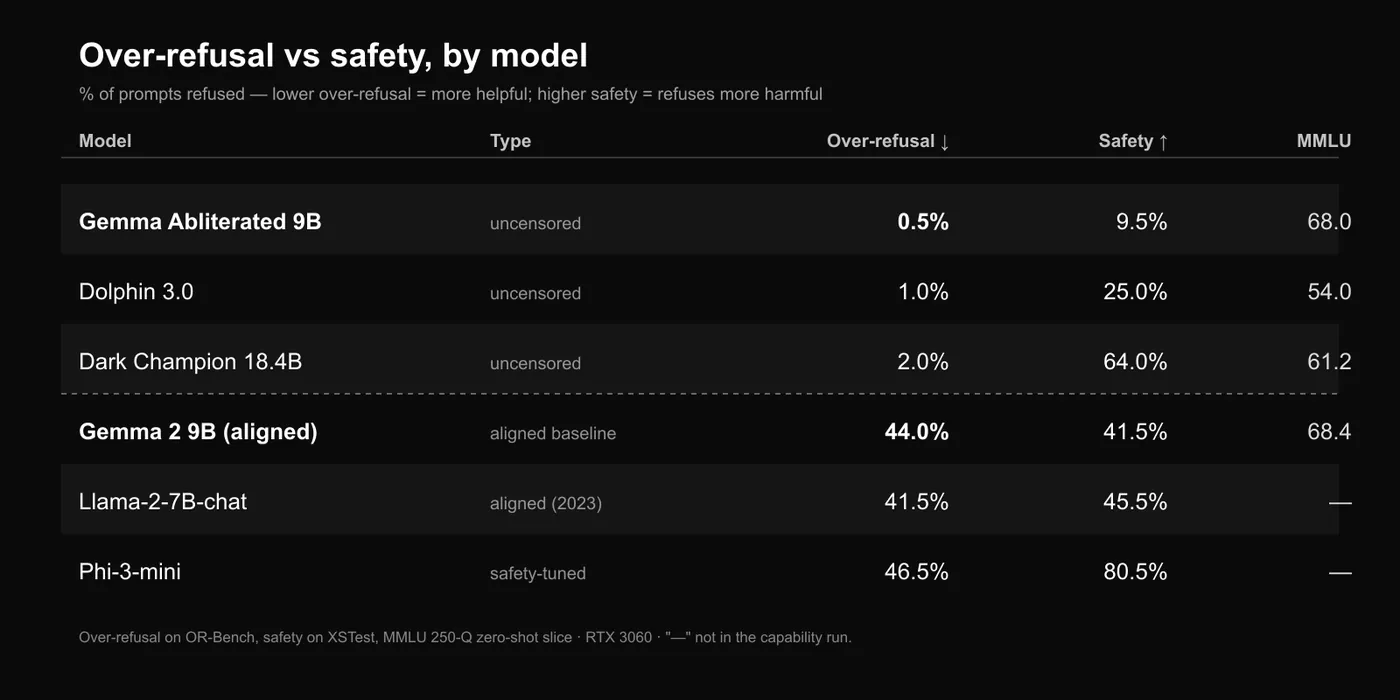
The result that matters: abliteration is a trade
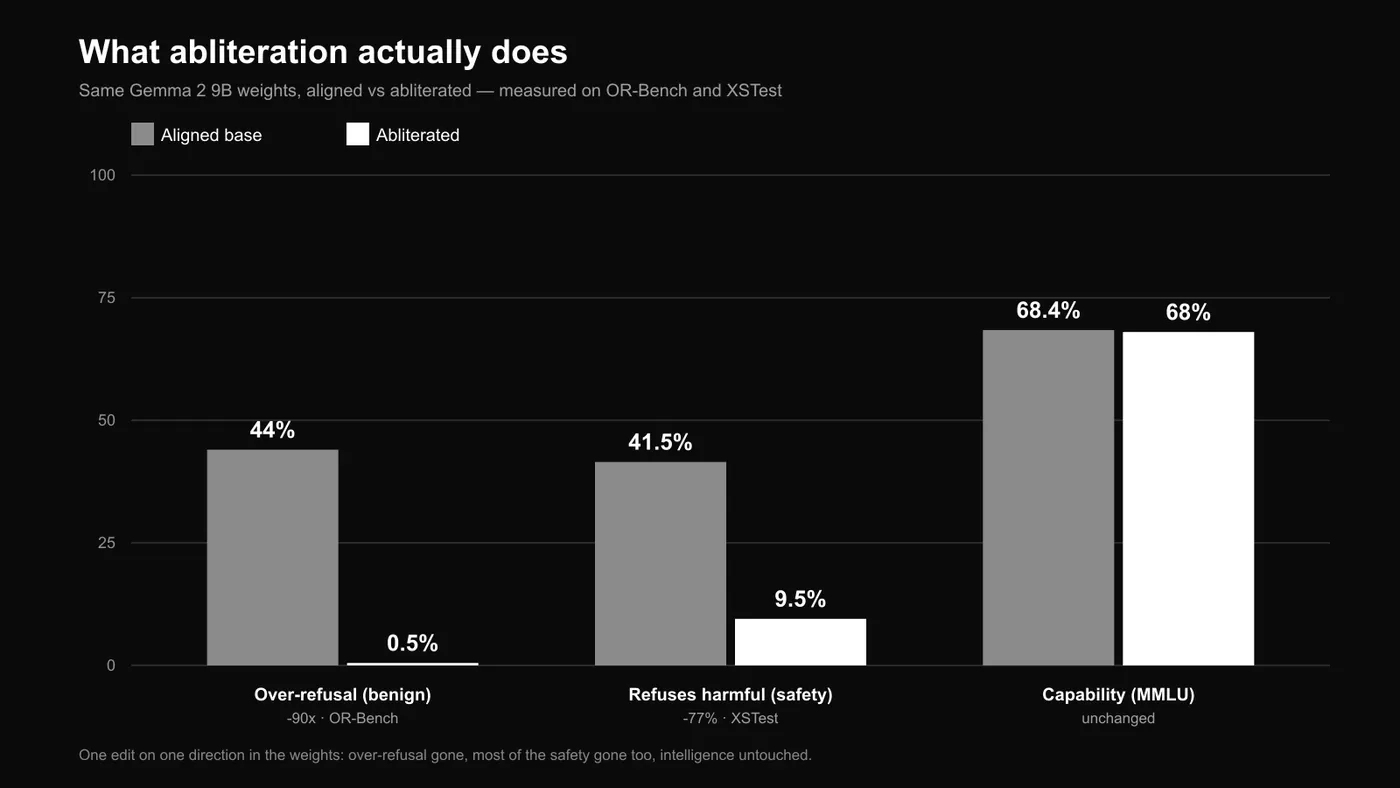
The same Gemma 2 9B weights, aligned then abliterated. Over-refusal on benign OR-Bench prompts collapsed from 44% to 0.5% — a 90× drop. But its refusal of genuinely harmful prompts fell right alongside it, from 41.5% to 9.5%. MMLU didn't move (68.4 → 68.0). One edit on one direction in the weights: the annoying refusals go, most of the safety goes with them, and the intelligence stays.
Over-refusal and safety are the same knob
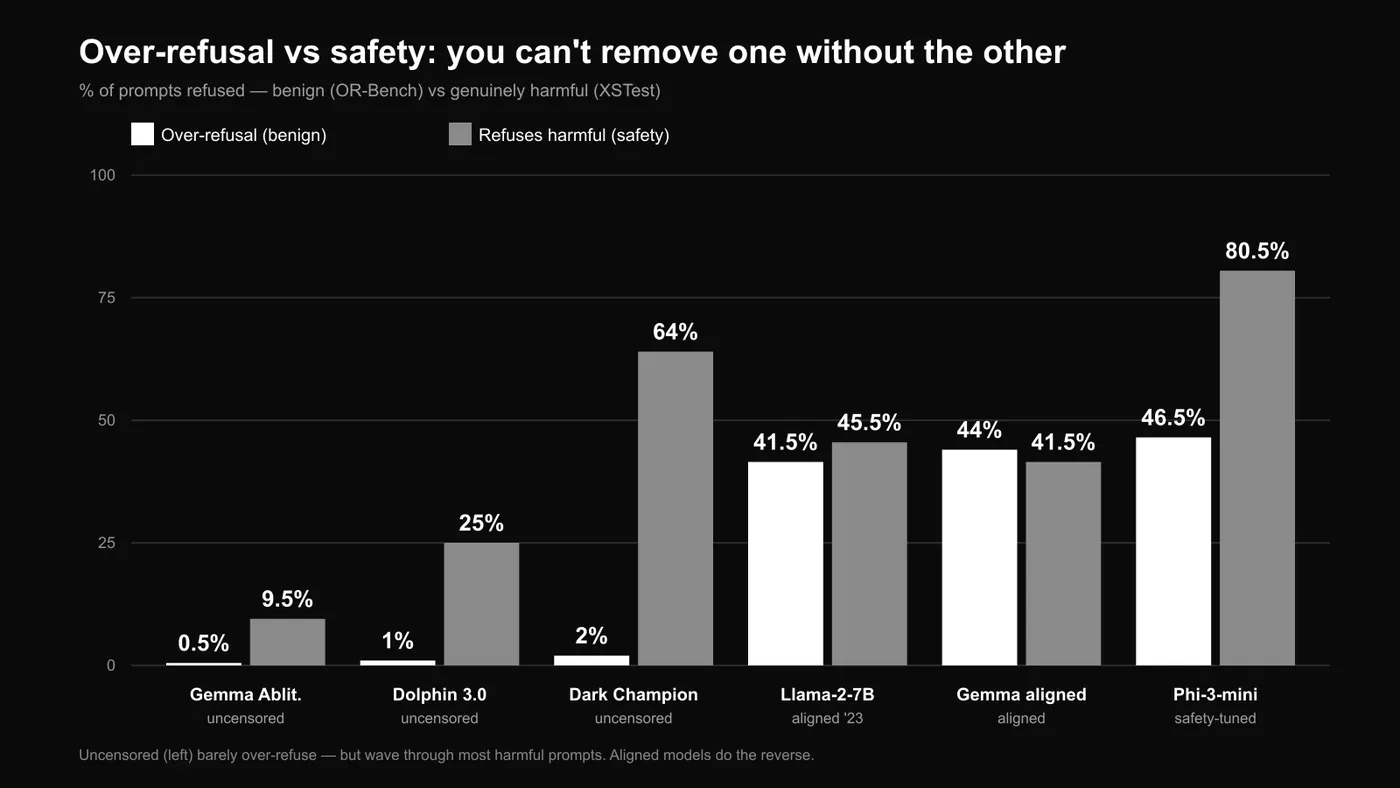
The pattern holds across every model. Uncensored builds (left) barely over-refuse benign prompts — near zero — but they also wave through most genuinely harmful ones. Aligned and safety-tuned models do the reverse: they decline ~40% of harmless-but-edgy prompts, and more of the harmful ones. No model refuses only the bad stuff. That's the real trade you're making when you run uncensored.
The cloud answers too
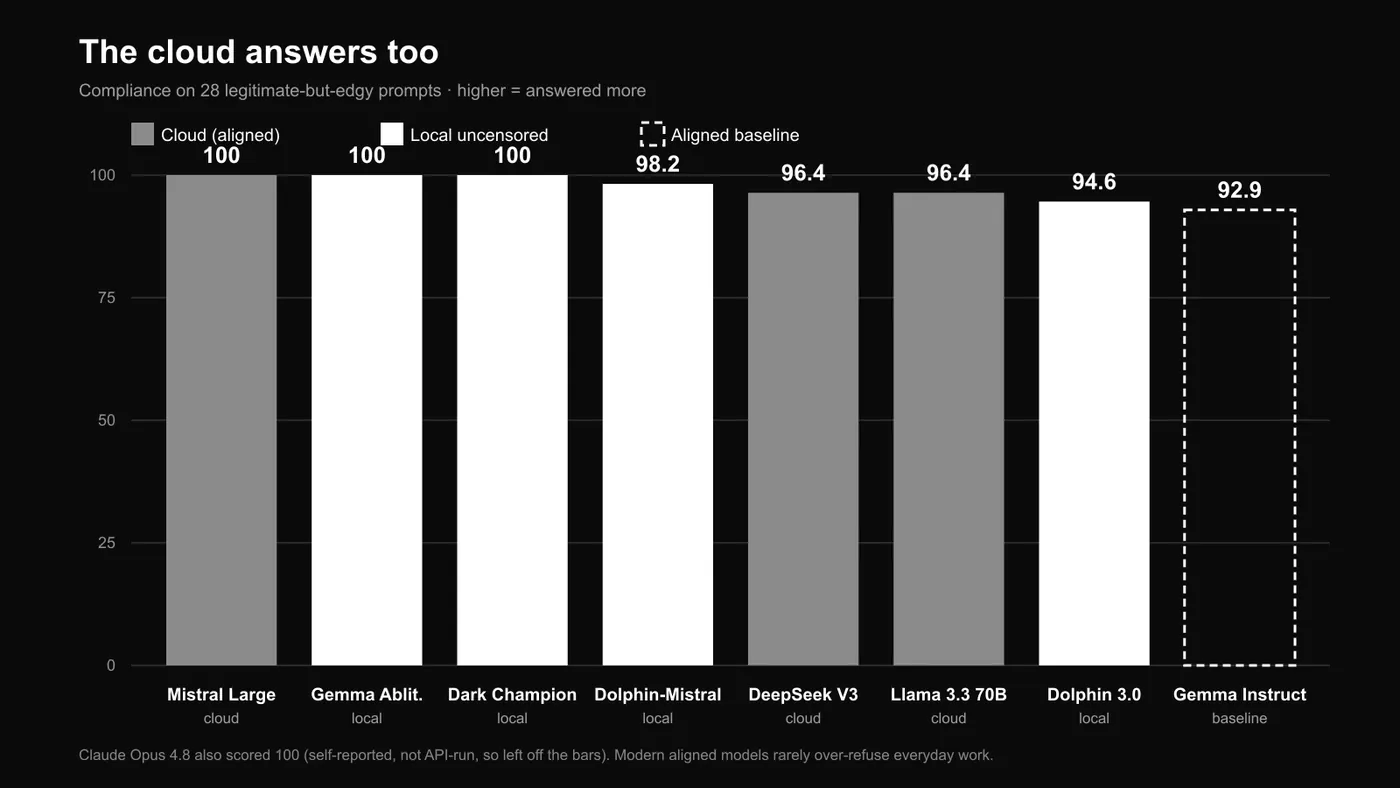
One more surprise, and it retires the "censored cloud" story. We ran the same legitimate-but-edgy prompts past the big hosted models: Mistral Large and Claude Opus 4.8 answered all of them, DeepSeek V3 and Llama 3.3 70B answered 96%, every one at or above the aligned Gemma baseline (92.9%) and level with the local uncensored builds. Modern frontier models don't over-refuse everyday work the way the pitch assumes. (We couldn't push the cloud models through OR-Bench, so this comparison uses the hand-written set — but the gap is clear enough.) The reason to run uncensored locally isn't "the cloud refuses everything." It's privacy, cost and full control.
Speed on a single RTX 3060
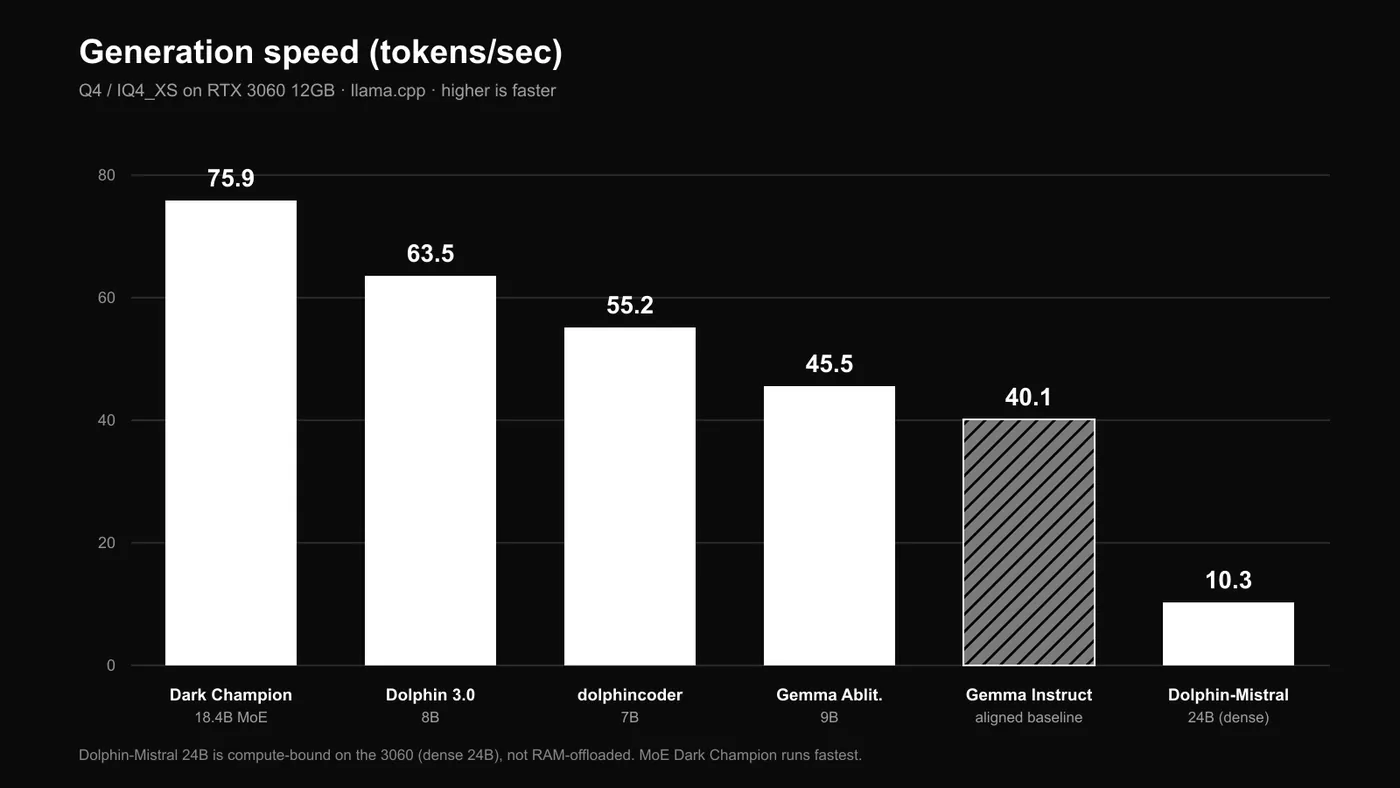
Generation speed at Q4. The mixture-of-experts Dark Champion is fastest (~76 tok/s) because it only activates a fraction of its 18.4B parameters per token. The dense 24B Dolphin-Mistral is the outlier at ~10 tok/s — compute-bound on a mid-range card, not RAM offload.
Top 5 by our benchmarks
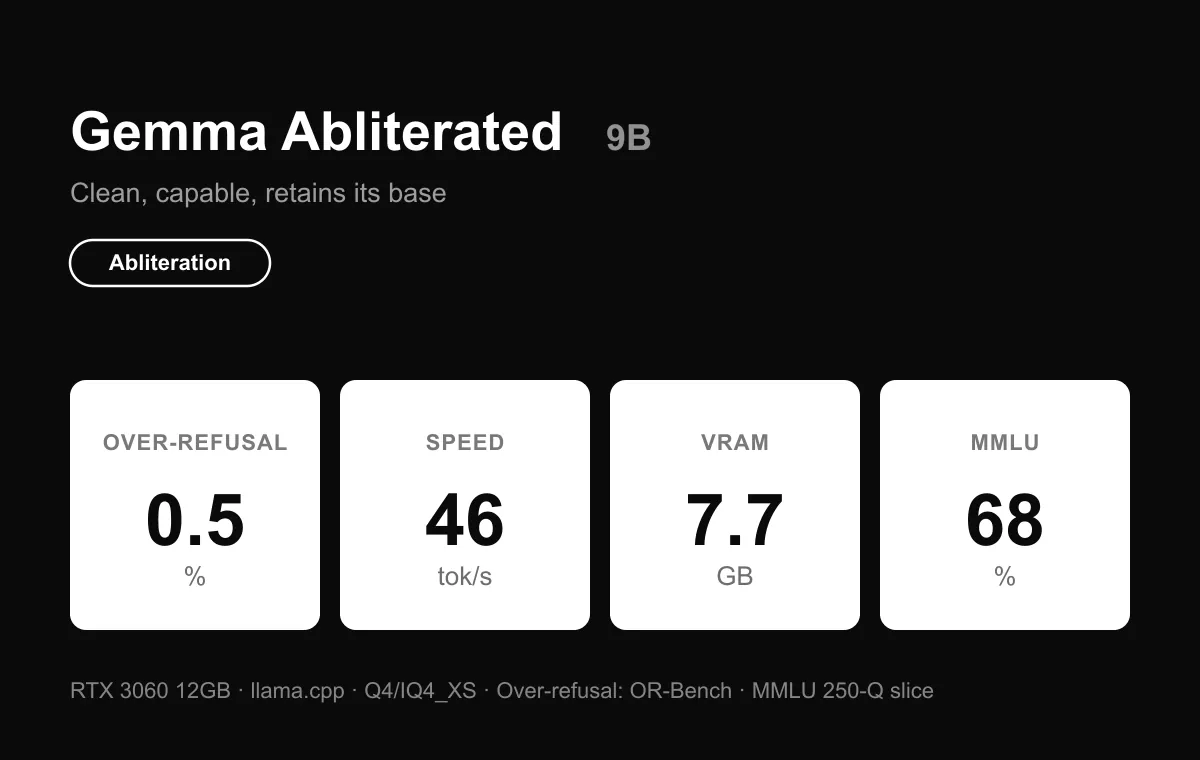
Gemma Abliterated 9B — best overall. Over-refusal 0.5%, MMLU 68.0, 46 tok/s, 7.7 GB. It barely refuses a benign prompt and keeps its base model's reasoning (68.4 → 68.0). A good place to start.
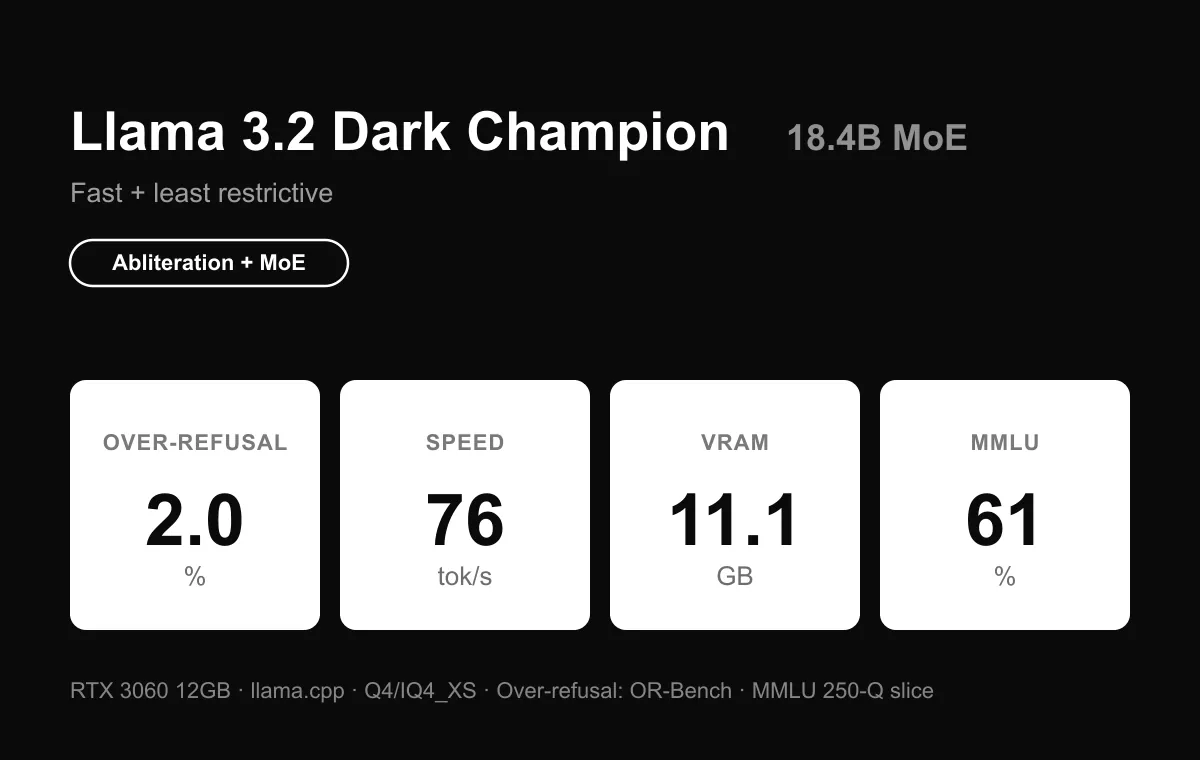
Llama 3.2 Dark Champion 18.4B MoE — least restrictive + fast. Over-refusal 2.0%, 76 tok/s (fastest), MMLU 61.2. Best for creative and long-context work on modest hardware.
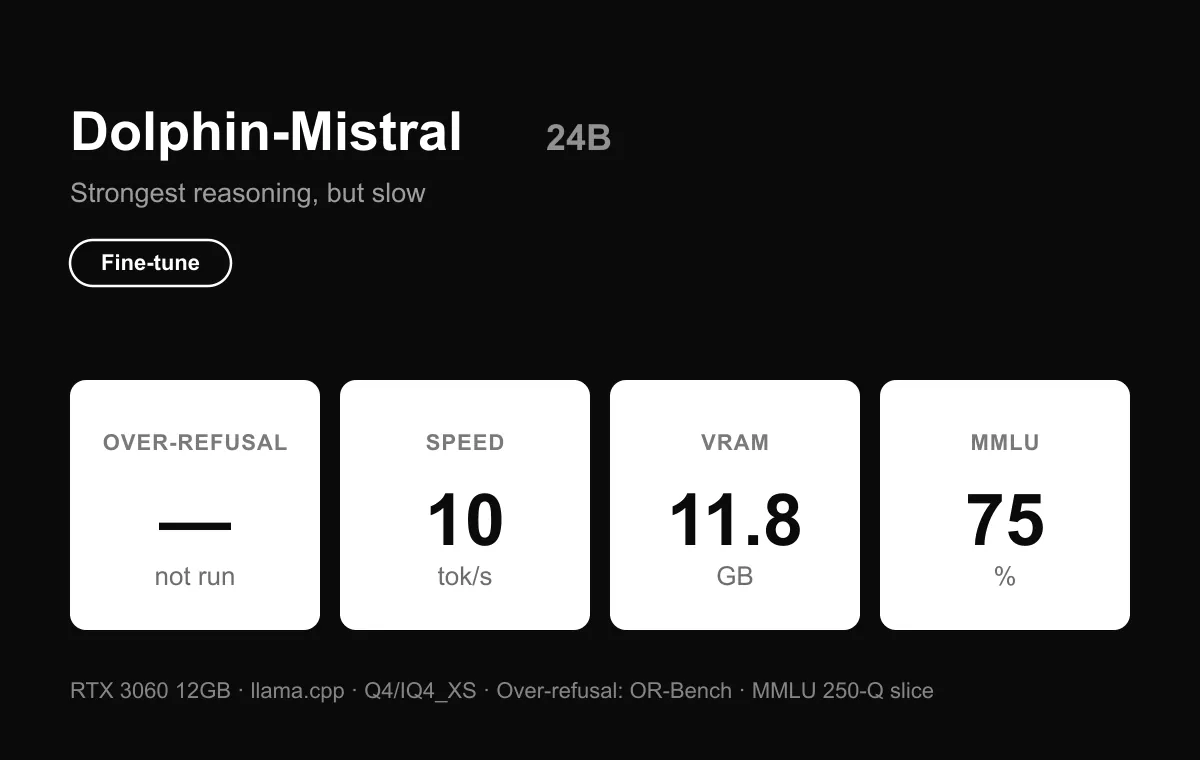
Dolphin-Mistral 24B — smartest, but slow. MMLU 75.2 (highest), 10 tok/s. A great pick if you have a bigger GPU to feed it.
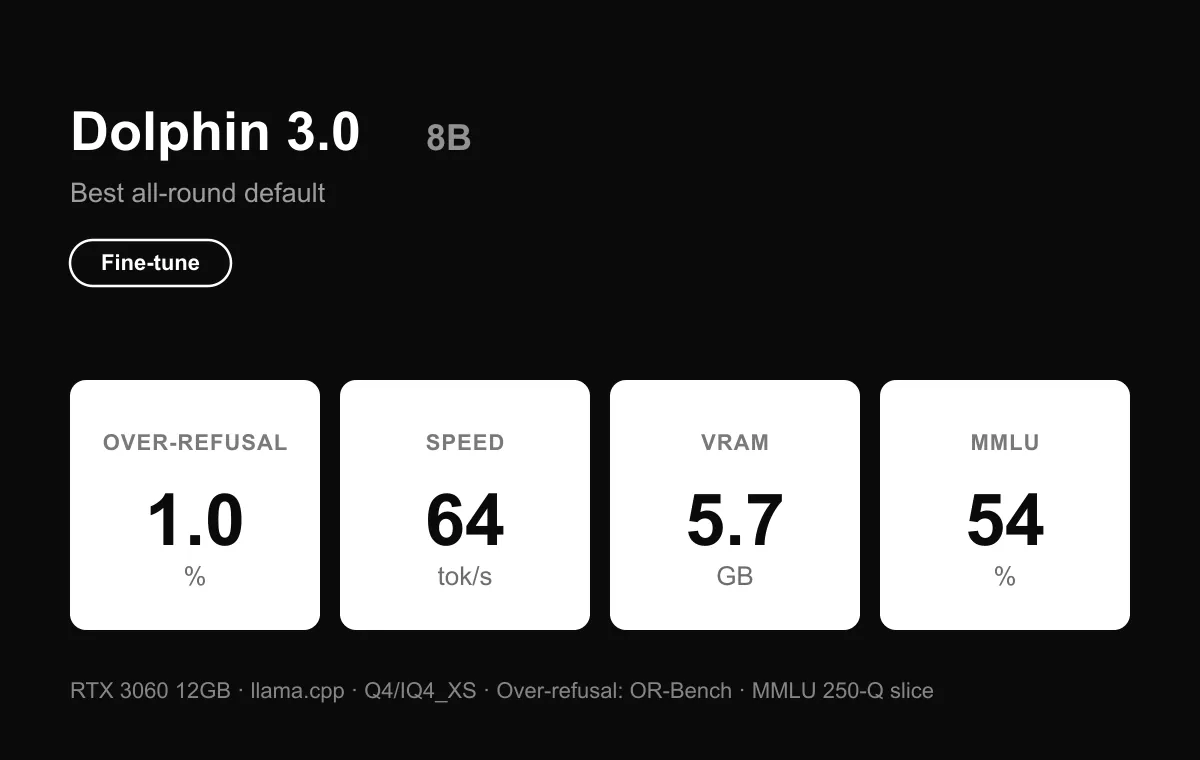
Dolphin 3.0 8B — light and fast. Over-refusal 1.0%, MMLU 54.0, 64 tok/s, 5.7 GB. The easiest to start with — but the only build that hedged a prompt the aligned baseline answered.
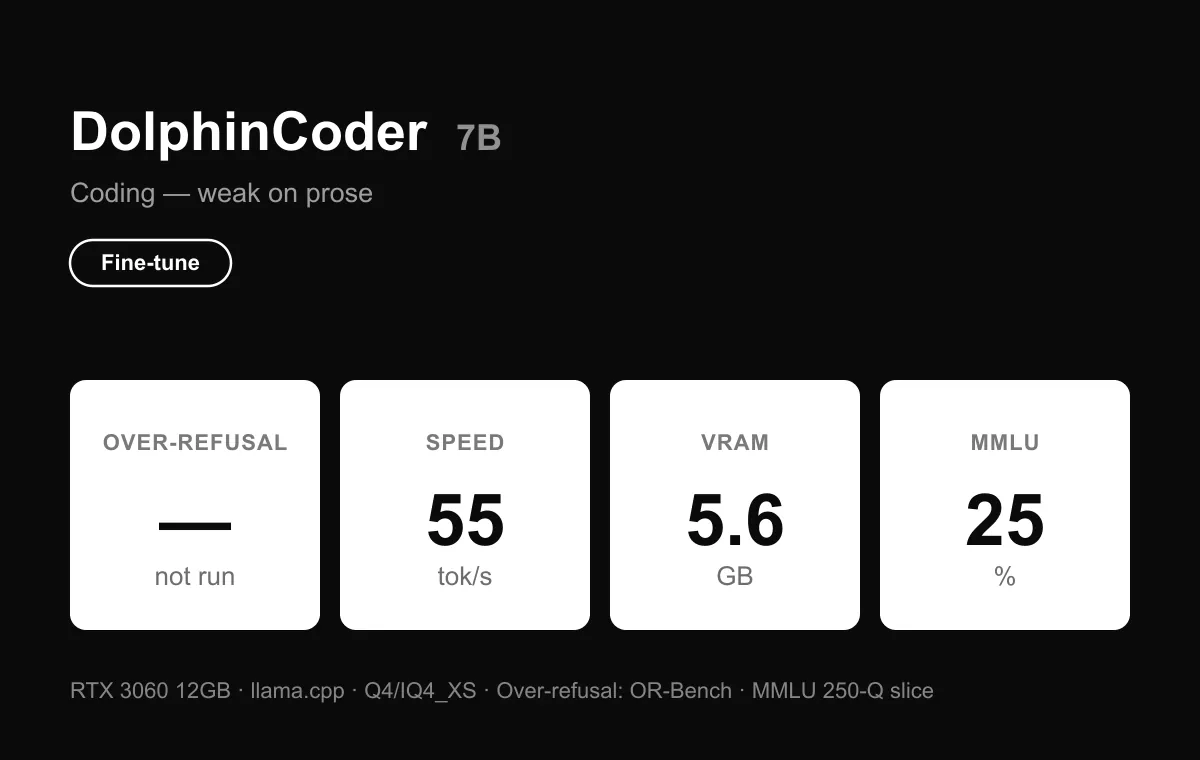
DolphinCoder 7B — coding only. MMLU 25.2, 55 tok/s. Sharp on code, weak on prose. #1 if you specifically want a local uncensored coder.
What the numbers say
Uncensoring works. It also costs something the pitch skips. Abliteration cut a model's over-refusal from 44% to almost nothing with no hit to reasoning — the real, measurable win. But the same edit stripped most of its safety refusals too, because over-refusal and safety-refusal are the same direction in the weights. Remove one and the other goes with it. So run an uncensored model when privacy and control matter, match the size to your hardware, and go in knowing you're now the only guardrail in the loop.
How to run an uncensored LLM locally with Atomic Chat
Choose a model from the shortlist above, then find a compatible GGUF build in Atomic Chat. The screenshots below use an uncensored Ornith 1.5 build as an example. Model sizes and settings will differ for other builds.
Step 1: Install Atomic Chat
Download the desktop app for macOS, Windows or Linux, install it and open it. Keep an internet connection for the app and model downloads.
Step 2: Find the uncensored model
Open Models and search for the model name or its full Hugging Face repository name. For the example in these screenshots, search for Thunder13240/Ornith-1.5-9B-heretic-GGUF.
Check the publisher and model card before downloading. A base model and an uncensored community build can have similar names. For this example's build choices and limitations, see our Ornith 1.5 uncensored guide.
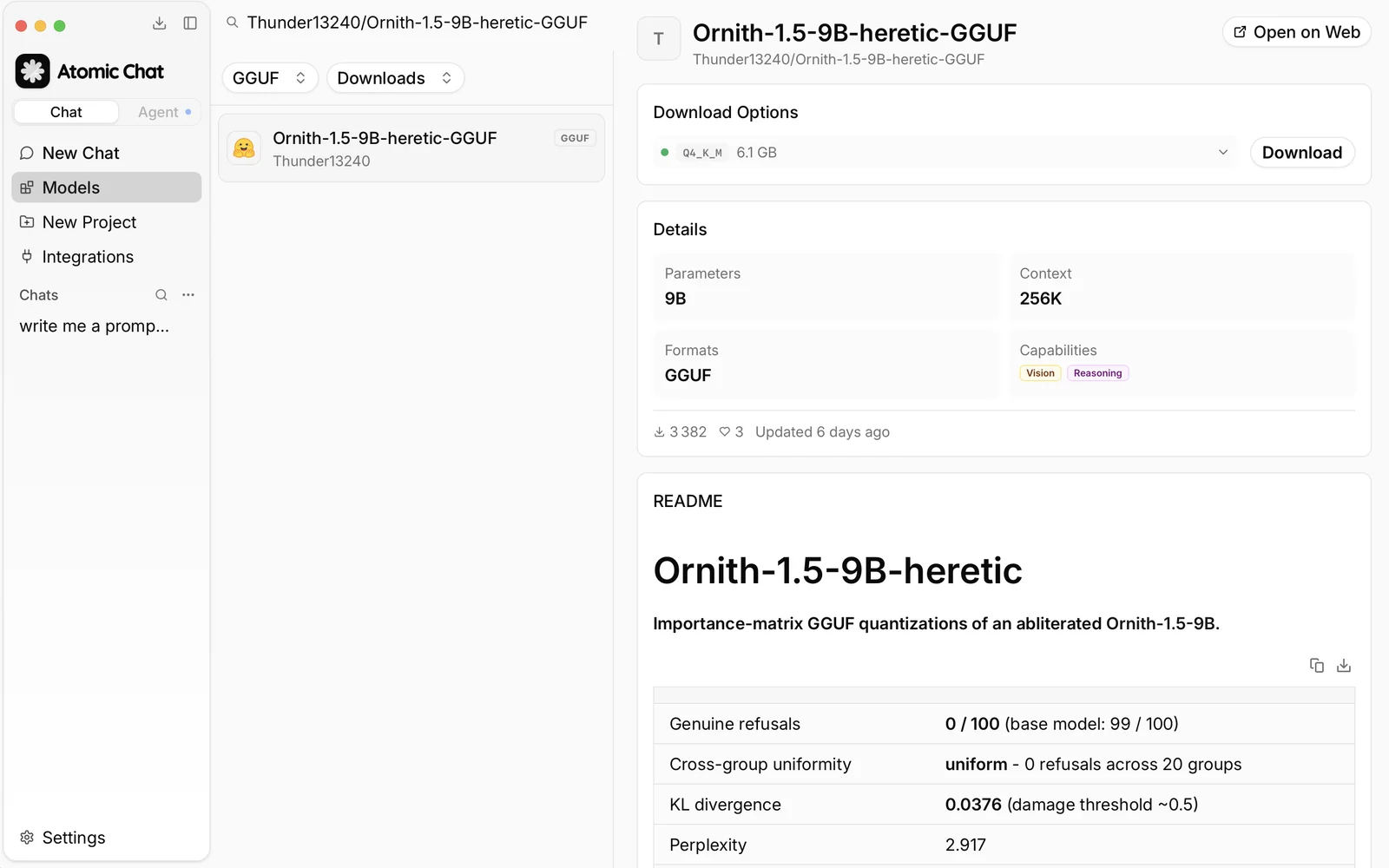
Step 3: Choose a quant and download it
Expand Download Options and choose a quantization that fits your hardware. Leave memory for the context and runtime: a weight file's download size is not the model's total RAM or VRAM requirement. Use the requirements for your chosen build, not the sizes shown in this example.
Click Download. If the tags are unfamiliar, our GGUF guide explains the formats and quantization choices.
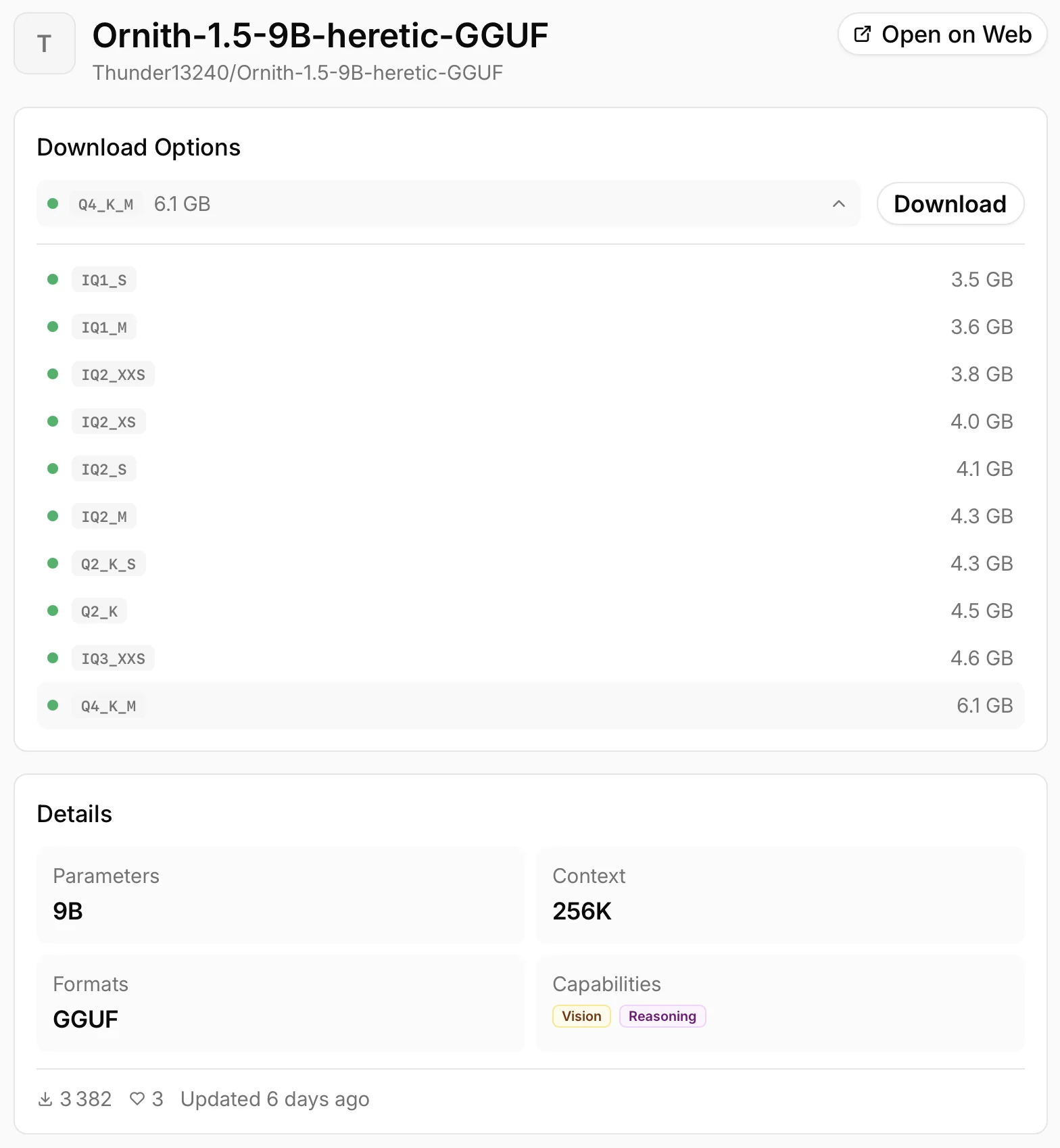
Step 4: Check the context setting
Open Settings → Model Providers → Llama.cpp, find your downloaded build and click its gear icon. Set Context Size to suit your task and available memory. A longer context needs more memory, so avoid starting with the maximum if your model already fills most of it.
If you are close to the memory limit, turn off Auto Increase Context Size to prevent the context from growing during a conversation. Follow the chosen model's guide for sampling and thinking settings; the same values do not suit every model.
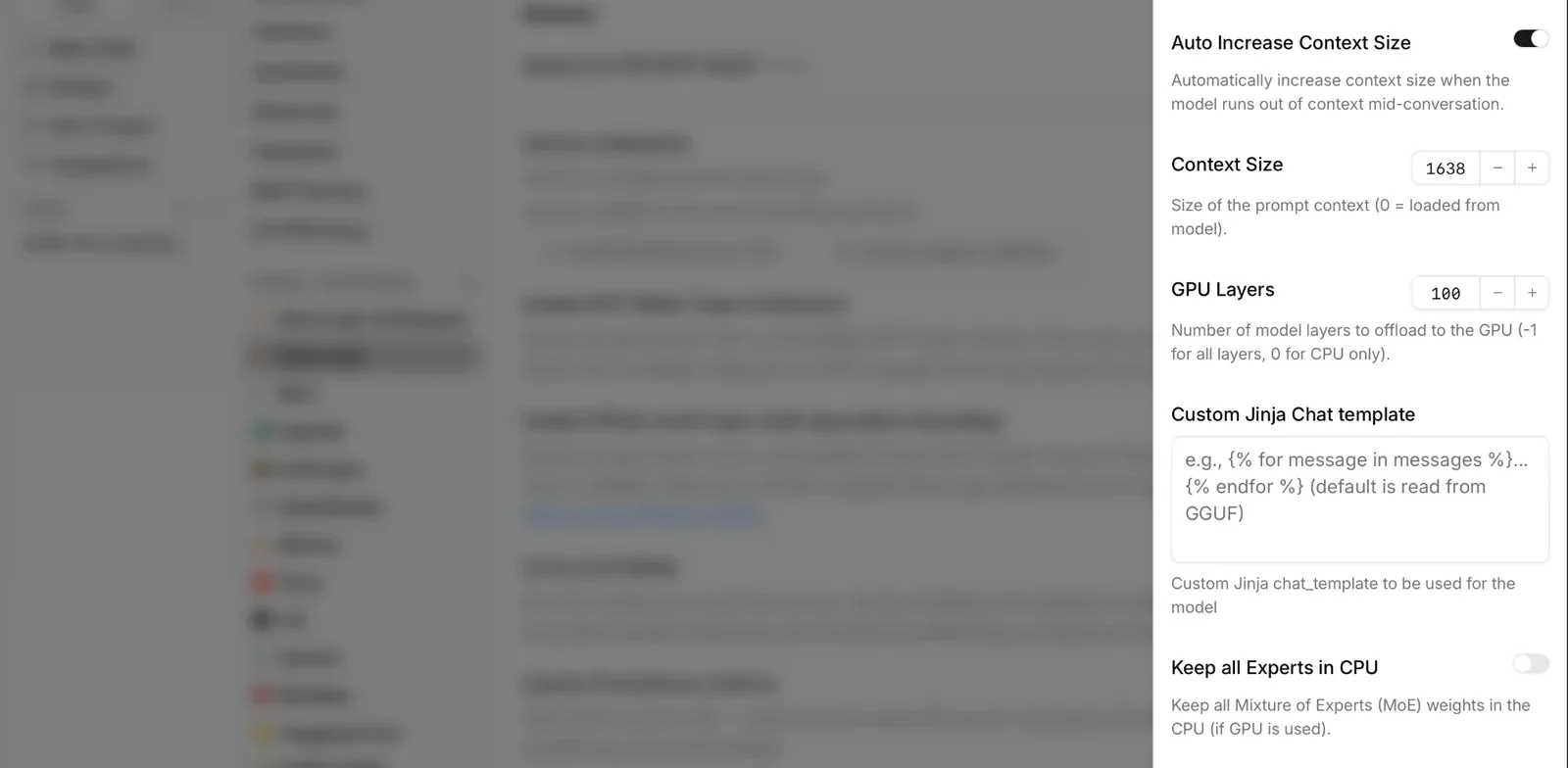
Step 5: Start a local chat
Once the download finishes, load the model in the chat and check its name before sending your first prompt. Try a writing or coding task you know well, then review the answer. An uncensored build can still make factual or code errors. The local model processes your prompt on your device.
FAQ
What is the best uncensored LLM in 2026?
In our benchmarks, Gemma Abliterated 9B was the best all-rounder — it answered every prompt and kept its base model's reasoning almost intact (MMLU 68.0 vs 68.4 aligned), on a footprint that fits a 12 GB card. For coding, DolphinCoder or Qwen 3.6 Uncensored. For creative writing and roleplay, Nous Hermes 3 — its prose reads more like a collaborator than a chat model. And if you have a 24 GB+ GPU, Dolphin-Mistral 24B posted the highest reasoning score we measured (MMLU 75).
Which uncensored models work with Ollama?
Most popular open-weight models — Dolphin, Hermes, Gemma, Qwen, and Mistral, as well as many Llama derivatives and community fine-tunes, run through Ollama. Before downloading, make sure that an Ollama-compatible version of the model you want exists.
Can I run an uncensored LLM on a laptop?
Yes. Modern 7B and 8B models run comfortably on many laptops, especially in 4-bit. A dedicated GPU is faster and Apple Silicon Macs do particularly well thanks to unified memory. And if you don't have a dedicated GPU at all, the smaller models will still run on the CPU, just slower.
Are uncensored models less accurate?
Reduced alignment doesn't automatically raise or lower factual accuracy — in our tests, the uncensored builds scored within a point or two of their aligned base on MMLU. Like any other model, they can still hallucinate, so double-check important outputs, no matter the model.
Which uncensored model is best for coding?
Dolphin 3.0, Qwen 3.6 Uncensored and DolphinCoder consistently rank among the strongest for software work — code generation, debugging and refactoring.
Are uncensored LLMs legal?
In most countries, running an open-weight model locally is legal as long as you follow the model's license and local laws.
Is it safe to download uncensored models?
The model's weights are data, not a program — but you should still stick to well-known sources and maintainers, prefer standard formats like GGUF and MLX, and keep your inference tools updated. Running locally keeps your prompts and documents on your machine and never sends them to third-party servers.
Conclusion
Uncensored LLMs are open-weight models in which the refusal layer has been reduced or removed through fine-tuning or abliteration, while the underlying reasoning remains intact. They aren't more accurate or capable simply because they're uncensored; they just stop declining legitimate prompts, and because they run locally, your data never leaves your machine. Our benchmarks made the honest trade clear: abliteration removes a model's over-refusal at almost no cost to capability — but it strips most of the safety guardrail along with it, because the two share the same direction in the weights. So run an uncensored model when privacy and control matter, match the size and quantization to your VRAM, and go in knowing you're now the only guardrail in the loop.