

GGUF is a file format used to distribute large language models (LLMs).
A GGUF file packages the model weights, tokenizer, architecture metadata, and other information required to run a local model into a single file, making it easy to share and deploy a model.
What's more, most models are published as several GGUF files at different quantization levels, that reduce the precision of the model weights — the higher the quantization level, the less RAM or VRAM you need to run a model.
In this article, you'll learn:
- What GGUF is and why it was created
- How GGUF works
- How to read the GGUF model name to select the right level of quantization for your hardware
The GGUF format explained
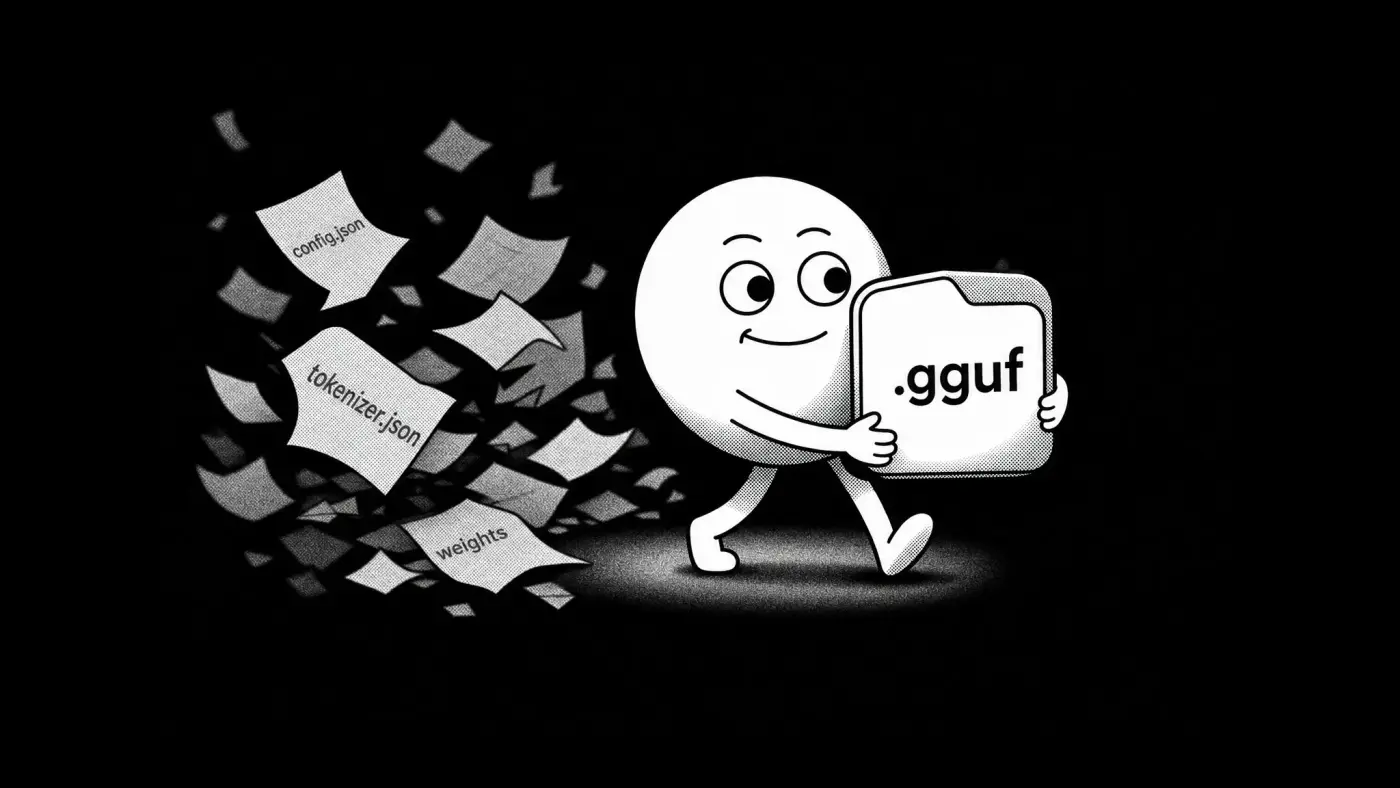
GGUF is a binary container format designed to store everything an inference engine needs to load and run a local large language model in a single file. You can think of it like a .zip or .rar file, but for an LLM. A .gguf file usually contains:
- Model weights
- Tokenizer data
- Model architecture information
- Tensor metadata
- Special tokens
- Quantization details
- Runtime configuration values
By packaging these components together, GGUF allows models to be distributed as a single portable file. Without this format, you'd need multiple files across multiple directories to share a model. In fact, before GGUF, models were distributed as repositories that would separately contain:
- Weight shards containing the model parameters
config.jsondescribing the model architecturetokenizer.jsoncontaining tokenization rulestokenizer_config.jsonwith tokenizer settings- Generation configuration files

Researchers still use these directory formats, particularly for training, but for widespread model distribution on platforms like Hugging Face, GGUF is now the standard.
GGML vs GGUF
GGUF replaced an earlier format called GGML, also created by Georgi Gerganov alongside llama.cpp. GGML stored a model's weights efficiently, but it didn't carry enough metadata to describe them — it had no reliable way to identify which architecture a model used, and adding a new setting could silently break older loaders.
GGUF fixed this by storing model information as extensible key-value metadata instead of a fixed list of fields. A loader reads the keys it recognizes and ignores the rest, so new architectures can add parameters without breaking existing files or readers. That's why GGML is now considered obsolete: GGUF absorbed everything it did and added the compatibility layer it was missing.
Why almost every local LLM uses GGUF
GGUF is the most widely used format for local LLMs because it offers several advantageous features for running local models:
- You can share the entire model as one file
- GGUF efficiently stores reduced-precision model weights, allowing larger models to run on weaker hardware.
- GGUF models can run on CPUs, GPUs, or a combination of both.
- GGUF is almost universally adopted through support from llama.cpp.
Today, GGUF is supported by llama.cpp, LM Studio, Jan, KoboldCpp, GPT4All, text-generation-webui, Atomic Chat, and many other local AI providers.
Flexible hardware usage
One of the most important practical features of GGUF is that it's not optimized just for the GPU. If a model doesn't fit into the available VRAM, which is often the case with consumer hardware, the inference engine can send some layers to the CPU and keep other layers on the GPU. This allows users to run models that exceed their graphics card memory capacity, although performance is usually lower than running the entire model on the GPU.
This is still a big advantage of GGUF over other formats, such as GPTQ, AWQ, and EXL2. These formats are often optimized specifically for GPU inference. They can provide excellent performance when the model fits entirely within VRAM. However, they may exhibit degraded performance if it does not.
GGUF is the native format of llama.cpp. Many local AI applications are built on top of llama.cpp or use compatible libraries. When improvements are made to the llama.cpp ecosystem, they often benefit other apps too.
For example, below is a demonstration of Multi-Token Prediction (MTP). This is an optimization that allows a model to predict multiple future tokens during generation. A verification process checks these predictions, allowing some workloads to achieve higher generation speeds without changing the model itself.
Atomic Chat contributed the Gemma 4 implementation, quantized assistant models to GGUF, and published benchmarks and source code demonstrating these optimizations.
Multi-Token Prediction (MTP) for LLaMA.cpp!
— atomic.chat (@atomic_chat_hq) May 7, 2026
Running Gemma4 local model 1.5x faster.
We patched LLaMA.cpp. Quantized Gemma 4 assistant models into GGUF format. We ran tests on a MacBook Pro M5Max. Gemma 26B with MTP drafts tokens 40% faster. Benchmarks, source code and models 👇 pic.twitter.com/hHH1cu1jLi
What is quantization in GGUF?
One of the biggest advantages of GGUF is its efficient support for quantization. A large language model stores its knowledge as billions of numerical values called weights. The amount of memory required depends on how precisely those weights are represented.
Most models are trained and released internally using 16-bit floating-point precision (FP16 or BF16). While this method is accurate, it also creates very large files.
Quantization reduces the precision used to store model weights. Instead of representing each value using 16 bits, a quantized model may store values using 8, 6, 5, or 4 bits.
For example:
- A model with 7 billion parameters stored at 16-bit precision may require around 15 GB of storage
- A version of the model quantized to 4 bits might be about 4–5 GB, roughly a third of the memory needed.
The tradeoff is that lower precision introduces approximation errors. The stored values are no longer identical to the original weights, which can slightly affect the model's output quality. The impact depends on the model, the quantization method, and the evaluation metric. In many cases, however, 4-bit and 5-bit quantized models retain most of the capabilities of their full-precision counterparts while being small enough to run on consumer GPUs, laptops, and even CPUs.
This is where GGUF becomes especially useful. Rather than distributing a separate model format for each precision level, GGUF packages the quantized weights and all required metadata into a single standardized file. As a result, most local LLM releases provide multiple GGUF files for the same model, each representing a different quantization level. Users can then choose the version that best balances memory usage, inference speed, and output quality for their hardware.
Understanding GGUF filenames
We're finally getting to the practical side of understanding GGUF as someone who wants to run large language models locally. If you browse GGUF models on Hugging Face, you'll usually find multiple files for the same model with names such as:
Q4_K_M
Q5_K_S
IQ4_XS
Q8_0
These filenames describe how the model was quantized, including the approximate bit precision, the quantization method, and sometimes the specific variant. Knowing how to read this will make it much easier to select the right model for your hardware.
The general GGUF naming pattern
Most quantized GGUF filenames follow this pattern:
Q<number>_<method>_<variant>
or
IQ<number>_<variant>
Each part has a specific meaning:
| Part | Meaning |
|---|---|
| Q | Standard quantized weights |
| IQ | Importance-aware quantized weights |
| Number | Approximate bits used per weight |
| Method | Quantization algorithm (for example, K) |
| Variant | Different versions of the same method (such as S, M, or L) |
Note: This pattern is usually the same, but you might see some variations. Older quantization methods may drop a method or variant, for example.
Breaking down a GGUF filename example
Consider the filename:
Q4_K_M
Reading from left to right:
| Part | Meaning |
|---|---|
| Q | Standard quantization |
| 4 | Approximately 4 bits per weight |
| K | Uses the K-quant quantization method |
| M | Medium variant |
Similarly:
Q5_K_S= 5-bit K-quant, small variantQ6_K= 6-bit K-quantQ8_0= 8-bit quantization using the older quantization schemeIQ4_XS= 4-bit importance-aware quantization, extra-small variant

What are K-quants?
If you've noticed, the letter K in the filename examples above stands for K-quants. K-quants are the modern family of quantization methods used by most GGUF models. Compared with older quantization schemes, they generally provide better quality at similar file sizes.
Some K-quants include a size variant:
- S (Small): Smaller file size with more aggressive compression
- M (Medium): Better balance between quality and size
- L (Large): Slightly larger file with additional precision
As a general rule of thumb, the Q4_K_M K-quant provides the best balance of compression vs performance loss.
What are I-quants?
Some GGUF files begin with IQ, for example:
IQ4_XSIQ3_MIQ2_S
These are importance-aware quantizations.
Rather than treating every part of the model equally, I-quants use calibration data to identify which weights are most sensitive to precision loss. This allows the available bits to be allocated more efficiently. This advantage is most noticeable at very low bitrates, where I-quants can often preserve more quality than similarly sized K-quants.
- If you have very limited memory: Consider I-quants such as
IQ4_XSor lower-bit IQ variants.
Older quantization formats
Older GGUF repositories may also contain files such as:
Q4_0Q4_1Q5_0Q5_1
These are legacy quantization formats inherited from the earlier GGML ecosystem. They remain supported by many inference tools, but K-quants generally provide better quality at similar file sizes.
You may also encounter:
F16BF16F32
These are not quantized. They store the model at full precision, resulting in significantly larger files. They are primarily intended for development, model conversion, or fine-tuning rather than everyday local inference.
Quick quantization guide
| Quantization | Best for |
|---|---|
Q8_0 | Highest quality when memory is not a concern |
Q6_K | High-quality local inference |
Q5_K_M | Quality-focused general use |
Q4_K_M | Best default for most users |
IQ4_XS | Smaller memory budgets |
IQ3 / IQ2 | Extreme compression when necessary |
Which GGUF quant should you download?
So, now that you understand what GGUF is and how to read GGUF filenames, how do you apply that practically to choose the right model size for your system? The goal is not to use the highest precision possible, but to find the biggest model at the most optimal quantization level that will comfortably fit on your hardware and provide usable generation speed.
Quick recommendations
Q4_K_M is the best starting point.
It provides a strong balance between file size and output quality, and it's usually the default quantization in model releases. You can step down or step up if:
- More memory available: Use
Q5_K_MorQ6_Kfor higher quality. - Very limited memory: Consider
IQ4_XSor lower-bit I-quants. - Evaluation work: Use higher precision formats such as
F16orQ8_0.
Quantization comparison table
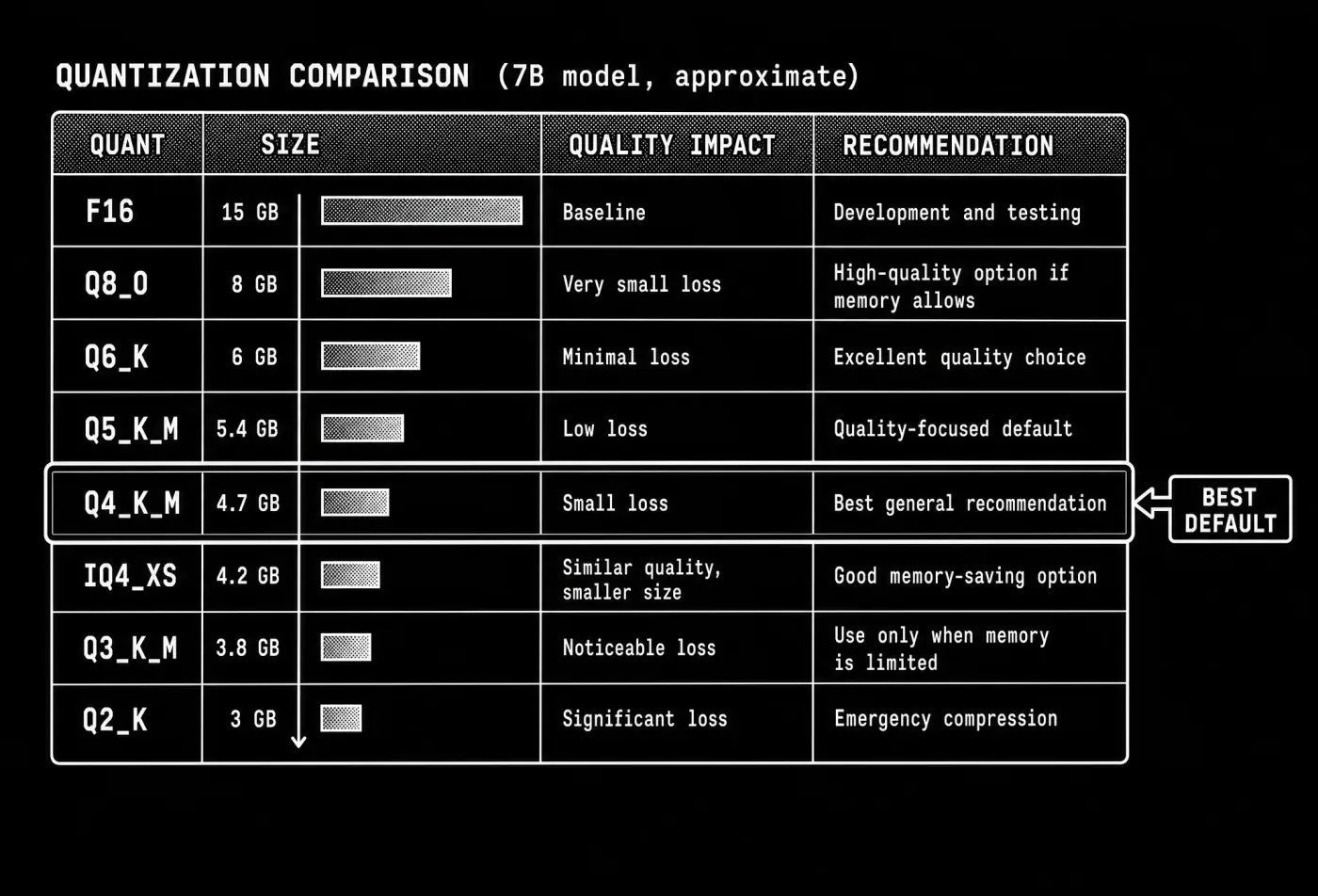
Let's take a look at an example. The table below shows approximate differences for a 7B model.
| Quant | Approximate size (7B) | Quality impact | Recommendation |
|---|---|---|---|
F16 | 15 GB | Baseline | Development and testing |
Q8_0 | 8 GB | Very small loss | High-quality option if memory allows |
Q6_K | 6 GB | Minimal loss | Excellent quality choice |
Q5_K_M | 5.4 GB | Low loss | Quality-focused default |
Q4_K_M | 4.7 GB | Small loss | Best general recommendation |
IQ4_XS | 4.2 GB | Similar quality at smaller size | Good memory-saving option |
Q3_K_M | 3.8 GB | Noticeable loss | Use only when memory is limited |
Q2_K | 3 GB | Significant loss | Emergency compression |
Note: The differences between higher-bit quantizations are often smaller than their memory requirements suggest. Moving from Q4_K_M to Q6_K can improve quality, but if you have that memory to spend, a larger model at lower quantization will usually outperform a smaller model at higher quantization.
The biggest drop in quality usually happens at very low bitrates. Once moving below approximately 4 bits, the loss from aggressive compression becomes more noticeable, which is where importance-aware I-quants can provide better results than older low-bit K-quants.
Match the quant to your RAM or VRAM
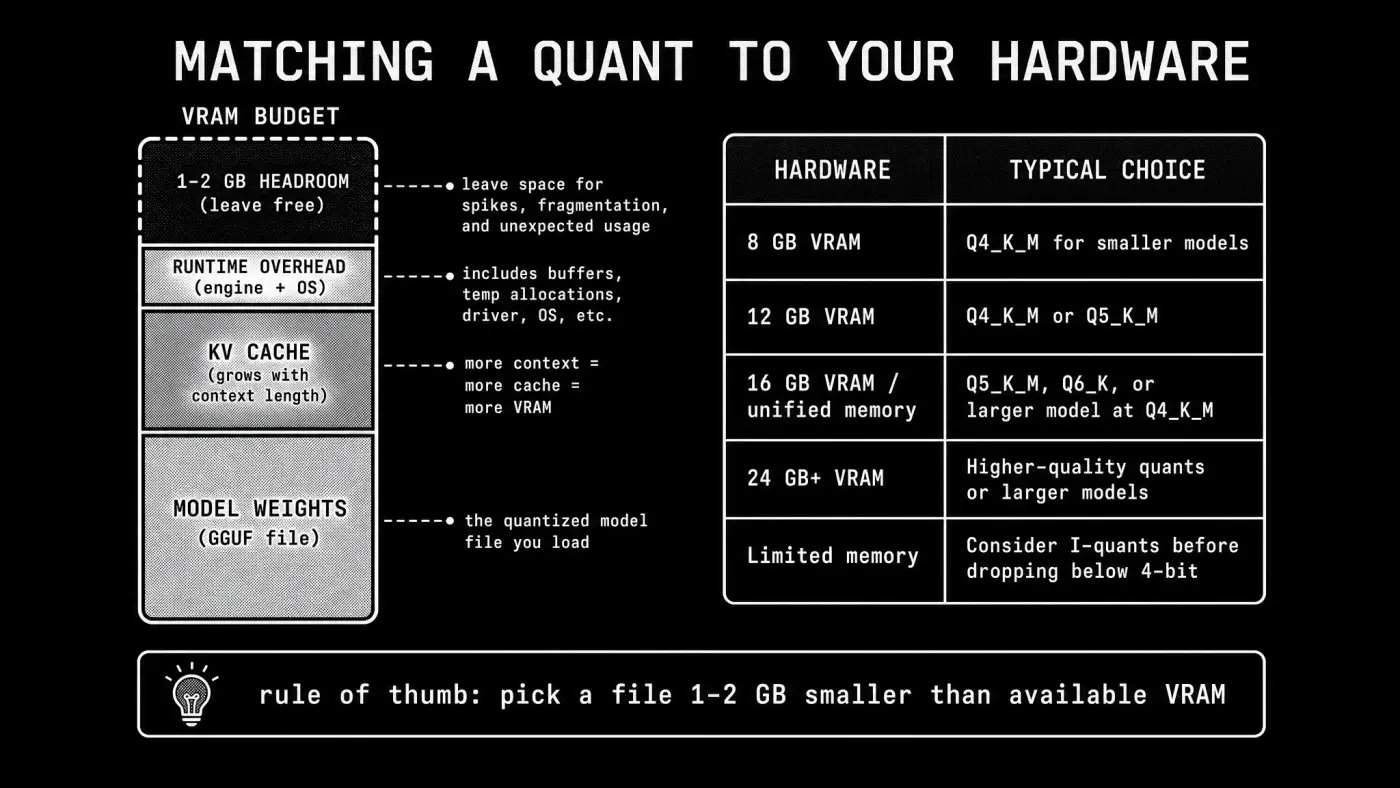
The most important factor when choosing a GGUF file is whether your hardware can comfortably hold the model during inference. The model weights are only part of the memory requirement. The inference engine also needs memory for:
- KV cache: Stores previous conversation tokens so the model can continue generating efficiently.
- Runtime overhead: Memory used by the inference engine and operating system.
- Context length: Longer conversations require a larger KV cache.
Because of this, a model that exactly matches your available VRAM may not run well. Leave some free memory rather than filling your GPU completely with model weights.
A common guideline is to choose a GGUF file that is around 1–2 GB smaller than your available VRAM. This is only a starting point; larger context windows and larger models may require additional headroom.
On systems using unified memory, such as Apple Silicon Macs, apply the same principle to total available RAM.
| Hardware | Typical choice |
|---|---|
| 8 GB VRAM | Q4_K_M for smaller models |
| 12 GB VRAM | Q4_K_M or Q5_K_M |
| 16 GB VRAM / unified memory | Q5_K_M, Q6_K, or larger models at Q4_K_M |
| 24 GB+ VRAM | Higher-quality quants or larger models |
| Limited memory | Consider I-quants before dropping below 4 bits |
If a model does not fit, the usual order of compromises is:
- Use a smaller quantization.
- Use an I-quant at a similar size.
- Use a smaller model.
- Reduce context length.
When not to use Q4_K_M
We said above that it's usually a good idea to start with Q4_K_M, but there are specific cases when you might prefer a different quantization level:
You need maximum accuracy for demanding tasks.
Some workloads are more sensitive to small changes in model weights. For example, programming, mathematical reasoning, and structured output generation can be less forgiving than general chatting or summarization. For these tasks specifically, it may be worth moving up to Q5_K_M or Q6_K.
You can run a larger model instead.
Model size often matters more than quantization level. A larger model at a lower quantization can outperform a smaller model at a higher quantization. For example, a 13B model at Q4_K_M will often provide better results than a 7B model at Q8_0, despite having a lower precision format.
The general priority is:
- Choose the largest model that fits your hardware.
- Use a quantization level that keeps quality acceptable.
- Avoid dropping below 4 bits unless memory constraints require it.
Where to download GGUF models
The largest collection of public GGUF models is available on Hugging Face. The platform provides a GGUF library filter that makes it easier to find models already converted for local inference.
To browse GGUF models, select GGUF under the Libraries filter on the Hugging Face model page, or use the GGUF model filter directly.
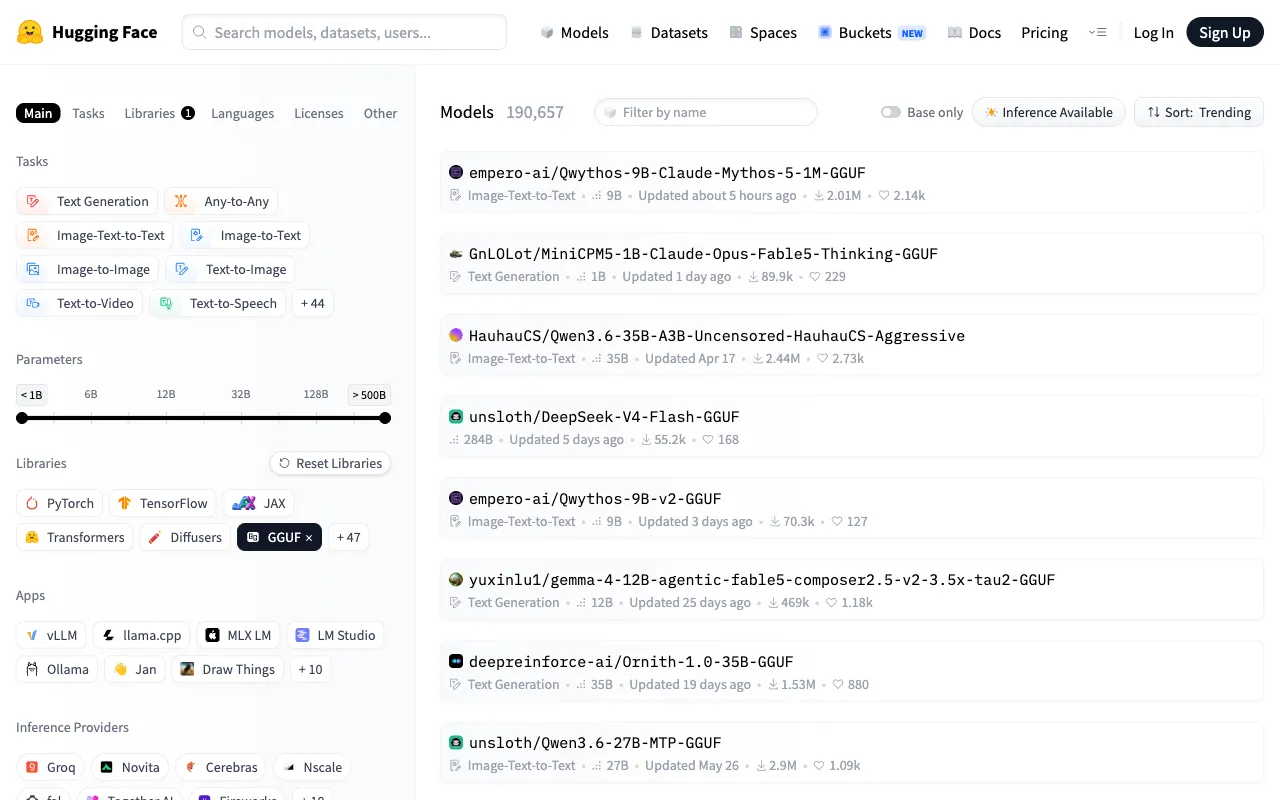
Search for the model you want and look for a repository containing GGUF files. For popular open models, GGUF conversions are often published shortly after the original model release by community members who specialize in quantization.

Trusted uploaders
GGUF files can be created by anyone, but the quality of a quantization depends on the conversion process and the metadata included with the model.
Established uploaders usually provide:
- Multiple quantization options
- Clear file size information
- Hardware recommendations
- Model-specific notes and benchmarks
- Correct tokenizer and metadata files
Some widely used GGUF uploaders include:
- bartowski — Known for extensive quantization releases and detailed model cards with recommendations.
- unsloth — Frequently publishes GGUF versions of newly released models with documentation.
- mradermacher — Maintains a large catalog, including many I-quant releases.
- TheBloke — One of the early major contributors to the local LLM quantization ecosystem. Many older GGUF repositories remain available from this account.
What local LLM apps can run GGUF files?
A .gguf file is only a model file. To use it, you need an inference engine or application that can load the model and generate text. GGUF is supported by many local AI applications, including:
- llama.cpp — The reference implementation for GGUF inference. It provides low-level control and supports CPU, GPU, and hybrid inference.
- Ollama — A local model runtime that provides model management, a CLI, and a local API.
- LM Studio — A desktop application for browsing, downloading, and chatting with local models.
- Jan — An open-source desktop application designed around local-first AI.
- Open WebUI — A browser interface that connects to local inference backends such as Ollama and llama.cpp.
- Atomic Chat — A local AI application with built-in GGUF model discovery and hardware-aware model selection.
If you're comparing local AI applications, see our guides on Ollama vs LM Studio and the best local LLM apps.
Run GGUF models in Atomic Chat
Atomic Chat uses GGUF as its native model format and aims to make running local models much simpler.
Instead of making you:
- Search Hugging Face manually
- Compare dozens of quantization variants
- Estimate whether a model will fit in your available memory
Atomic Chat handles much of that work for you.
The app can discover compatible GGUF models and recommend quantizations based on your hardware, so you don't have to decipher filenames like Q4_K_M or manually calculate memory requirements before downloading a model.
Of course, the model weights aren't the only thing that uses memory during inference. Another major component is the KV cache, which stores information from previous tokens so the model can continue generating coherent responses. As conversations get longer, the KV cache grows as well.
To help with this, Atomic Chat includes additional memory optimizations. One example is TurboQuant, a KV-cache compression technique developed by the Google Research team. It reduces the precision of the KV cache while preserving model quality, allowing longer context windows with lower memory usage. Unlike model quantization, which permanently reduces the precision of the model weights, KV-cache compression only affects the temporary memory used during inference. The two techniques are independent and can be used together.
The end result is that you can run longer conversations using less memory while keeping the same underlying GGUF model.
Multi-Token Prediction (MTP) for Qwen on LLaMA.cpp!
— atomic.chat (@atomic_chat_hq) May 14, 2026
+40% performance! 90% acceptance rate. Running locally on a MacBook Pro M5 Max 64GB
We patched LLaMA.cpp, quantized Qwen 3.6 27B into GGUF format with TurboQuant and shipped MTP drafts on top. Benchmark, Source code & models👇 pic.twitter.com/TV4O1UOcZk
GGUF vs other model formats
Notably, GGUF is not the only format used for local and production AI models. Different formats are optimized for different workflows.
Some formats prioritize:
- Training and fine-tuning
- GPU serving performance
- Apple Silicon optimization
- Broad hardware compatibility
The right format depends on where and how the model will run.
| Format | Best for | Main advantage | Main limitation |
|---|---|---|---|
| GGUF | Local inference | Runs across CPUs, GPUs, and mixed hardware | Usually slower than specialized GPU formats |
| Safetensors | Training and model distribution | Safe, efficient tensor storage | Not designed as a complete local inference format |
| GPTQ | GPU inference | Mature 4-bit quantization ecosystem | Requires compatible GPU software stacks |
| AWQ | GPU inference | Strong quality/performance balance | Primarily GPU-focused |
| EXL2 | Maximum GPU speed | Very fast VRAM-only inference | Requires supported backends |
| MLX | Apple Silicon | Optimized for Mac hardware | Limited to Apple devices |

GGUF vs Safetensors
Safetensors is primarily a model storage format used for training, fine-tuning, and distribution. It stores model tensors safely and efficiently and was created as an alternative to Python pickle-based formats, which could execute arbitrary code when loading files.
A typical Hugging Face model repository may contain:
- Safetensors files containing model weights
- Configuration files describing the architecture
- Tokenizer files
- Additional metadata
GGUF packages the information required for local inference into a single file and adds support for efficient quantized weights.
A common workflow looks like this:
- A model is trained and published using formats such as Safetensors.
- The model is converted into GGUF.
- The GGUF version is quantized and distributed for local inference.
Users who run models through GPU serving frameworks such as Transformers or vLLM often use Safetensors directly. Users running models locally on desktops and laptops commonly use GGUF.
GGUF vs GPTQ
GPTQ is an early post-training quantization method designed to reduce model size, commonly to 4-bit precision. It became popular because it allowed large models to run on consumer GPUs when full-precision versions were too large. However, GPTQ is primarily designed around GPU inference and usually requires the model to fit within available VRAM.
GGUF provides more flexibility because it can run across CPUs, GPUs, and mixed CPU/GPU configurations. GPTQ is still useful in GPU-focused inference environments, like datacenters, but GGUF is usually the more flexible choice for general local use.
GGUF vs AWQ
AWQ (Activation-aware Weight Quantization) is another GPU-focused quantization method designed to preserve important model weights while reducing precision.
Compared with older GPTQ workflows, AWQ can provide strong performance and quality characteristics in GPU inference frameworks.
The main difference is hardware focus:
- AWQ is optimized for GPU inference when the model fits in VRAM.
- GGUF is optimized for flexibility across different hardware configurations.
For dedicated GPU servers, AWQ can be an excellent choice. For laptops, desktops, and mixed CPU/GPU systems, GGUF is usually more practical.
GGUF vs EXL2
EXL2 is a quantization format designed for high-performance GPU inference through the exllamav2 ecosystem.
One of its advantages is support for fractional bit rates, allowing files such as 4.65bpw that provide more precise control over the memory/quality tradeoff than traditional integer labels.
EXL2 can be extremely fast when the entire model fits in VRAM. However, it is designed around GPU-only inference and depends on specific supported backends.
GGUF vs MLX
MLX is Apple's machine learning framework designed specifically for Apple Silicon devices. MLX models can achieve excellent performance on Macs because they are optimized for Apple's unified memory architecture and hardware acceleration.
For Mac users, MLX and GGUF are both viable options depending on the model and application. We compared their performance directly in GGUF vs MLX on Mac.
Frequently asked questions
What does GGUF stand for?
There is no official expansion of the GGUF acronym. The format specification does not define the name. The documented origin is that GGUF follows GGML, which was named after its creator Georgi Gerganov and "ML" for machine learning.
What's the difference between GGUF and GGML?
GGML was the earlier model format used by llama.cpp. It stored tensors efficiently but lacked the metadata system needed to support many newer model architectures.
GGUF replaced GGML in 2023 with a more extensible format that stores model information as key-value metadata, allowing better compatibility with new architectures.
Is GGUF better than safetensors?
They serve different purposes.
Safetensors is primarily used for storing, distributing, and fine-tuning models. GGUF is designed for efficient local inference, especially with quantized models.
A model may start as Safetensors and later be converted into GGUF for local use.
Which GGUF quant should I choose?
For most users, start with Q4_K_M.
Choose Q5_K_M or Q6_K if you have additional memory and want higher quality. If memory is very limited, consider smaller I-quants before moving to older low-bit formats.
What does Q4_K_M mean?
Q means the model uses quantized weights.4 indicates approximately 4-bit precision.K identifies the K-quant quantization family.M indicates the medium variant.
The number represents an approximate average precision rather than an exact number of bits for every weight.
Can GGUF use a GPU?
Yes. GGUF can run on CPUs, GPUs, or a combination of both.
Supported acceleration depends on the inference engine and hardware platform, including technologies such as CUDA, Metal, ROCm, and Vulkan.
One of GGUF's advantages is that models can often run even when they do not fully fit into GPU memory by offloading some work to the CPU.
Where can I download GGUF models?
The largest collection of public GGUF models is available on Hugging Face. Look for established uploaders that provide clear model cards, quantization information, and hardware recommendations.
Commonly used GGUF uploaders include bartowski, unsloth, and mradermacher.
Can I convert safetensors to GGUF?
Yes. llama.cpp provides conversion tools such as convert_hf_to_gguf.py, followed by quantization tools such as llama-quantize.
Most popular models already have GGUF versions available, so conversion is usually only needed for newer or less common models.
Is Q8 always better than Q4?
Q8 preserves more precision, but higher precision is not always the best choice.
For many users, the additional memory required by Q8 is better spent running a larger model or increasing context length. The practical difference between high-quality quantizations is often smaller than the difference between model sizes.
What is a quantized model?
A quantized model stores its weights using lower precision values than the original model.
Instead of using formats such as 16-bit precision, quantized models may use 8, 6, 5, or 4-bit representations. This reduces memory requirements while introducing a controlled amount of quality loss.
Wrapping up
GGUF is the standard format for running many open-source language models locally because it combines portability, quantization support, and compatibility with a wide range of hardware. Here are the key takeaways:
- GGUF packages the model and required metadata into a single file. It's the most popular format for distributing models on Hugging Face and other local LLM hubs.
- If this helps, you can loosely think of GGUF like a .zip or .rar file for a model.
- One of the main advantages of GGUF is efficient quantization support. Quantization stores model weights at lower precision, which compresses the model at a small quality-loss cost and allows it to fit into less RAM or VRAM.
If you'd like to learn more about getting started with local large language models, see our guide on how to run an LLM locally, or download Atomic Chat — our local LLM app that automatically suggests the best GGUF model for your system and installs it in one click.