
This guide explains what LLM quantization does to a model, what GGUF, MLX, GPTQ, AWQ, EXL3 and NVFP4 are and how they differ, how far each bit width moves a model away from its original outputs in our measurements, and which format to download for your hardware.
What LLM quantization is and why it matters
To start with, a language model contains billions of numbers that it uses to process your prompts. These numbers are called weights, and open models are usually released with each weight stored in 16 bits (BF16), and that decides how much memory the model needs. Quantization stores those weights in fewer bits, such as 8, 4 or less, by rounding each one to the nearest value a smaller number format can hold. The model then takes less memory and reads less data for every generated token.
Rounding has a price: each weight ends up slightly off, so the quantized model can work a little worse than the original. To keep that error small, formats store weights in small blocks that share a higher-precision scale.
What quantization affects
Quantization can touch three parts of a running model:
- Weights, the model's learned parameters. Every format in this guide quantizes them, and they account for most of the memory saving.
- Activations, the intermediate values computed for each token. Most formats keep them in 16 bits and quantize only the weights. A few newer formats quantize activations too, so on GPUs that support them the matrix math itself runs in low precision.
- The KV cache, which stores attention data for every token in the context. Weight quantization doesn't shrink it: the cache is compressed separately, while the model runs, and the weight format doesn't affect it.
Limits of quantization
The loss grows as bits drop. It stays small at 8 bits and, in our measurements later in this guide, speeds up below about 4 bits per weight.
A "4-bit" model takes more than 4 bits per weight. Besides the rounded weights, the file stores helper numbers needed to restore them, one for each small group of weights. With those included, most 4-bit files come to about 4.5–5 bits per weight, so a 4-bit model is larger than its bit width alone suggests.
Speed depends on hardware and runtime. A format runs only in runtimes that implement it, and its speed gain needs kernels for your GPU: some 4-bit formats get their speedup only on the newest GPUs.
Post-training quantization vs quantization-aware training
Every quantization method solves the same problem: how to round billions of weights so the model behaves as close to the original as possible. The weights don't matter equally. Rounding some of them barely changes the output, while rounding others changes it a lot. So a method either has to find the weights that matter and round them more carefully, or make the model less sensitive to rounding in the first place. That gives two families of methods.
Post-training quantization (PTQ) takes a model that has already finished training and adapts the rounding to it, without training it any further. It needs no training run, so anyone can quantize a released model on their own hardware. Many PTQ tools first run a small set of sample text through the model to see which weights affect the output most, then give those weights more precision. This step is called calibration; our builds use a public calibration corpus.
Quantization-aware training (QAT) does the opposite: it adapts the model to the rounding. The model is trained or fine-tuned while simulating low-precision weights, so it learns weights that lose less when rounded.
GGUF, MLX, GPTQ, AWQ, EXL3 and NVFP4 described
These six names don't describe the same kind of thing.
GGUF and MLX are file formats: they tell you what kind of file you download and which app can open it.
GPTQ, AWQ and EXL3 are quantization methods: they describe how the weights were rounded to fewer bits and which weights got extra precision, and EXL3 also has its own file format for ExLlamaV3.
NVFP4 is a number type: it describes how each weight is written down, here as a 4-bit floating-point number.
File formats, quantization methods and number types: pros and cons
File formats: GGUF and MLX
GGUF is the file format of llama.cpp engine and the apps built on it. It runs on CPUs, NVIDIA and AMD GPUs and Apple Silicon.
- One file holds everything: the weights, tokenizer, chat template and metadata.
- Models larger than VRAM still run. llama.cpp can run some layers on the CPU, so you can run a model a few gigabytes larger than your VRAM, but every layer moved to the CPU lowers tokens per second.
- The quant name is a recipe, not a result. Each tensor in the file can use its own quantization type, so a name like Q4_K_M (explained in What Is GGUF?) describes a general recipe: files with the same name from different publishers can differ in quality.
MLX is the format of Apple's machine-learning framework and runs only on Apple Silicon.
- No separate VRAM limit. Macs share one pool of memory between CPU and GPU, but the model still has to fit in memory alongside macOS.
- A 4-bit model takes 4.5 bits per weight. A standard 4-bit MLX model stores a 16-bit scale and offset for every 64 weights. Check the group size in config.json: smaller groups are larger but more accurate.
- Quality depends on the publisher. Basic conversion is plain rounding, while MLX-LM also offers calibrated methods such as AWQ, GPTQ and DWQ.
Quantization methods: GPTQ, AWQ and EXL3
GPTQ rounds a layer column by column and, after each step, adjusts the weights not yet rounded to absorb the error. That correction lets it go down to 3 bits, which makes the file about a fifth smaller than at 4 bits, at a larger cost in quality.
GPTQ checkpoints run in vLLM, an open-source inference server built to serve a model to many users at once, and in Hugging Face Transformers, the standard Python library for loading models.
AWQ finds the small share of weights that matter most by looking at how large the activations passing through them are. It scales those channels up before rounding everything to 4 bits, so they lose less precision.
It needs no backpropagation, and its authors report that it holds up on instruction-tuned and multimodal models. Most AWQ checkpoints are 4-bit with groups of 128.
EXL3 is the format of ExLlamaV3 runtime, based on QTIP, a research method from Cornell. Instead of rounding each weight on its own, QTIP encodes whole sequences of weights together, which packs more accuracy into the same number of bits.
EXL3 also lets you choose any average bitrate rather than fixed presets, so a model can be sized to your exact VRAM: if a 4-bit 27B file is about 1 GB too big, you can build a 3.7-bit one that fits instead of dropping to 3 bits.
ExLlamaV3 is built mainly for NVIDIA GPUs, AMD support is experimental, and dense models must fit entirely in VRAM.
In our Gemma 4 12B test on an RTX 5090:
- a GGUF Q5_K_M build stayed about 30% closer to the original than EXL3 at the same file size;
- ExLlamaV3 processed prompts more than twice as fast.
Full results are in EXL3 vs GGUF.
GPTQ or AWQ? In practice there's little difference: at 4 bits both produce similar checkpoints that run on the same kernels in vLLM. Take whichever is available for your model.
Number type: NVFP4
NVFP4 is NVIDIA's 4-bit floating-point number type, not a file format or a method.
MLX, GPTQ, AWQ and most GGUF types store each rounded weight as an integer: one of 16 evenly spaced steps at 4 bits. NVFP4 stores it as a tiny floating-point number instead, with steps packed closer together near zero, so more of its precision goes to small values, where most weights sit.
Every 16 values share an 8-bit scale, which comes to 4.5 bits per value. In practice, an NVFP4 file is about the same size as a 4-bit GGUF, so it doesn't save memory.
Its advantage is speed on new hardware: Blackwell GPUs (RTX 50 series, RTX PRO Blackwell, DGX Spark) run FP4 math natively. llama.cpp supports NVFP4 inside GGUF files. In our RTX 5090 tests, three community NVFP4 builds, compared with ordinary GGUF builds:
- processed 4K prompts 28–58% faster;
- generated tokens 2–10% faster.
We didn't separate the effect of FP4 hardware from that of the smaller files. Details are in Best Local LLMs for RTX 5090 and What Is NVFP4?
- Advantages: native FP4 math on Blackwell GPUs; finer scaling than MXFP4.
- Drawbacks: on older GPUs it is just another 4-bit format.
What our Qwen3.8 27B measurements show
This part shows what quantization does in practice, using our own measurements of Qwen3.8 27B, a model people commonly run locally. We built and measured many GGUF files of the same model and compared each with the original, which let us check three things:
- how much quality a model loses as its file gets smaller;
- whether files with the same quant name from different publishers are equally good;
- whether it matters which parts of the model get the extra bits.
We measured 16 GGUF builds against the original BF16 weights, using the same evaluation text. KL divergence measures how much their next-token probability distributions differ. Top-1 agreement measures how often their highest-probability next token is the same. Neither is a direct measure of task accuracy, and disagreement with BF16 does not by itself mean a wrong answer.
Measurement setup and limits
- What we compared against: the original, unquantized model (BF16). Every quantized file is scored by how far its predictions drift from it. Even Q8_0, the largest quantized file, drifts slightly.
- Test text: 356,352 tokens of mixed text that wasn't used while building the files, so the results aren't tuned to the test.
- Calibration text: a separate set of about 5 million tokens that we used while building our files to find which weights matter most (the calibration step described above). It covers code, reasoning, tool use, multilingual and long-context text, and doesn't overlap with the test text.
- Tools and hardware: llama.cpp's built-in evaluation tool, run on RTX 5090 GPUs.
- Other publishers' files: downloaded and tested the same way, on the same text, against the same original.
We used the same text to compare layouts, so treat these as development results on one model, not an independent benchmark.
The model card lists released builds; the metrics repository provides logs, reference information and tensor-level recipes.
Prediction drift as files get smaller
In GGUF, the number after Q is roughly the bits per weight: Q8_0 is the standard 8-bit type and the largest file here, Q4 files are about 4 bits, and IQ1 files are the smallest. The AD prefix marks our own Atomic Dynamic builds: for example, AD-Q4_K_M is our version of a Q4_K_M-sized file, with extra bits placed where our measurements showed they matter most.
Across these builds, top-1 agreement changes relatively little between Q8_0 and AD-Q5_K_M, then falls more rapidly toward the smallest files. The chart uses total file size rather than nominal bit width because each build can mix tensor types.
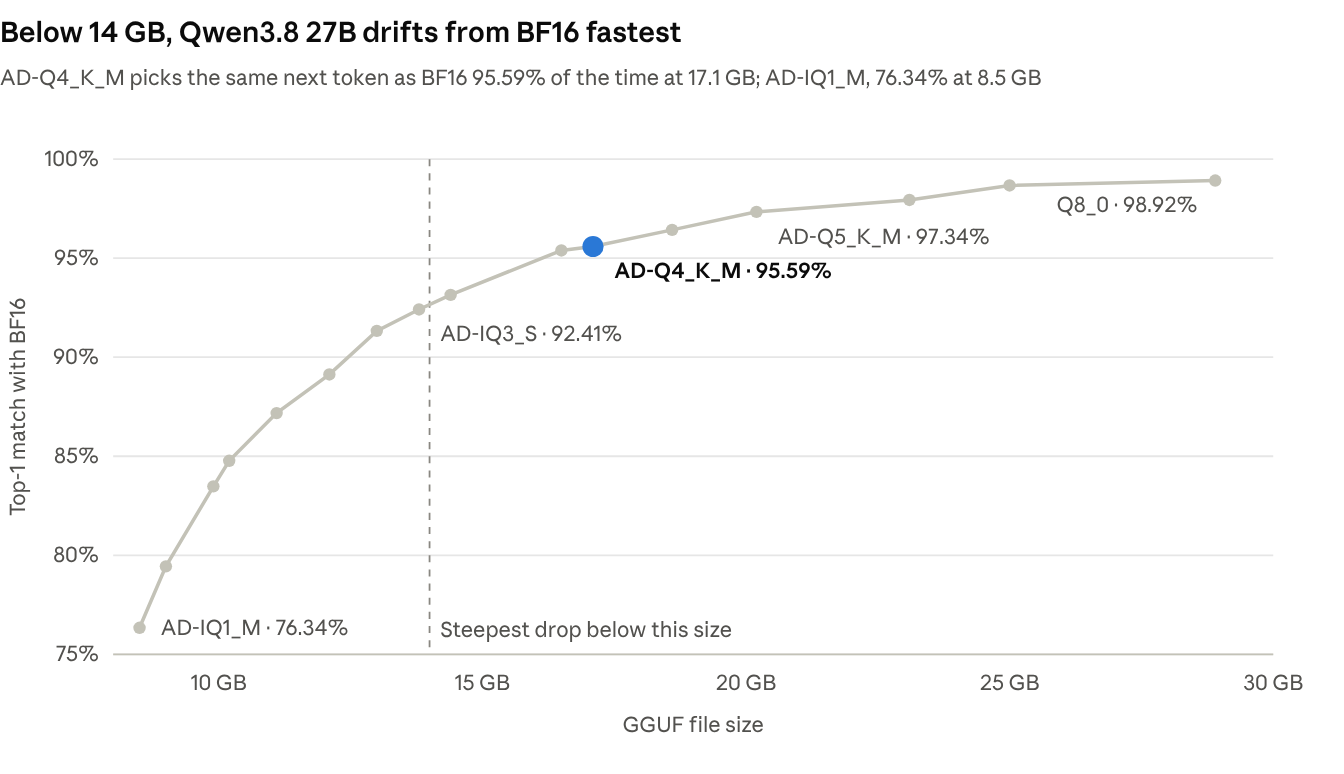
Sixteen builds, one BF16 reference. AD-Q4_K_M reaches 95.59% top-1 agreement at 17.1 GB; AD-IQ1_M reaches 76.34% at 8.5 GB.
From Q8_0 to AD-Q5_K_M, top-1 agreement falls by 1.58 percentage points. From AD-Q4_K_M to AD-IQ1_M, it falls by 19.25 percentage points.
We recommend Q4_K_M-class builds or larger. If those don't fit in your memory, a smaller model is likely a better choice than a more aggressive quant.
Three files labelled Q4_K_M
We measured three publishers' Q4_K_M builds under the same conditions:
The 17.1 GB AtomicChat file has about 46% lower KL divergence than the 16.8 GB lmstudio-community file. The ggml-org file is the largest of the three but still drifts more than ours.
Our builds do not lead at every size. Unsloth's UD-Q4_K_XL reaches 0.00955 KL divergence at 17.9 GB, compared with 0.01126 for our 17.1 GB AD-Q4_K_M.
Where the extra bits go
Earlier in this guide, we saw that some weights affect the output more than others. The same is true of whole parts of the model. A language model processes text through a stack of layers, one after another: Qwen3.8 27B has more than 60 of them, each with its own weights. A quantized file doesn't have to round every layer to the same number of bits: it can give some layers extra precision and keep others smaller. So a file's quality depends not only on how many bits it has in total, but also on which layers get them.
To test this, we took one baseline file and added about 1 GB of extra bits to it in two different ways. Both results are exactly the same size:
The same gigabyte, placed in the right layers, made the file about 18% closer to the original. This is why two files of the same size, or with the same quant name, can differ in quality, as the three Q4_K_M files above did.
Which format to use on your hardware
Running quantized models in Atomic Chat
Atomic Chat runs GGUF and MLX models.
Our AD GGUF model cards include KL divergence and top-1 agreement against BF16 where measured. Use these to compare prediction drift alongside file size.
On a Blackwell GPU, import a supported NVFP4 GGUF through Settings → Model Providers → llama.cpp → Import.
To save memory on long contexts, Atomic Chat compresses the KV cache with TurboQuant. It works on top of any weight format and doesn't change the file you download. You can turn it on in the model's cache settings.
Frequently asked questions
What is LLM quantization?
Quantization stores a model's weights in fewer bits, such as 8 or 4 instead of the original 16, by rounding each one. The model then needs less memory and runs faster, at the cost of a small loss in quality.
Does quantization make a model worse?
Slightly, and the loss grows as bits drop. In our Qwen3.8 27B measurements, 8- to 5-bit files stayed very close to the original, and quality fell much faster below about 4 bits. Our metrics show how close a file stays to the original, not how well it solves a specific task.
Why is a 4-bit model larger than 4 bits per weight?
Besides the rounded weights, the file stores helper numbers, one for each small group of weights, that are needed to restore them. With those included, most 4-bit files come to about 4.5–5 bits per weight.
What is the difference between GGUF, GPTQ and NVFP4?
They answer different questions. GGUF is a file format: what you download and which app opens it. GPTQ is a quantization method: how the weights were rounded. NVFP4 is a number type: how each weight is written down. That's why they can be combined, for example an NVFP4 model in a GGUF file.
Which format should I use on a Mac?
GGUF or MLX. Both run on Apple Silicon; MLX runs only there, while GGUF also works on Windows and Linux. EXL3 runs mainly on NVIDIA GPUs.
Is GPTQ or AWQ better?
In practice there's little difference: at 4 bits both produce files of about the same size that run on the same software. Take whichever is available for your model.
Why do files with the same quant name differ in quality?
A quant name describes a general recipe, and each publisher decides which parts of the model get extra bits. In our tests, files with the same name and almost the same size differed by about two times in how far they drifted from the original.
Does quantization shrink the KV cache?
No. Weight formats don't change the KV cache, the memory that grows with context length. It's compressed separately while the model runs; in Atomic Chat, this is done with TurboQuant.
Can I convert a GGUF file to EXL3 or GPTQ?
Start from the original 16-bit weights instead. Quantizing an already quantized file adds a second rounding error on top of the first and can't recover what was lost.
Sources
- vLLM: Quantization, supported hardware and inference backends
- llama.cpp: Quantization tool and tensor-type overrides
- MLX-LM
- Frantar et al.: GPTQ
- Lin et al.: AWQ
- QTIP: Quantization with Trellises and Incoherence Processing
- ExLlamaV3: project documentation
- ExLlamaV3: releases and ROCm support
- NVIDIA: Introducing NVFP4
- AtomicChat: Qwen3.8 27B GGUF builds and measurements
- AtomicChat: calibration corpus
- Atomic Chat: EXL3 vs GGUF
- Atomic Chat: Best Local LLMs for RTX 5090