
By now, there are probably hundreds of thousands of MCP connectors that can expand what your AI model can do by letting it interact with external tools and apps.
If you're looking for the best MCP servers and wondering which ones are worth installing, you're in the right place. We've put together a list of 38 useful MCP connectors for productivity apps, development tools, databases, web research, cloud infrastructure, and automation.
What are MCP connectors?
MCP connectors are integrations that allow AI applications to use tools provided through the Model Context Protocol (MCP).
MCP is an open protocol for exposing tools, resources, and other capabilities to AI applications through a standardized interface. An MCP server defines the capabilities available to the application, while the application decides when and how to use them.
An MCP integration typically involves the following components:
| Component | Example | Role |
|---|---|---|
| MCP host | Atomic Chat | Runs the AI application and connects to MCP servers |
| AI model | Llama, Qwen, Gemma, or a hosted model | Interprets requests and selects tools |
| MCP server | Notion MCP server | Exposes tools for a particular service or system |
| External service | Notion workspace | Contains the data or functionality accessed by those tools |
38 Best MCP connectors
We've organized MCP connectors by category so you can jump straight to the tools that match your work.
| Category | Connectors in this section |
|---|---|
| Develop and debug software | GitHub, GitLab, Context7, Playwright, Figma, Sentry, Atlassian Rovo |
| Search documents and coordinate work | Notion, Obsidian, Google Drive, Slack, Linear, Airtable, Gmail, Google Calendar, Asana |
| Query databases and data platforms | PostgreSQL, Supabase, MongoDB, Redis, Neon, Qdrant, BigQuery |
| Search or operate on the web | Brave Search, Tavily, Exa, Firecrawl, Apify, Browserbase |
| Work with cloud infrastructure | AWS, Cloudflare, Azure, Google Cloud, Kubernetes, Terraform, Vercel |
| Automate workflows and payment operations | Stripe, n8n |
MCP connectors for software development, debugging, and design
These MCP connectors give coding agents access to repositories, tickets, documentation, browsers, designs, and production errors.
1. GitHub
The official GitHub MCP Server connects MCP clients to GitHub repositories and development workflows. It can work with repositories, issues, pull requests, releases, GitHub Actions, and code security.
GitHub provides both local and remote connection options. You can also limit the server with specific toolsets, read-only mode, or lockdown mode, which helps avoid giving it access to more repositories and actions than the project requires.
2. GitLab
The GitLab MCP server connects compatible clients to GitLab.com, GitLab Self-Managed, and GitLab Dedicated.
With GitLab MCP, you can work with:
- projects;
- issues;
- merge requests;
- other GitLab development data.
Authentication uses OAuth. The server is currently in beta and may need to be enabled for the relevant group or instance.
3. Context7
Context7, maintained by Upstash, gives a model access to current documentation and code examples for libraries and frameworks.
This is useful when the model understands a library in general but is missing a newer API, configuration option, or framework change.
Context7 does not replace GitHub or Git. It provides information about the libraries your project depends on, while repository connectors provide access to the project's own code.
4. Playwright
Playwright MCP gives an MCP client control of a browser. It can open pages, click controls, fill forms, and inspect the current state of an interface through structured accessibility data.
That makes it useful for debugging web interfaces and running repeatable browser checks without depending entirely on screenshots.
Microsoft notes that Playwright MCP should not be treated as a security boundary. An authenticated browser may have access to sensitive accounts, and web pages can contain untrusted content. Separate browser profiles and approval controls can reduce that exposure.
5. Figma
The official Figma MCP server gives supported clients access to the structure of a Figma design, including frames, components, variables, layouts, Code Connect mappings, and assets.
Instead of reconstructing an interface from a screenshot, a coding agent can inspect the actual design data behind it.
With Figma MCP, you can:
- retrieve design context;
- read component and variable information;
- access assets and Code Connect mappings;
- create or modify native Figma content in supported clients.
Figma offers both remote and local MCP options. The hosted remote server has the broader feature set, although client compatibility is limited to applications supported by Figma.
6. Sentry
The Sentry MCP server connects coding agents to the diagnostic information stored in Sentry. It can retrieve issues, inspect events and traces, and provide the context surrounding an application error.
Its focus is debugging rather than managing every part of Sentry. The connector helps the model understand what happened in production, while code changes are still reviewed and applied through the normal development workflow.
7. Atlassian Rovo
The Atlassian Rovo MCP server connects MCP clients to Jira, Confluence, and Compass.
With Rovo MCP, a client can search project information and documentation, read work items, and create or update supported content. Having Jira and Confluence available through the same connector also makes it easier to connect implementation work with the specifications and decisions behind it.
Authentication uses OAuth 2.1 or scoped API tokens, and the server only exposes information the connected Atlassian account is allowed to access.
The remote server is designed for Atlassian Cloud. Support for self-managed Atlassian products should be checked separately.
MCP connectors for documents, communication, and project work
These MCP connectors bring documents, notes, email, calendars, and project trackers into the same conversation as the model.
8. Notion
The official Notion MCP server connects AI clients to pages and databases inside a Notion workspace. It can search existing content, retrieve pages, create new material, and update structured information.
With Notion MCP, a client can work across multiple pages instead of treating each document separately. That makes it well suited to project documentation, research collections, specifications, and other work that already lives in Notion.
Notion recommends its hosted OAuth server. The older open-source server is still available for specialized self-hosted or token-based setups, but it is no longer actively maintained.
9. Obsidian
Obsidian MCP connectors give AI clients access to notes stored in an Obsidian vault.
Depending on the server, you can:
- search notes;
- read and edit Markdown files;
- create new notes;
- work with links between documents.
There is no single official Obsidian MCP server. Most options are community-maintained, so their features and permission models differ. The vault itself remains a normal collection of Markdown files that can be edited or backed up without MCP.
10. Google Drive
The Google Drive MCP server provides access to files stored in Google Drive. It can find and retrieve files and supports selected operations for uploads, listings, permissions, and file management.
This gives an MCP client direct access to documents and other project material already stored in Drive, rather than requiring files to be uploaded into each conversation manually.
Google currently labels the service a developer preview. Setup requires a Google Cloud project, enabled APIs, OAuth configuration, and the appropriate Drive scopes, so it is more involved than connecting a typical consumer app.
11. Slack
The official Slack MCP server connects MCP clients to Slack conversations and workspace data.
With Slack MCP, you can search channels, read conversation context, send messages, and use other actions exposed by the connected Slack app. This makes it possible to bring information from threads and channels into the same workflow as code, documents, or project tools.
Access depends on the registered Slack app behind the connection. OAuth scopes, admin approval, workspace controls, and audit policies determine what the client can read or change.
For message sending, keeping a review step before posting helps prevent an ambiguous prompt from becoming a public workspace action.
12. Linear
The Linear MCP server connects AI clients to Linear's issue and project system. It can find, create, and update issues, projects, comments, and related planning objects.
Linear provides two useful connection modes:
- a standard read-write endpoint for workflows that need to change project data;
- a dedicated read-only endpoint for research, summaries, and reporting.
The read-only option is particularly useful when the client only needs project context and should not be able to alter tickets or planning data.
13. Airtable
The official Airtable MCP server gives AI assistants access to data stored in Airtable bases. It can query records, analyze data, and create or update information where the connected user has permission.
Its access model follows Airtable's existing roles. Owners, creators, and editors may be able to make changes, while commenters and read-only users receive correspondingly narrower access.
That means the permissions already configured on a base also determine what an MCP client can do with it.
14. Gmail
Google's Workspace MCP offering includes Gmail tools for searching mailboxes, reading messages, accessing profile information, creating drafts, and carrying out supported read-write actions.
With Gmail MCP, a client can:
- find messages and threads;
- read correspondence in context;
- prepare drafts;
- combine email information with data from other connected tools.
The Workspace MCP server is in developer preview and requires Google Cloud and OAuth setup.
Email content should also be treated as untrusted input. Messages can contain text intended to influence an AI client, so drafting before sending provides a useful review point.
15. Google Calendar
The Google Calendar MCP server exposes calendar data and scheduling actions to MCP clients.
It can search and list events, suggest available times, create or update meetings, respond to invitations, and delete events. This allows scheduling to be combined with information from email, project tools, or other connected sources.
The server is currently in developer preview and uses Google Cloud with OAuth authentication.
Calendar changes can affect other attendees, so actions such as creating, moving, declining, or deleting events benefit from remaining visible before they are committed.
16. Asana
The Asana MCP server gives compatible AI clients access to the Asana Work Graph, including projects, tasks, and related work-management data.
It can be used to find existing work, create tasks, update project information, and summarize activity across a project.
Asana groups its MCP tools into read, write, and interactive operations. Current integrations should use the V2 Streamable HTTP endpoint rather than the earlier beta SSE endpoint.
An authorized MCP connection can access the tools available to that user, so the permissions already configured in the Asana workspace remain the main boundary on what the client can see or change.
MCP connectors for databases and data platforms
Database MCP connectors give AI clients direct access to structured data. Some can also execute SQL, update records, manage schemas, or inspect database performance.
17. PostgreSQL
Postgres MCP Pro is a community-maintained MCP server for PostgreSQL. It can inspect schemas, execute SQL, check database health, analyze query plans, and recommend indexes.
With Postgres MCP Pro, you can:
- explore an unfamiliar database schema;
- investigate slow queries;
- inspect execution plans;
- identify potential indexing improvements.
It is not an official PostgreSQL Global Development Group project. Read-only access can be configured, while some of the more advanced performance tools depend on PostgreSQL extensions such as pg_stat_statements and hypopg.
18. Supabase
The official Supabase MCP server connects AI development tools to Supabase projects. Its tools cover database queries, migrations, logs, functions, project information, branching, and other development operations.
This makes the connector broader than a basic SQL interface: an agent can inspect the database and also work with other parts of the Supabase development environment.
Supabase currently labels the server public alpha and recommends it for development and testing rather than production data. Connections can be restricted to one project, selected feature groups, or read-only access.
19. MongoDB
The official MongoDB MCP Server works with both MongoDB data and Atlas management APIs.
It can inspect databases and collections, run CRUD operations and aggregations, examine schema information, and manage supported Atlas resources such as projects and clusters.
MongoDB provides several ways to limit access, including database roles, collection-level permissions, and Atlas service accounts. Its VS Code extension can also expose an MCP server using the database connection currently active in the editor.
20. Redis
Redis MCP gives an AI client access to data stored in Redis. It can read and write values, inspect keys, query supported data structures, and work with features such as streams.
With Redis MCP, a client can examine cached data, inspect application state, count or search keys, and analyze Redis datasets through natural-language requests.
Redis often contains live operational state, including sessions, queues, and caches. That makes write access more consequential than it may be with an isolated analytics database. Restricted users or dedicated databases are preferable when the connector does not need access to production state.
21. Neon
The Neon MCP server connects AI clients to Neon projects, databases, branches, migrations, and SQL queries.
Its most distinctive feature is Neon's branching model. Database changes can be created and tested on a separate branch before they affect the primary database, which fits well with agent-assisted schema work and application development.
Neon provides a managed remote server with OAuth or API-key authentication as well as a local option. Its documentation recommends using MCP for development and testing rather than production databases or data containing personally identifiable information.
22. Qdrant
The official Qdrant MCP server connects AI clients to Qdrant vector storage.
Its core workflow is simple:
- store information in a Qdrant collection;
- retrieve related information using semantic search.
That makes it different from the relational and document databases in this section. Qdrant is primarily used when information needs to be found by meaning and similarity rather than exact values or SQL conditions.
The server can work with a remote Qdrant instance or local storage and supports read-only access. Search quality also depends on the embedding model and how the collection is structured.
23. BigQuery
The BigQuery remote MCP server lets AI applications inspect BigQuery resources and run SQL against data stored in Google Cloud.
With BigQuery MCP, you can list resources, inspect table and dataset metadata, and execute analytical queries. It is aimed more at querying and understanding warehouse data than managing an application database.
Existing Google Cloud controls still apply, including IAM permissions, quotas, regional restrictions, and query costs.
This is especially important with large datasets: a generated query can scan far more data than expected even when the SQL itself is correct, so query scope and bytes processed should be checked before running expensive production analysis.
MCP connectors for web search, research, and browser work
These MCP connectors give AI clients access to live web search, page content, crawling, structured extraction, and browser automation.
24. Brave Search
The Brave Search MCP setup connects an AI client to Brave Search's web index. It is primarily used for current web results, source discovery, news, and research that depends on information outside the model's training data.
The connector uses the Brave Search API, so an API account and key are required. Pricing, request limits, and rules around storing results come from the API rather than the MCP client.
Brave Search returns sources, not verified conclusions, so the quality of the final answer still depends on how those sources are evaluated.
25. Tavily
The official Tavily MCP server combines web search with deeper retrieval tools.
With Tavily MCP, you can:
- search the web;
- extract content from pages;
- map a website;
- crawl multiple pages for broader research.
It is a good fit for research workflows that start with search and then need to inspect the most relevant sources in more detail.
Tavily provides a hosted endpoint with OAuth or API-key authentication.
26. Exa
The Exa MCP server provides web search, page retrieval, code search, and optional research tools.
Its main distinction is semantic search. Instead of relying only on exact keywords, Exa can search for pages that match the meaning of a request. That is useful when looking for a type of company, technical example, research topic, or concept that may be described using different language across the web.
Exa supports hosted and local package-based connections with OAuth or API keys. Optional tools can be enabled individually rather than exposing the full toolset.
27. Firecrawl
The Firecrawl MCP server retrieves web content and converts it into cleaner formats for AI models.
It covers more than basic page scraping. Firecrawl can search, scrape individual pages, crawl sites, generate site maps, extract structured fields, and perform supported browser interactions.
This makes it particularly useful when the important information is inside the page itself rather than in search-result snippets.
Firecrawl offers both a hosted service and an open-source server. Some functionality is available through a limited keyless tier, while larger crawls and extraction workloads require an account or API key.
28. Apify
The Apify MCP server connects AI clients to Apify Actors, which are prebuilt scraping and automation programs available through the Apify Store.
Actors cover a wide range of sources, including:
- websites and search engines;
- marketplaces;
- social platforms;
- maps and location data.
Instead of building a scraper for each source, an MCP client can discover an appropriate Actor, run it, and read the resulting dataset or storage output.
Actor runs can incur Apify usage charges. The MCP server can also be restricted to selected Actors and tools rather than exposing the full store.
29. Browserbase
The Browserbase MCP server gives AI agents access to hosted browser sessions powered by Stagehand.
The agent can navigate pages, click controls, type into forms, extract structured information, and keep a browser session active across multiple operations.
Browserbase differs from local browser tools such as Playwright because the browser runs on managed infrastructure rather than on the user's machine.
Persistent sessions can contain cookies, login state, and other sensitive browser data, so they should be treated as credentials rather than disposable scraping sessions.
MCP connectors for cloud platforms and infrastructure
These MCP connectors let AI clients inspect and manage cloud resources, infrastructure, deployments, logs, networking, and related platform services.
30. AWS
The AWS MCP Server is a managed remote server for working with AWS services through MCP. It can discover resources, inspect configurations, and perform AWS operations allowed by the connected identity.
Rather than exposing thousands of AWS API actions as separate MCP tools, the server uses a smaller fixed toolset to find and invoke the appropriate AWS capabilities.
AWS MCP is generally available and uses existing AWS authentication and IAM permissions. Activity performed through the server is reflected in the underlying AWS API calls and can be tracked through services such as CloudTrail.
31. Cloudflare
Cloudflare provides several managed MCP servers rather than a single connector for the entire platform.
There is a broad API server covering more than 2,500 Cloudflare endpoints, along with more focused servers for products and datasets such as:
- Workers and observability;
- DNS analytics and audit logs;
- Browser Rendering;
- Radar and AI Gateway.
The focused servers are useful when only one part of Cloudflare needs to be exposed to the client. Authentication is available through OAuth for interactive use and scoped API tokens for automation.
32. Azure
The Azure MCP Server connects AI development tools to supported Microsoft Azure services.
With Azure MCP, a client can work with services including Storage, Cosmos DB, Key Vault, Azure Monitor, App Configuration, Azure AI Search, and Azure Developer CLI workflows.
Access is controlled through Microsoft Entra ID and Azure Role-Based Access Control, so the server inherits the permissions assigned to the selected Azure identity.
Microsoft positions the local Azure MCP Server as a developer tool rather than a service intended to be exposed directly to end users.
33. Google Cloud
Google provides remote MCP servers for supported Google Cloud products. These connect AI clients directly to individual Cloud services, while Google's Developer Knowledge server provides current product documentation and implementation guidance.
The exact tools depend on the service. BigQuery, for example, exposes data and query operations, while other Google Cloud MCP servers focus on their corresponding platform resources.
Google Cloud does not use one universal MCP endpoint for every product. Availability, supported regions, and release status vary between services, and several of the newer MCP integrations remain in preview.
34. Kubernetes
The Kubernetes MCP server maintained by the Containers organization gives AI clients access to Kubernetes and OpenShift clusters.
It can inspect:
- workloads and other cluster resources;
- events and configuration;
- pod and application logs;
- resources available through the connected credentials.
The server can also perform cluster operations where its credentials permit them.
This is a community-maintained project rather than an official Kubernetes project. Its effective access is determined by the Kubernetes credentials and RBAC permissions supplied to it.
35. Terraform
The official Terraform MCP server gives AI development tools access to current Terraform provider and module information.
This is particularly useful when generating Terraform configuration because the client can retrieve current Registry information instead of relying on older provider schemas or module inputs from model training data.
Terraform MCP can also connect to HCP Terraform and Terraform Enterprise resources.
HashiCorp supports both local deployments and centrally managed remote setups. The connector assists with infrastructure authoring and context; existing Terraform workflows such as validation, planning, and apply remain separate steps.
36. Vercel
The official Vercel MCP server connects AI clients to Vercel projects and deployment information.
It can search Vercel documentation, inspect projects and deployments, and read deployment logs. That gives coding agents direct access to information about a deployed application without requiring the same details to be copied manually from the Vercel dashboard.
Vercel MCP uses a hosted OAuth connection and is currently in public beta.
Vercel also maintains a list of approved MCP clients, so support depends on the host application being used.
MCP connectors for automation and payments
These connectors connect AI clients to payment systems and automation platforms, where they can work with transactions, billing objects, workflows, and connected applications.
37. Stripe
The official Stripe MCP server gives AI clients access to Stripe documentation and supported Stripe resources.
With Stripe MCP, you can work with objects including:
- customers and products;
- prices and coupons;
- invoices and subscriptions;
- account balances.
This makes it useful for both Stripe development work and investigating billing data through natural-language requests.
Stripe currently labels the server a public preview. Access can be restricted with Stripe API keys, and test mode provides a separate environment for development before working with live payment data.
38. n8n
The built-in n8n MCP server connects AI clients to workflows running in an n8n instance.
It can find, create, edit, test, and run workflows, as well as work with n8n data tables. Existing workflows can also be exposed as individual MCP tools, allowing the client to trigger a complete automation without needing direct access to every service used inside it.
For example, a workflow that already gathers sales data, transforms it, and produces a report can be presented to the model as one higher-level tool rather than several separate integrations.
The instance-level n8n MCP server is currently in beta. Administrators enable MCP at the instance level and choose which workflows are available to connected clients.
How to use MCP connectors with a local model in Atomic Chat
Atomic Chat is a local AI app we've built to connect local and cloud models to different MCP servers. Once a server is added, its tools can be enabled for any supported model in a chat.
To set up MCP connectors in Atomic Chat:
- Install Atomic Chat and choose a model. You can use a local model or connect one from a cloud provider. Atomic Chat supports Llama, Qwen, Gemma, and more than 100 other models.
- Add the MCP server. Go to Settings → MCP Servers → Add MCP Server and enter the server's connection details.
- Enable the tools you want to use. In a chat, you can turn on the whole connector or choose individual tools.
Configured servers will appear on the MCP Servers page, along with their connection type and current status.
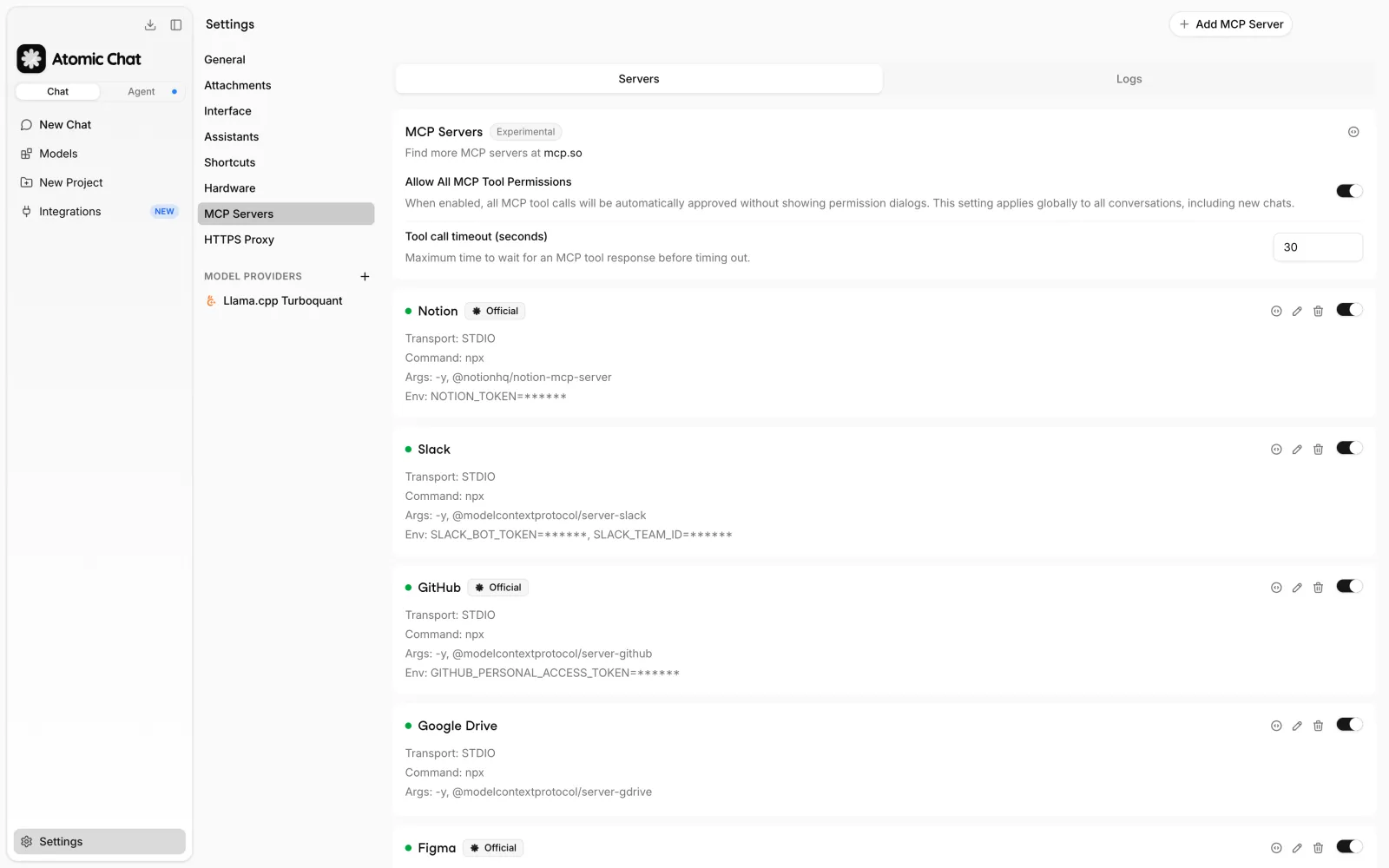
Atomic Chat supports STDIO, HTTP, and SSE connections. STDIO is commonly used for servers running on the same computer, while hosted MCP services generally use HTTP. SSE is mainly kept for compatibility with older remote servers.
The example below shows a local STDIO configuration for Sentry. The command and package arguments are entered directly, while the access token is stored as an environment variable.
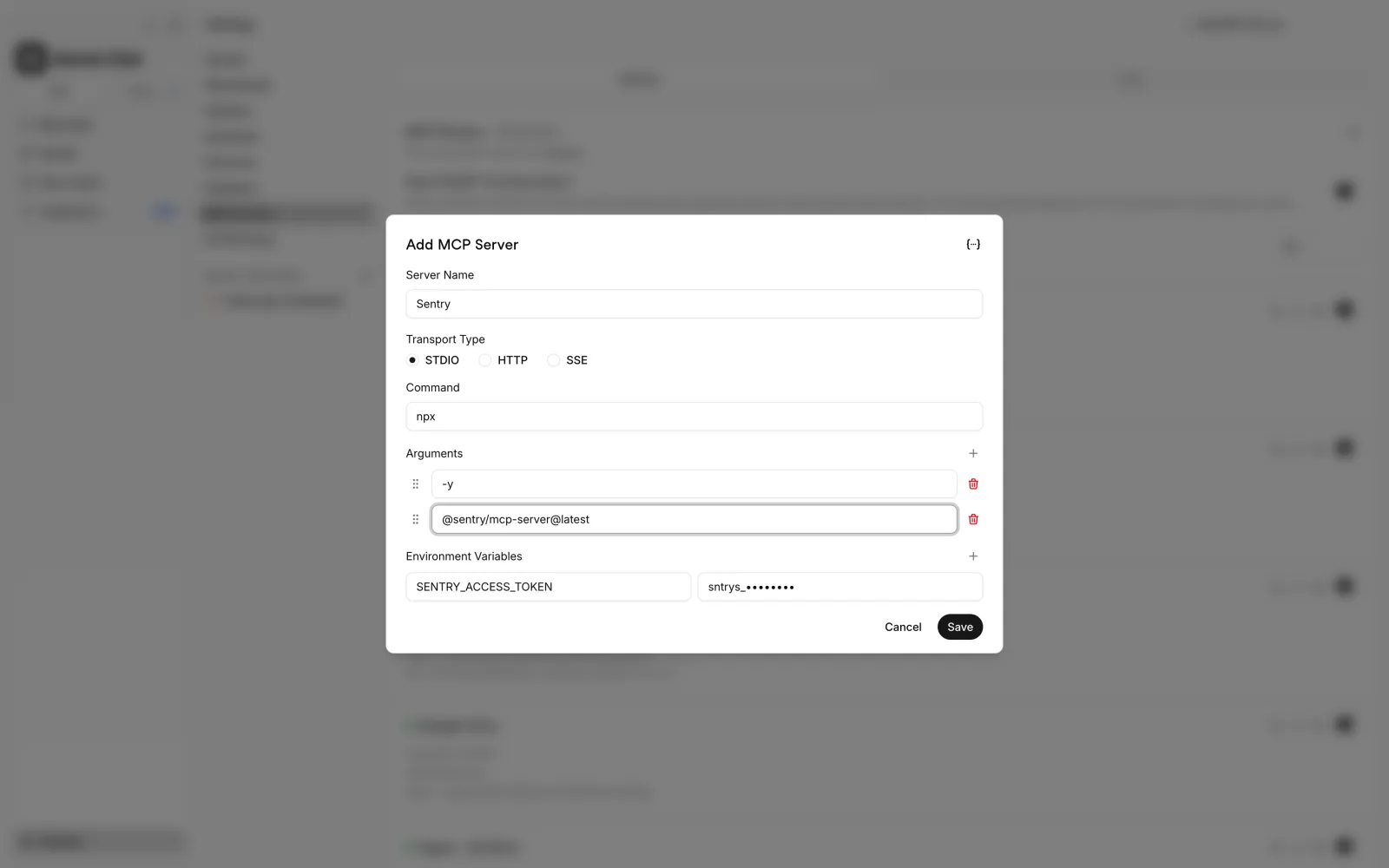
For a hosted server, select HTTP and enter the endpoint and authentication details provided by the service.
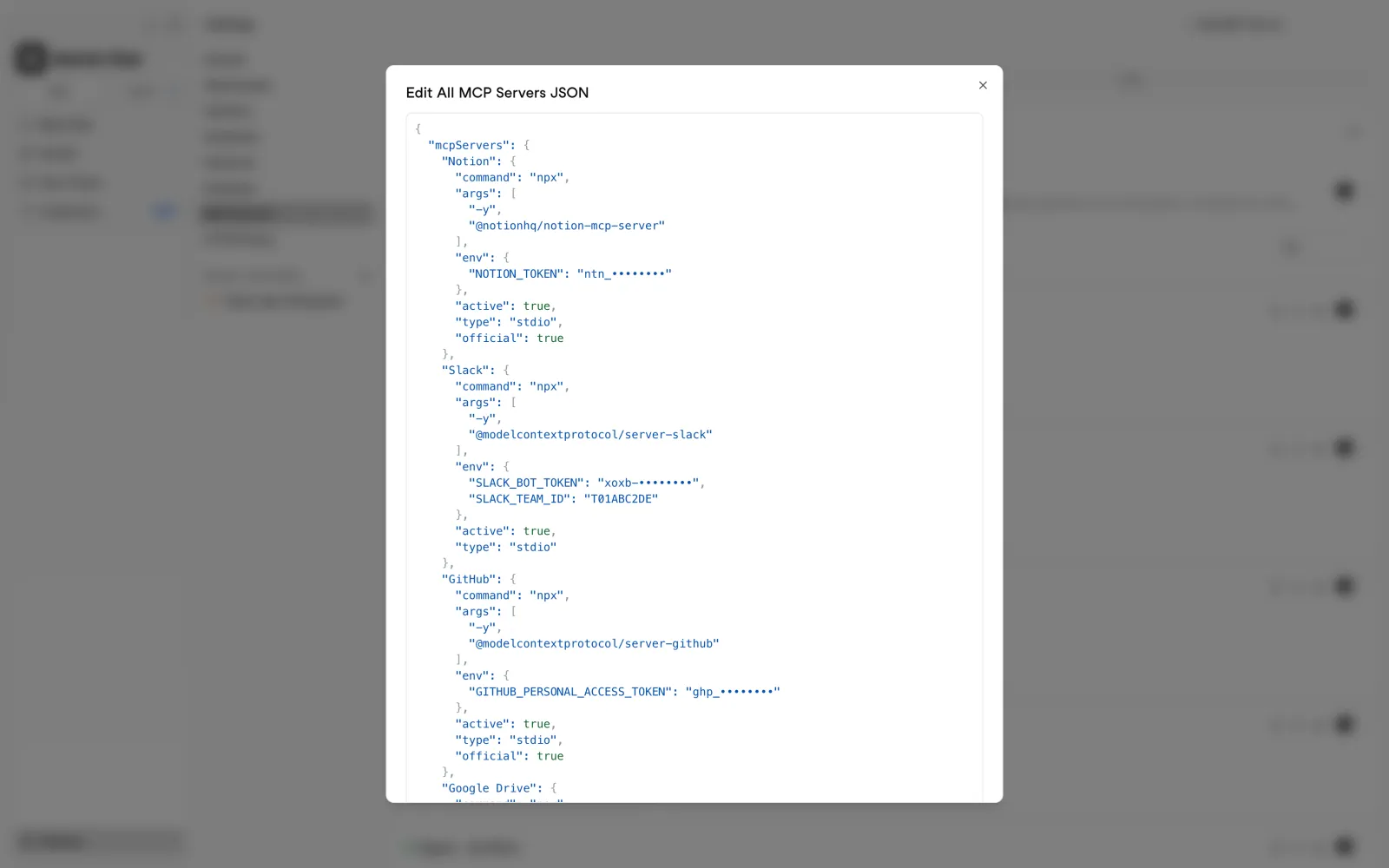
Atomic Chat also includes a JSON editor for MCP configurations. This is useful when a server already provides a complete JSON config or when several existing server definitions need to be added at once.
Once a server connects, Atomic Chat shows the tools it exposes. You can enable the full toolset or choose individual operations.
For example, Slack's read tools can be enabled separately from slack_post_message, so the model can search and read conversations without also being able to post.
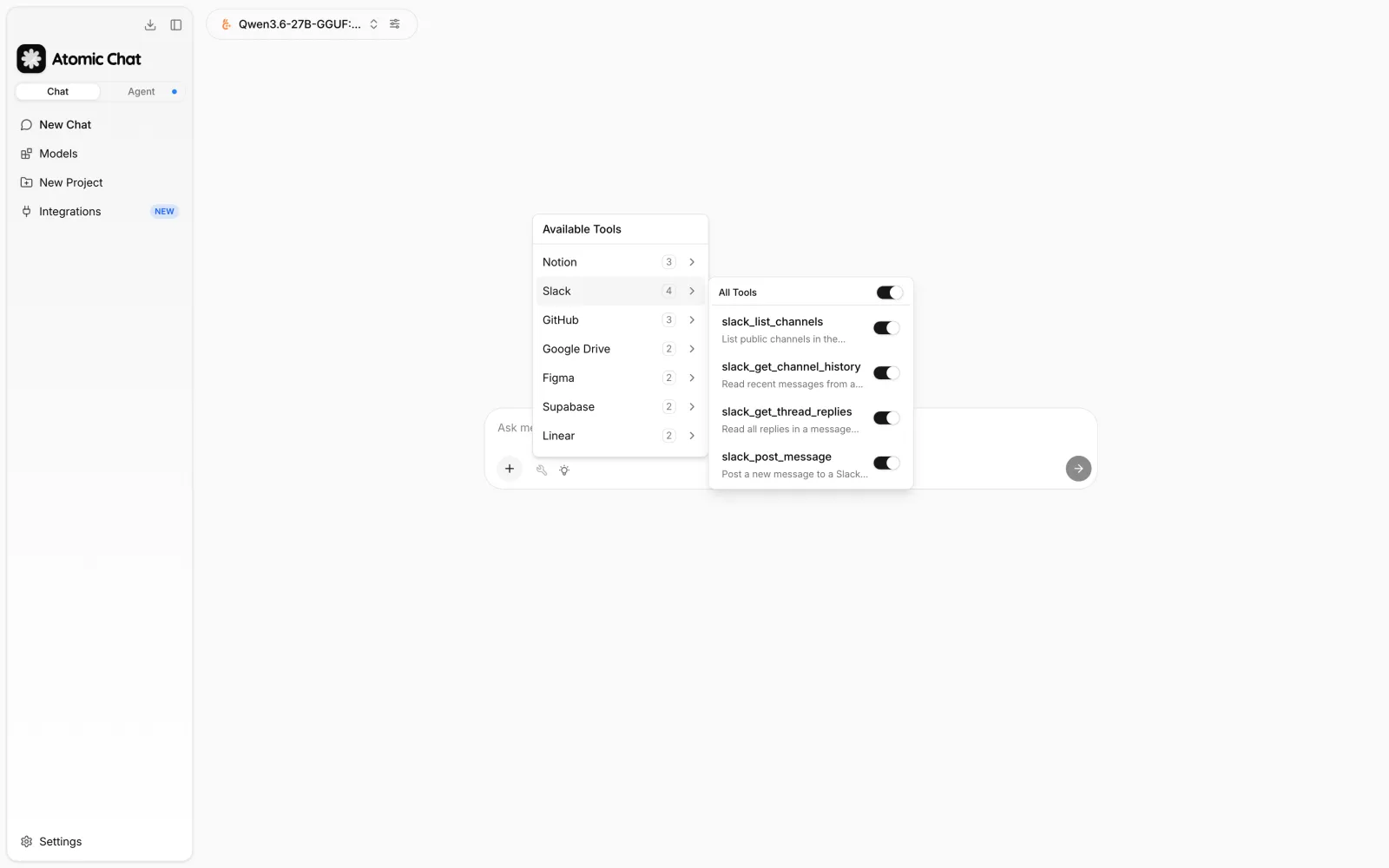
The same setup works with local models. A Qwen model running on the computer can use the configured MCP tools in the same way as a cloud model.
Where the data goes depends on the connector. A local Filesystem server can keep its work on the computer, while connectors for Slack, Notion, Stripe, and other online services still need to contact those services over the internet.
How to use MCP connectors safely
MCP connectors can expose both read and write operations. Depending on the server and its credentials, a model may be able to read files, send messages, modify documents, run database queries, deploy infrastructure, or create payment-related objects.
Basic safety practices include:
- Use the maintainer's official endpoint or repository. A server listed under a familiar product name is not necessarily maintained or reviewed by that product's vendor.
- Restrict permissions. Grant access only to the repositories, folders, projects, databases, or workspaces required for the task. Use read-only credentials where write access is unnecessary.
- Test write operations outside production. Use development databases, staging projects, test payment accounts, and non-critical workspaces before enabling changes to live systems.
- Require confirmation for consequential actions. Sending messages, creating payments, deploying infrastructure, deleting resources, and writing to production databases should remain explicit actions.
- Treat retrieved content as untrusted input. Web pages, emails, issues, and documents can contain instructions intended to influence the model. This is commonly referred to as indirect prompt injection.
- Disable tools that are not needed. If a server exposes many operations, enable only the subset required for the current task.
Frequently asked questions
What is an MCP connector?
An MCP connector connects an AI application to an external service or local data source through the Model Context Protocol. It exposes specific tools to the model, such as searching Notion, reading files, or querying a database.
What is the difference between an MCP connector and an MCP server?
An MCP server is the software that exposes tools and responds to MCP requests.
A connector is the configured connection between that server and an MCP host such as Atomic Chat. In practice, many products use the terms interchangeably.
Which MCP connectors are best for beginners?
Start with a connector for a service you already use regularly.
Common starting points include:
- GitHub for repositories and issues;
- Notion or Obsidian for documents and notes;
- Brave Search for web search.
A read-only connector is usually easier to test than one that can modify data.
Can local AI models use MCP connectors?
Yes. MCP is handled by the host application, so a compatible local model can use the same tools as a cloud model.
Atomic Chat supports MCP with local models including Llama, Qwen, and Gemma.
Do MCP connectors work offline?
Some do.
A local model connected to a local Filesystem, Git, or Obsidian server can operate without an internet connection if all required data is stored on the device.
Connectors for services such as Slack, Notion, GitHub, web search, and cloud platforms require network access to those services.
Are MCP connectors safe?
MCP defines how clients and servers communicate. It does not guarantee that a server is trustworthy or that its permissions are appropriate.
Safety depends on the server being used, the credentials it receives, the tools that are enabled, and whether sensitive actions require confirmation.
Are MCP connectors free?
The MCP connection itself may be free, but the service behind it may not be.
Possible costs include API requests, search usage, hosted browsers, cloud resources, and automation runs. Atomic Chat does not require an Atomic API key or subscription to add MCP servers, although third-party services can have their own pricing.
How many MCP connectors should I enable at once?
Enable the connectors needed for the current task.
Installed servers can remain configured without exposing every tool in every conversation. Disabling unused tools also keeps the model's available tool list smaller.
Where can I find trusted MCP servers?
The best source is usually the service provider's own documentation or repository.
Other useful sources include the official MCP Registry and the Model Context Protocol servers repository, which contains reference implementations.
For community servers, check the maintainer, source code, requested permissions, and recent maintenance before installing them.
Can I use the same MCP connectors with different AI models?
Yes, as long as the MCP host supports the selected model.
In Atomic Chat, MCP servers are configured separately from the model, so the same server configuration can remain available when switching between supported local and cloud models.
Explore the connectors in Atomic Chat
The connectors in this guide cover local notes, development tools, documents, databases, web research, cloud platforms, payments, and automation.
In Atomic Chat, MCP servers can be added once and then enabled for the local or cloud models that need them. Start with the connectors required for a specific workflow and add others as needed.