

What we love Cloud AI for is its access. Need a quick piece of advice? Go and ask Claude on your phone. Need to run a long-context, complex coding task? Grab your laptop and run your desktop Claude Code. They are always there for you.
And local LLMs are there as well, but some of us have never heard of it: you can actually run locally on your phone, and instead of paying for AI – you can own it. It’s free, it’s unlimited and it doesn’t need Wi-Fi nor your Mobile Internet. Just pick an app, download it on your iPhone or Android, and it's always on the go.
TL;DR
Which offline AI is the best? Atomic Chat is user-friendly and reliable: there are best models picked for you – switch between to get the best output. Private LLM handles the largest models on iPad M4. Locally AI syncs your iPhone with your macOS and can run heavy desktop models on your phone.
What won't work? Real-time voice conversation (3-5 tok/sec makes it feel like a satellite phone delay). Any model above 3B on iPhone, or above 7B on Android. Background processing: close the app, and inference stops.
How strong should my phone be? You don't need a flagship. Most mid-range phones from 2021 onward with 6GB RAM run a useful 3B model fine. The spec that matters for local AI is RAM, not processor speed and price.
How much memory do I need? At minimum 6GB of total RAM to run a useful 3B model. Phones with 4GB RAM can attempt 1B models. 8GB is the practical floor for comfortable iPhone use. 12GB+ is required for 7B on Android.
Is there AI that can be used offline? Any app using GGUF or MLX model formats can run offline once the model is downloaded. The model files range from 700MB for 1B quantized models up to 5–8GB for 7B models.
What "offline AI" means on a phone
Here's everything simple, just like in any other local LLM: the model downloads once, runs entirely on your device, and no request leaves the phone, no server is involved.
However, it's not as fast as we get used to: cloud AI responds in under a second and local AI on a phone takes 15-20 seconds for a 100-word response, and slows further as the chip heats up over a long session. However, this pace couldn't be called "unbearably slow", it's not. Once you try it, it's fine for day-to-day Q&A, drafting or rewriting your docs, sometimes even dealing with math and programming – especially for the model that runs completely offline.
It's still the same technology as desktop local AI, just with less memory and a smaller thermal budget.
What hardware you need: iPhone and Android
As we mentioned, you don't need to have a flagship. Your phone, Android or iPhone, if launched from 2021 onward – is enough for running light models. For bigger, check your RAM more attentively in further tables.
On Android
To find out what RAM you have: Go to Settings → About Phone → Memory (exact path varies by manufacturer: Samsung puts it under Device Care → Memory, Pixel under About phone).
These are some of the popular Android models that users use:
| Device | RAM | Max model | Speed |
|---|---|---|---|
| Pixel 9 / 9 Pro | 12–16GB | 3–7B | ~3–5 tok/sec* |
| Galaxy S24 Ultra | 12GB | 7B | ~4 tok/sec |
| Galaxy S25 / S25+ / S25 Ultra | 12GB | 7B | ~5 tok/sec |
| OnePlus 13 | 16GB | 7B | ~5 tok/sec |
*Pixel 9 Pro caveat: it has 16GB RAM and a Google Tensor G4 chip. Available hardware acceleration depends on the app and backend; NPU access alone does not determine whether inference is CPU-only.
Anything above 7B isn't practical on any phone – safer to stay on your laptop or desktop.
On iPhone
iOS doesn't show RAM anywhere in Settings. You can use this table below to check what your model has:
| Device | RAM |
|---|---|
| iPhone 12 / 12 mini, iPhone 13 / 13 mini | 4GB |
| iPhone 12, 13, 14, Pro / Pro Max, 15 / 15 Plus | 6GB |
| iPhone 15, 16 Pro / Pro Max, iPhone 15, 16 / 15, 16 Plus, iPhone 17 | 8GB |
| iPhone 17 Air, 17 Pro, 17 Pro Max | 12GB |
| iPad Air M2 | 8GB |
| iPad mini (A17 Pro) | 8GB |
| iPad Pro M4 | 16GB |
Total RAM minus 2–3GB = what's actually available for a model.
Note battery drain under sustained inference: iPhone 16 Pro runs down in 2–4 hours at continuous load. It’s important that you don't run inference while charging – thermal throttling cuts speed by 30–50% as the device heats up.
What will / won’t run on offline AI app
Before we start checking out the apps for trying, it’s worth mentioning that some things you might expect from an AI assistant aren’t available here. It comes from running a model entirely inside your phone's RAM – and it has natural limits.
You need current information
Local models have no internet access and asking about today's news, a stock price, a flight status, yesterday's match score, or whether a restaurant is still open will get you a confident guess at best or a hallucinated answer at worst.
For anything time-sensitive it’s still better to go to the cloud.
What works well instead: anything you paste in directly. A local model is good at working with text you provide like summarizing, rewriting, answering questions about a document you paste into the chat. The model doesn't need to know what's happening in the world if you hand it the context yourself.
Long, multi-turn conversations
Iterating on a business proposal over 20 back-and-forths, writing huge chunks of text through several drafts – anything where the model has to not lose its train of thought. A 3B model on a phone loses track of earlier context and starts contradicting itself or forgetting previous edits.
Cloud models hold 100K+ tokens without degrading, so for anything that builds on itself, they're the better tool.
Complex reasoning or coding
Spotting a bug in 200 lines of async code, reviewing code for unusual clauses, comparing two: a 3B model will give you an answer, but it will miss things a bigger model wouldn't. For such cases either run local AI on your desktop – it handles coding tasks well, or go Cloud if you’re sure that this code isn’t a sensitive one and you can let it leave your machine.
Simple coding tasks are fine on the offline phone app: writing a regex, explaining what a short function does, generating a boilerplate component, or converting a snippet from one language to another. Those fit within what a 3B model handles reliably.
6 Offline AI apps you can run in 2026
| App | Platforms | Cost | Models | What makes it different |
|---|---|---|---|---|
| Atomic Chat | iOS, Android, Mac, Windows, Linux | Free | 13 curated for mobile; 1,000+ on desktop | Same interface across iOS, Android, Mac, Windows, Linux; 13 pre-tested models for different tasks (thinking, programming, visuals, audio) |
| PocketPal AI | iOS, Android | Free | Any GGUF from Hugging Face | Widest model selection; load anything, any quantization |
| Google AI Edge Gallery | iOS, Android | Free | Gemma 4 only | Camera and voice features; official Google app |
| Locally AI | iOS, iPad | Free | MLX (curated) | Connects to LM Studio on Mac via LM Link; runs desktop models from your phone |
| Private LLM | iOS, iPad, Mac | $5.99 | GGUF (curated) | Native SwiftUI; loads 13B on iPad Pro M4 without crashes |
| MLC Chat | iOS, Android (sideload) | Free | Compiled (curated) | Compiles models for your device chip; faster on Snapdragon 8 Elite |
Atomic Chat
.webp)
Platforms: iOS, Android, macOS (Intel and Apple Silicon), Windows, Linux
Cost: Free, open source (Apache 2.0)
Storage: ~100MB app + model downloads (GGUF, MLX, and ONNX formats supported)
Models: 13 models, 0.8B-8B, tested and picked specifically for phones (Qwen, Gemma, SmolLM, Bonsai, DreamShaper and others) and most-needed tasks (thinking, programming, working with files, images and audios)
Atomic Chat is available both on desktop, laptop and your phone. The mobile app (iOS and Android) is separate: desktop and phone don't sync conversations or share sessions. But they share the same interface design. If you already use Atomic Chat on your Mac, the phone app will feel immediately familiar.
Models are already there: you don’t need to go through endless lists on Hugging Face and testing each. Atomic Chat picked 13 best models that work well on phones and you can switch in seconds between them: use Qwen 3.5 (4B) for thinking, Gemma for working with PDFs, photos and even audios.
Phone constraints still apply no TurboQuant on mobile.
Best for: easy and user-friendly setup, built-in best models for any phone that run in 2 mins – you don’t need to spend time on searching through Hugging Face. Fast switching between models for better output in specific tasks (thinking, visuals, audio).
Cons: Mobile is still capped at 1-3B like every other phone app. The desktop has way more opportunities.
Try local models on your phone:
→ Android
→ iOS
Google AI Edge Gallery
Platforms: iOS, Android
Cost: free
Storage: App + Gemma 4 model download (~1-2GB depending on variant selected) Models: Gemma 4 family (Google-optimized for on-device)
Notable: opfficial Google app, available on both app stores
Gemma 4 is Google's model, built specifically for on-device inference (not adapted from a desktop-sized checkpoint), and that gives you faster cold-start loads and fewer out-of-memory crashes. A generic 7B GGUF from Hugging Face has no idea what phone it's landing on; Gemma 4 here does.
Three features worth knowing beyond basic chat, all run offline and doesn’t leave your device:
- Ask Image: point your camera, ask a question.
- Audio Scribe: on-device transcription, no Whisper API.
- Mobile Actions: a fine-tuned 270M function-calling model that triggers shortcuts directly on your device.
That last one is experimental, but it's the most technically interesting thing in the app.
The hard limit for Google's app: it runs Gemma 4 only – no Llama, no Qwen, no custom fine-tunes. If you need a specific model, this isn't the right app – try running Atomic Chat double Gemma’s capabilities with Qwen’s or another model – there is built-in Gemma alongside other 12 local LLMs.
Best for: Android users who want a polished, officially supported app with multimodal and voice features and zero configuration.
Cons: locked to Gemma 4 – there are no Llama, Qwen, DeepSeek, or custom models. Not useful if you have specific model requirements.
Locally AI by LM Studio
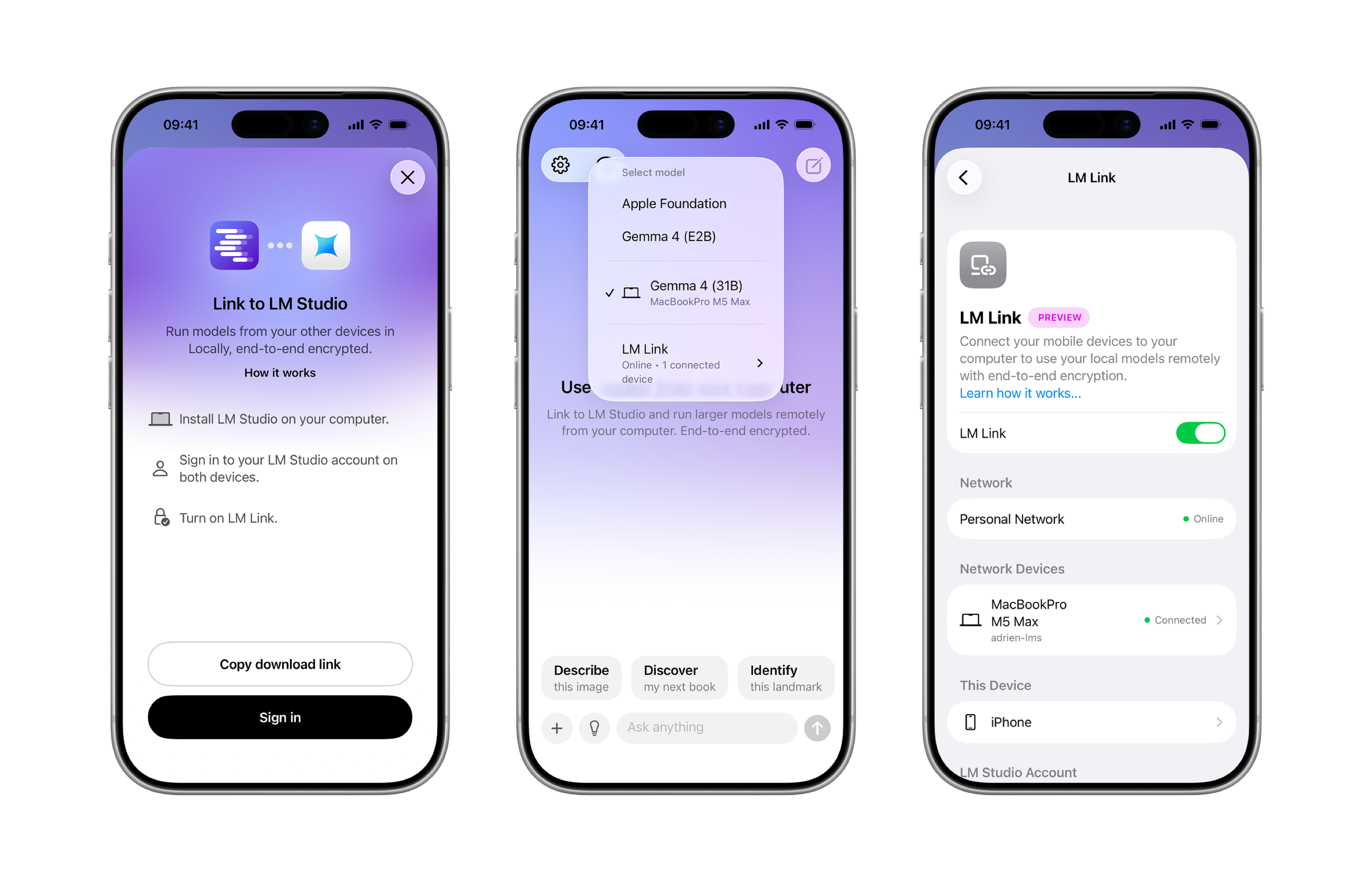
Platforms: iOS, iPad (no Android)
Cost: Free
Storage: ~60MB app + MLX model downloads (~1.5GB for 1B, ~2.5GB for 3B – MLX files run slightly larger than equivalent GGUF)
Models: Llama 3.2, Gemma 2 & 3, Qwen 3, DeepSeek; Apple MLX format
Locally AI uses Apple MLX, whose supported devices include the CPU and GPU. MLX does not directly target the Neural Engine. GGUF-based apps such as PocketPal can also use GPU acceleration, including Metal on iOS. Performance over a long session depends on the device, model, backend, and thermal limits; model format alone does not establish a speed or thermal-stability advantage.
LM Link is the feature that makes this app worth trying: if you have LM Studio on a Mac, Locally AI connects to it over your local network with end-to-end encryption and runs your desktop's models: 13B, 30B, even 70B. The framework looks like this: your phone sends the prompt, and your Mac does the work.
Best for: iPhone users who already run LM Studio on a Mac and want to use their desktop's larger models from their phone via LM Link.
Cons: iOS only; without the Mac desktop bridge, it offers nothing over other apps here; MLX model library is narrower than GGUF.
PocketPal AI
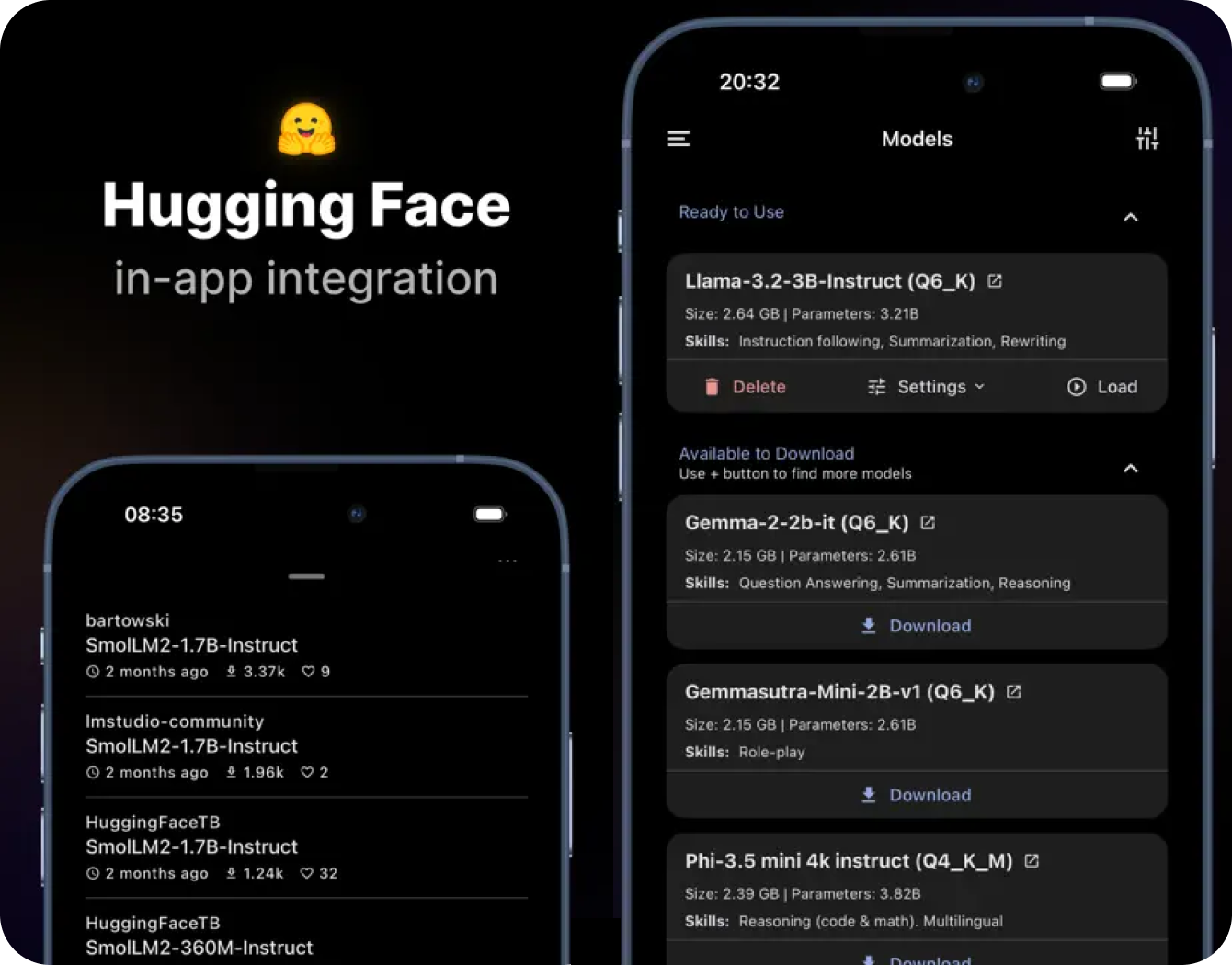
Platforms: iOS, Android
Cost: Free, open source
Storage: ~60MB app + model downloads (700MB for 1B Q4, ~2GB for 3B Q4, ~4.5GB for 7B Q4)
Models: GGUF format – Phi-4 Mini, Gemma 2, Qwen 2.5, Llama 3.2, and anything else from Hugging Face.
This is a harder app for those who have a solid background in running local AI. PocketPal is built on llama.cpp (the same inference engine under Ollama) via React Native bindings: broad model compatibility, but occasionally sluggish UI on lower-end Android devices.
It is integrated with The Hugging Face and enables searching for any GGUF model in the app: pick your quantization level (Q4_K_M is usually the right trade-off between size and quality), download without leaving the app.
A built-in Multi-Token Prediction tool shows tokens/sec and memory usage per model, which helps figure out what your device can handle before committing to a 4GB download.
Best for: users who want access to the full Hugging Face catalog and don't mind picking their own model and quantization.
Cons: react Native frontend lags on lower-end Android, no desktop version, model selection requires some upfront knowledge.
Private LLM
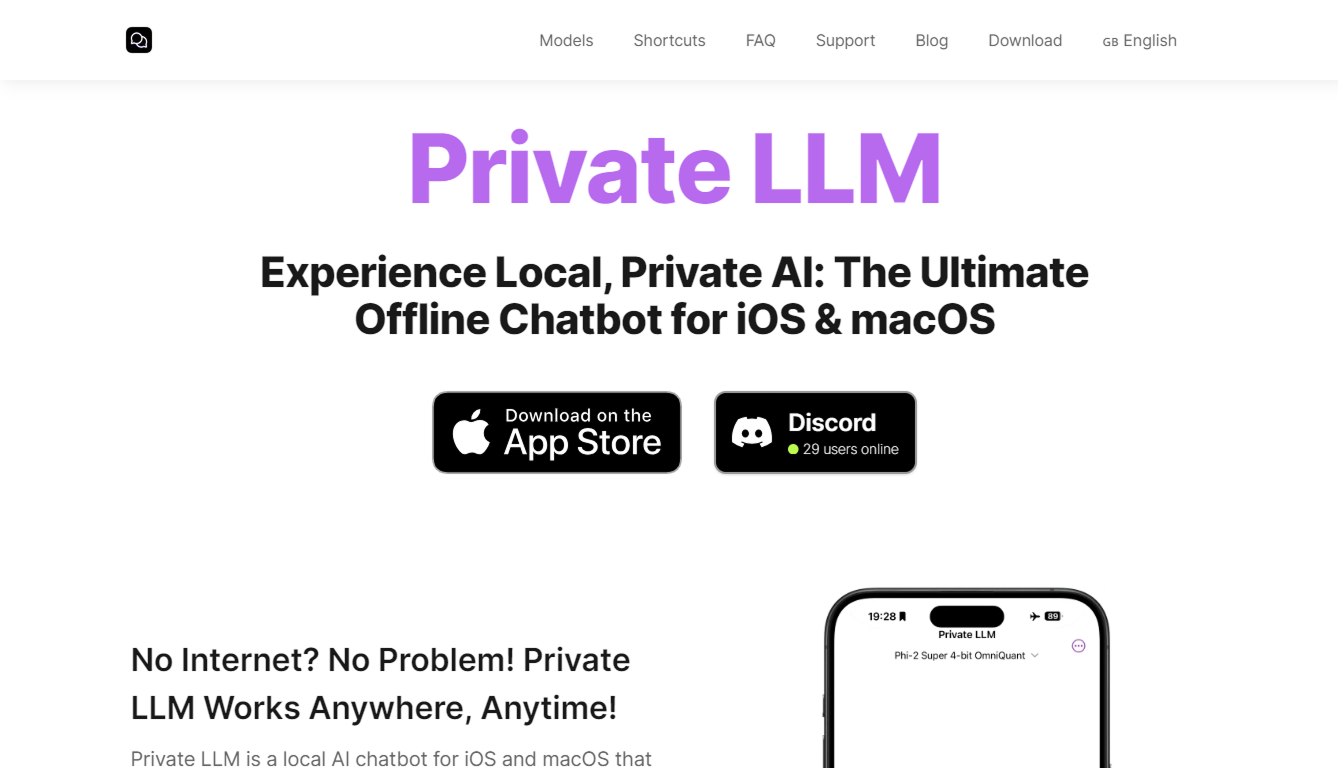
Platforms: iOS, iPad, macOS (Apple Silicon)
Cost: $5.99 one-time purchase
Storage: ~100MB app + models downloaded in-app (same GGUF sizes: ~2GB for 3B, ~8GB for 13B)
Models: 3-13B on iPad Pro M4, 1-3B on iPhone
Private LLM is a native SwiftUI app. The only paid app in this list: one-time $5.99, but no subscription. On an M4 iPad Pro with 16GB unified memory, it runs 13B models at around 15 tok/sec. PocketPal can struggle to load 13B on the same device, while Private LLM handles it cleanly because it's built natively for Apple Silicon, not wrapped in React Native.
On the iPhone, we think it's better to save those $5.99. Hardware limits you to 3B regardless of which app you use, the same ceiling you'd hit with any other app – at least it will be for free.
Best for: iPad Pro M4 owners who want to run 13B models reliably without crashes (native SwiftUI handles memory better than React Native-based alternatives)
Cons: $5.99 is hard to justify on iPhone since hardware limits you to 3B regardless and no Android-support.
MLC Chat
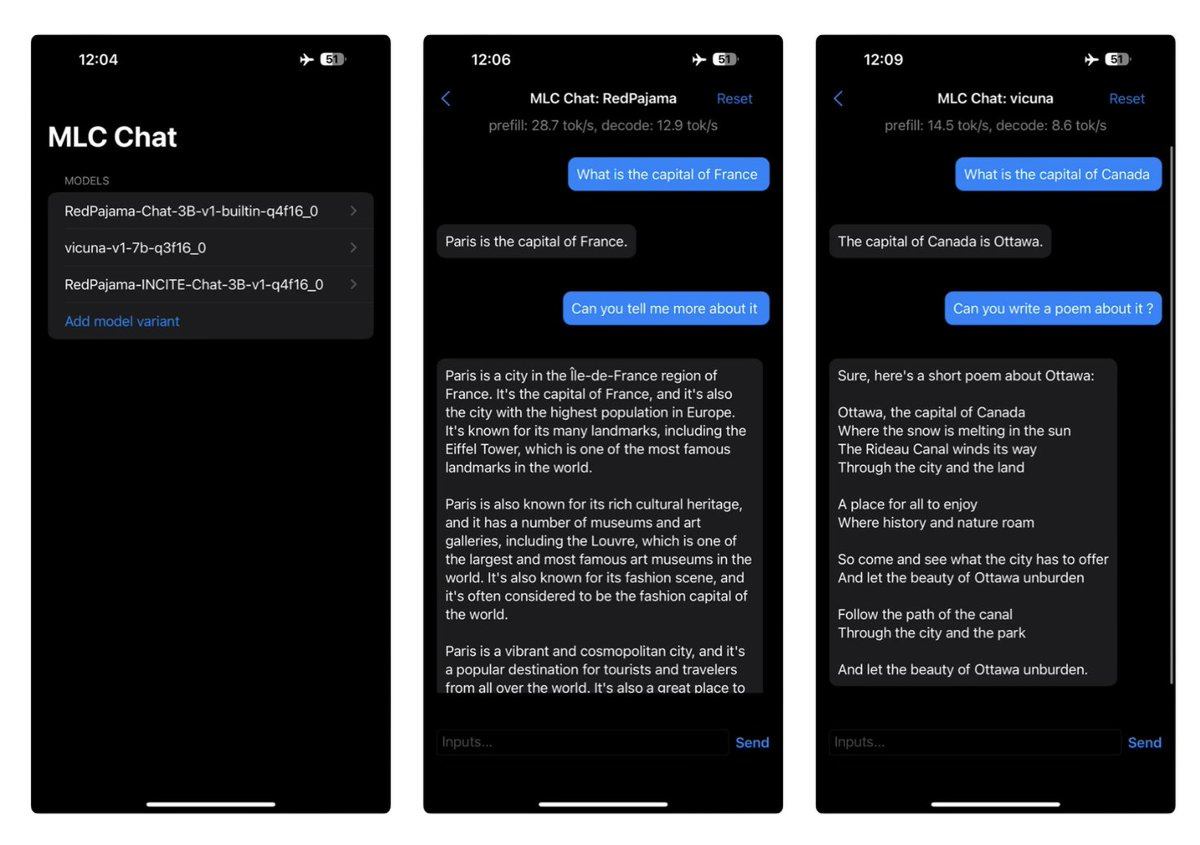
Platforms: iOS, Android (sideload APK)
Cost: Free, open source
Best for: technical users on Snapdragon 8 Elite (Galaxy S25 Ultra, OnePlus 13) who want the fastest possible 1-3B inference via Hexagon NPU.
Cons: curated model library only; can't load arbitrary GGUF files; Android requires manual APK sideload; compiled models can't be used in other apps.
MLC Chat compiles model libraries for its target platform and uses mobile GPU acceleration. Other apps on this list can also use hardware acceleration, so this approach does not by itself prove that it is faster. On a Galaxy S25 Ultra, Phi-4 Mini hits ~22 tok/sec versus ~16 tok/sec in PocketPal – noticeable on longer outputs and less so for short replies. The catch is that this approach requires a fixed, pre-compiled model list, and you can't load your own files.
It's also not on the Play Store, so Android users have to sideload an APK. On iPhone, the speed advantage on 1–3B is modest and 7B still crashes from RAM limits, so so any of the GGUF-based apps above (like Atomic Chat or Locally AI) are the simpler choice.
Storage: ~100MB app + compiled model downloads (~1.5GB for 1B, ~3GB for 3B; MLC-compiled weights are slightly larger than raw GGUF due to architecture-specific optimizations)
Models: Llama, Qwen, Gemma, Phi; 1B to 7B; uses MLC compilation for efficiency
FAQ
What is the difference between an offline AI app and ChatGPT?
ChatGPT sends your input to OpenAI's servers, processes it remotely, and returns the response. An offline AI app loads the model into your phone's RAM and runs inference locally. Nothing leaves the device. The gap in capability is real: ChatGPT runs against much larger models. What you get in return is privacy and no subscription cost.
Can I run an offline AI app on an older phone?
4GB RAM is the minimum. That covers most phones from 2020 onward. Below that, model loading fails before output starts. On a 4GB device, limit to 1B models. Qwen 2.5 0.5B or Llama 3.2 1B are the practical options. Anything larger will either crash or produce output so slowly it's not worth waiting for.
Does offline AI drain battery faster?
Yes, inference keeps the CPU, GPU, or NPU, depending on the backend, at high load continuously. iPhone 16 Pro runs down in roughly 2–4 hours under sustained inference, compared to 8–10 hours of normal use. Sessions of 10–15 minutes are fine; long continuous use generates heat and triggers thermal throttling, which slows output further.
Can I use offline AI for coding on a phone?
For short snippets, yes. A 3B model handles code explanation, simple completions, and one-function debugging. Multi-file context and anything above a few hundred tokens of code quickly exceeds what's useful at 3–5 tok/sec. For serious coding, offline AI on a laptop with a 13B+ model is a different tool entirely.
Is offline AI private?
Inference itself is on-device for every app listed here. But some apps send crash reports or analytics in the background even when no prompt data leaves the phone. PocketPal AI sends nothing by default. Atomic Chat is open source, so you can check for network calls directly in the code. If privacy is the reason you're running locally, verify what each app phones home, not just whether inference is local.
Final word
If you have no idea which app to try first: download Atomic Chat on both your phone and desktop, pick a 1-3B model (safe starting points: Qwen 3.5 2B or Gemma 4 E2B IT), and use it for a week.
The speed is the main thing that may frustrate you: at 3-5 tok/sec, it feels slow until you adjust your expectations and use it for tasks that fit – short Q&A, drafting, summarizing.
If 3 tok/sec is a dealbreaker, an iPad Pro M4 is the only mobile device where local AI runs fast enough without frustration. At 15 tok/sec on 13B, it's close to what you'd get on a mid-range laptop running the same model. Everything below that, you're making concessions on either model size or speed.